


new feature in ECUFlash 1.35: periphery bits


I'm using 1.29, but entered this in my 94170015 XML:
<scaling name="blobbits" storagetype="bloblist" storagebits="1">
<data name="0" value="00"/>
<data name="1" value="01"/>
</scaling>
<table name="ECU Periphery00 (F9A) Bits" category="ECUPeriphery" address="f9a" type="2D" level="2" scaling="blobbits">
<table name="Periphery Bit Number" type="Static Y Axis" flipy="true" elements="16">
<data>bit.15</data>
<data>bit.14</data>
<data>bit.13</data>
<data>bit.12</data>
<data>bit.11</data>
<data>bit.10</data>
<data>bit.9</data>
<data>bit.8</data>
<data>bit.7</data>
<data>bit.6</data>
<data>bit.5</data>
<data>bit.4</data>
<data>bit.3</data>
<data>bit.2</data>
<data>bit.1</data>
<data>bit.0</data>
</table>
</table>
<table name="ECU Periphery (FAA) Bits" category="ECUPeriphery" address="faa" type="2D" level="2" scaling="blobbits">
<table name="Periphery Bit Number" type="Static Y Axis" flipy="true" elements="16">
<data>bit.15</data>
<data>bit.14</data>
<data>bit.13</data>
<data>bit.12</data>
<data>Disable EGR / Enabled Ign Adv (set bit=1)</data>
<data>bit.10</data>
<data>Enable Warmup Ign Retard</data>
<data>bit.8</data>
<data>Enable High Oct Ign Map Lookup (and many other subroutines)</data>
<data>"WG solenoid? Enable Speed Limit Test"</data>
<data>bit.5</data>
<data>bit.4</data>
<data>bit.3</data>
<data>bit.2</data>
<data>bit.1</data>
<data>bit.0</data>
</table>
</table>
<table name="ECU Periphery1 (FBA) Bits" category="ECUPeriphery" address="fba" type="2D" level="2" scaling="blobbits">
<table name="Periphery Bit Number" type="Static Y Axis" flipy="true" elements="16">
<data>bit.15</data>
<data>bit.14</data>
<data>bit.13</data>
<data>bit.12</data>
<data>bit.11</data>
<data>bit.10</data>
<data>bit.9</data>
<data>bit.8</data>
<data>Lean Spool</data>
<data>bit.6</data>
<data>bit.5</data>
<data>bit.4</data>
<data>bit.3</data>
<data>bit.2</data>
<data>bit.1</data>
<data>bit.0</data>
</table>
</table>
<table name="ECU Periphery2 (FCA) Bits" category="ECUPeriphery" address="fca" type="2D" level="2" scaling="blobbits">
<table name="Periphery Bit Number" type="Static Y Axis" flipy="true" elements="16">
<data>P0443, P0446, P0403, P0243, P0090, P2263</data>
<data>P0450, P0451, P0452, P0453 Evap</data>
<data>P0441, P0442 Evap</data>
<data>bit.12</data>
<data>P0031, P0032, P0037, P0038</data>
<data>P1400 MAP Sensor</data>
<data>P0401 EGR Test</data>
<data>P0506, P0507 Idle Test</data>
<data>P0170 (P0171, P0172)</data>
<data>P0134 Front O2</data>
<data>P0000 - or with bit.4</data>
<data>P0000 - or with bit.5</data>
<data>P0132, P0136 O2</data>
<data>P0133, P0159</data>
<data>P0421 not in FSM</data>
<data>bit.0</data>
</table>
</table>
<table name="ECU Periphery3 (FDA) Bits" category="ECUPeriphery" address="fda" type="2D" level="2" scaling="blobbits">
<table name="Periphery Bit Number" type="Static Y Axis" flipy="true" elements="16">
<data>P0128 CT Below Reg</data>
<data>P1603 Battery Backup</data>
<data>bit.13</data>
<data>bit.12</data>
<data>P0180 - P0183, P0461, P2066 Fuel Sensors</data>
<data>bit.10</data>
<data>bit.9</data>
<data>bit.8</data>
<data>P0551 PS Pressure</data>
<data>P0500 Speed Sens</data>
<data>bit.5</data>
<data>bit.4</data>
<data>bit.3</data>
<data>P0234, P0243, P2263</data>
<data>P0510 not in FSM</data>
<data>P1715, P1750, etc</data>
</table>
</table>
<table name="ECU Periphery4 (FEA) Bits" category="ECUPeriphery" address="fea" type="2D" level="2" scaling="blobbits">
<table name="Periphery Bit Number" type="Static Y Axis" flipy="true" elements="16">
<data>P0140 Rear O2 No Act</data>
<data>P0069 MAP vs Baro</data>
<data>P0111 IAT Circuit</data>
<data>P0554 PS Press Sens</data>
<data>P1530 A/C1 Switch</data>
<data>bit.10</data>
<data>bit.9</data>
<data>P0830 Clutch Pedal Circuit</data>
<data>P0090 Fuel Pressure Circuit</data>
<data>bit.6</data>
<data>bit.5</data>
<data>bit.4</data>
<data>bit.3</data>
<data>bit.2</data>
<data>bit.1</data>
<data>bit.0</data>
</table>
</table>
But I got this:
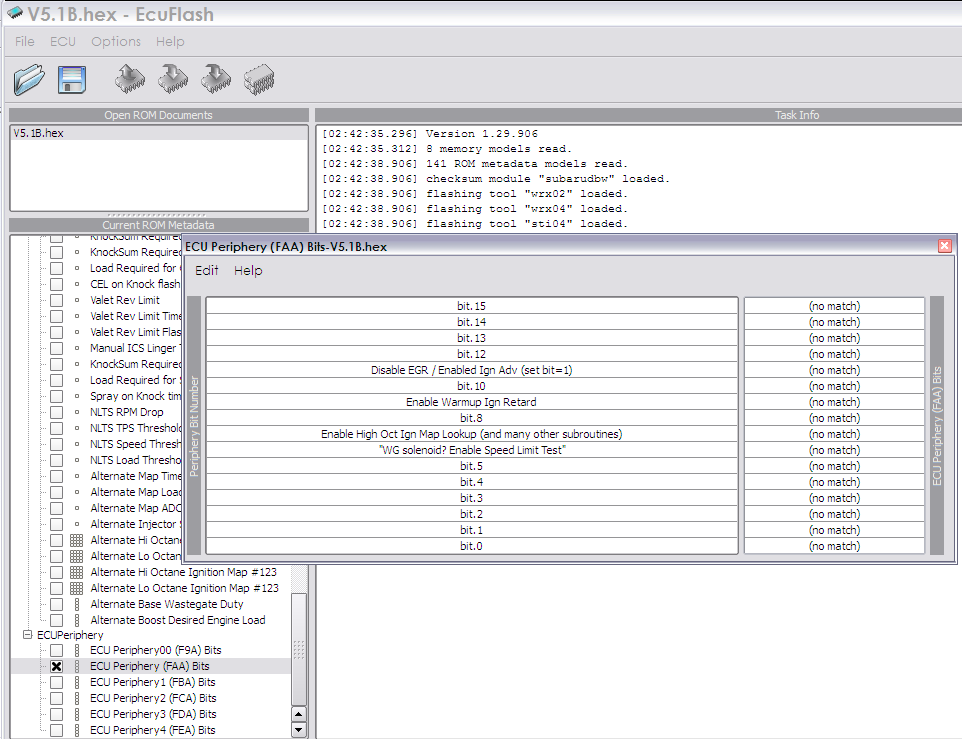
What in the world does that mean?
<scaling name="blobbits" storagetype="bloblist" storagebits="1">
<data name="0" value="00"/>
<data name="1" value="01"/>
</scaling>
<table name="ECU Periphery00 (F9A) Bits" category="ECUPeriphery" address="f9a" type="2D" level="2" scaling="blobbits">
<table name="Periphery Bit Number" type="Static Y Axis" flipy="true" elements="16">
<data>bit.15</data>
<data>bit.14</data>
<data>bit.13</data>
<data>bit.12</data>
<data>bit.11</data>
<data>bit.10</data>
<data>bit.9</data>
<data>bit.8</data>
<data>bit.7</data>
<data>bit.6</data>
<data>bit.5</data>
<data>bit.4</data>
<data>bit.3</data>
<data>bit.2</data>
<data>bit.1</data>
<data>bit.0</data>
</table>
</table>
<table name="ECU Periphery (FAA) Bits" category="ECUPeriphery" address="faa" type="2D" level="2" scaling="blobbits">
<table name="Periphery Bit Number" type="Static Y Axis" flipy="true" elements="16">
<data>bit.15</data>
<data>bit.14</data>
<data>bit.13</data>
<data>bit.12</data>
<data>Disable EGR / Enabled Ign Adv (set bit=1)</data>
<data>bit.10</data>
<data>Enable Warmup Ign Retard</data>
<data>bit.8</data>
<data>Enable High Oct Ign Map Lookup (and many other subroutines)</data>
<data>"WG solenoid? Enable Speed Limit Test"</data>
<data>bit.5</data>
<data>bit.4</data>
<data>bit.3</data>
<data>bit.2</data>
<data>bit.1</data>
<data>bit.0</data>
</table>
</table>
<table name="ECU Periphery1 (FBA) Bits" category="ECUPeriphery" address="fba" type="2D" level="2" scaling="blobbits">
<table name="Periphery Bit Number" type="Static Y Axis" flipy="true" elements="16">
<data>bit.15</data>
<data>bit.14</data>
<data>bit.13</data>
<data>bit.12</data>
<data>bit.11</data>
<data>bit.10</data>
<data>bit.9</data>
<data>bit.8</data>
<data>Lean Spool</data>
<data>bit.6</data>
<data>bit.5</data>
<data>bit.4</data>
<data>bit.3</data>
<data>bit.2</data>
<data>bit.1</data>
<data>bit.0</data>
</table>
</table>
<table name="ECU Periphery2 (FCA) Bits" category="ECUPeriphery" address="fca" type="2D" level="2" scaling="blobbits">
<table name="Periphery Bit Number" type="Static Y Axis" flipy="true" elements="16">
<data>P0443, P0446, P0403, P0243, P0090, P2263</data>
<data>P0450, P0451, P0452, P0453 Evap</data>
<data>P0441, P0442 Evap</data>
<data>bit.12</data>
<data>P0031, P0032, P0037, P0038</data>
<data>P1400 MAP Sensor</data>
<data>P0401 EGR Test</data>
<data>P0506, P0507 Idle Test</data>
<data>P0170 (P0171, P0172)</data>
<data>P0134 Front O2</data>
<data>P0000 - or with bit.4</data>
<data>P0000 - or with bit.5</data>
<data>P0132, P0136 O2</data>
<data>P0133, P0159</data>
<data>P0421 not in FSM</data>
<data>bit.0</data>
</table>
</table>
<table name="ECU Periphery3 (FDA) Bits" category="ECUPeriphery" address="fda" type="2D" level="2" scaling="blobbits">
<table name="Periphery Bit Number" type="Static Y Axis" flipy="true" elements="16">
<data>P0128 CT Below Reg</data>
<data>P1603 Battery Backup</data>
<data>bit.13</data>
<data>bit.12</data>
<data>P0180 - P0183, P0461, P2066 Fuel Sensors</data>
<data>bit.10</data>
<data>bit.9</data>
<data>bit.8</data>
<data>P0551 PS Pressure</data>
<data>P0500 Speed Sens</data>
<data>bit.5</data>
<data>bit.4</data>
<data>bit.3</data>
<data>P0234, P0243, P2263</data>
<data>P0510 not in FSM</data>
<data>P1715, P1750, etc</data>
</table>
</table>
<table name="ECU Periphery4 (FEA) Bits" category="ECUPeriphery" address="fea" type="2D" level="2" scaling="blobbits">
<table name="Periphery Bit Number" type="Static Y Axis" flipy="true" elements="16">
<data>P0140 Rear O2 No Act</data>
<data>P0069 MAP vs Baro</data>
<data>P0111 IAT Circuit</data>
<data>P0554 PS Press Sens</data>
<data>P1530 A/C1 Switch</data>
<data>bit.10</data>
<data>bit.9</data>
<data>P0830 Clutch Pedal Circuit</data>
<data>P0090 Fuel Pressure Circuit</data>
<data>bit.6</data>
<data>bit.5</data>
<data>bit.4</data>
<data>bit.3</data>
<data>bit.2</data>
<data>bit.1</data>
<data>bit.0</data>
</table>
</table>
But I got this:
What in the world does that mean?

Thread Starter
EvoM Guru
iTrader: (50)
Joined: Mar 2006
Posts: 9,675
Likes: 132
From: Tri-Cities, WA // Portland, OR
Hey, I got it to show the right values by adding the first couple lines as earlier discussed.
My problem now is that I am throwing a P0500 code for the speed sensor and want to disable it. I tried changing the value in periphery 3, bit 6 from 1 to 0, but the code still shows up?
I'm having this problem because I switched from auto to manual, and haven't been able to work this sensor out. I'll get it done eventually but need to pass emission soon and the workers around here won't even try the car if the MIL light is on.
My problem now is that I am throwing a P0500 code for the speed sensor and want to disable it. I tried changing the value in periphery 3, bit 6 from 1 to 0, but the code still shows up?
I'm having this problem because I switched from auto to manual, and haven't been able to work this sensor out. I'll get it done eventually but need to pass emission soon and the workers around here won't even try the car if the MIL light is on.
Hey, I got it to show the right values by adding the first couple lines as earlier discussed.
My problem now is that I am throwing a P0500 code for the speed sensor and want to disable it. I tried changing the value in periphery 3, bit 6 from 1 to 0, but the code still shows up?
I'm having this problem because I switched from auto to manual, and haven't been able to work this sensor out. I'll get it done eventually but need to pass emission soon and the workers around here won't even try the car if the MIL light is on.
My problem now is that I am throwing a P0500 code for the speed sensor and want to disable it. I tried changing the value in periphery 3, bit 6 from 1 to 0, but the code still shows up?
I'm having this problem because I switched from auto to manual, and haven't been able to work this sensor out. I'll get it done eventually but need to pass emission soon and the workers around here won't even try the car if the MIL light is on.
Thread Starter
EvoM Guru
iTrader: (50)
Joined: Mar 2006
Posts: 9,675
Likes: 132
From: Tri-Cities, WA // Portland, OR
No changes need to maintain compatibility with newer versions of ECUFlash. Just pull your custom XML files out onto your desktop, install ECUFlash 1.3x, and then drop your custom xml files back into the appropriate folder (replacing the existing ones). Just keep in mind that some people are having issues with their cable not working with v1.3x. If your cable doesn't work with 1.3x, then if you bought the cable from Tactrix or Mynes, call Tactrix to sort it out. If you bought it from Limitless (EvoScan), then contact evo4mad to get a fix.

Thread Starter
EvoM Guru
iTrader: (50)
Joined: Mar 2006
Posts: 9,675
Likes: 132
From: Tri-Cities, WA // Portland, OR
Not sure where the FAA bit15 came from. It has nothing to do with disabling the EGR test. There are two ways though to disable the EGR test. The first is the old way where the FCA periphery *word* value is changed from 0xEFDF to 0xEDDF. The new way is to change the periphery FCA bit9 value to 0. Both methods do the exact same thing, but by different representation of the control values.

Thread Starter
EvoM Guru
iTrader: (50)
Joined: Mar 2006
Posts: 9,675
Likes: 132
From: Tri-Cities, WA // Portland, OR
NO problem, I only thought about it because I am converting from 1.30 to 1.38 and did the endian change. Was second guessing myself because the numbers changed to 512000 ms and I had to change them back to the 3000 ms. I figured the change of the endian value would keep the setting the same between versions. interesting.

