


How do you add a custom scaling


Thread Starter
Account Disabled
Joined: Nov 2006
Posts: 174
Likes: 0
From: Akron, Ohio
How do you add a custom scaling
I have read through Eric's Maf Scaling spreadsheet and agree with his logic. I am at the point where I would like to scale my Maf Scaling table and use it to tune with.
I opened the Maf Scaling table and clicked on the Edit menu
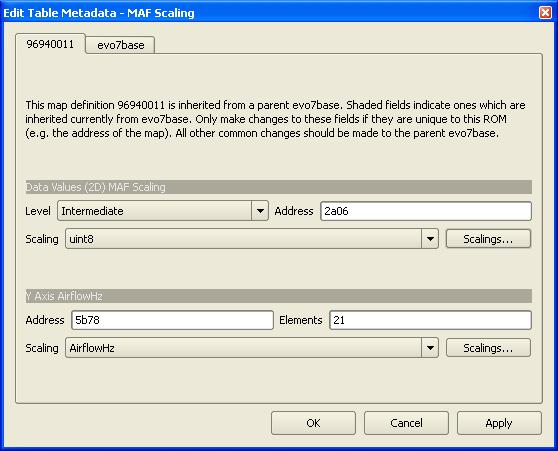
I then selected Edit Map Definition
I clicked scalings... under the y axis
I then clicked Add
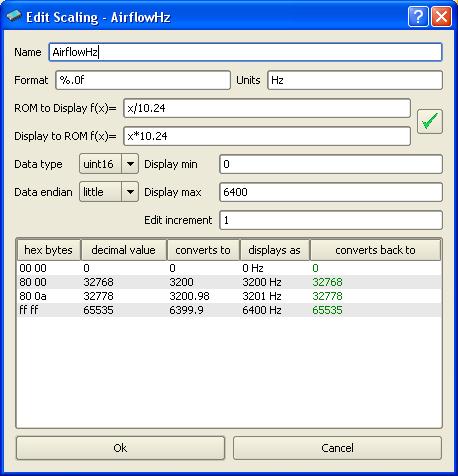
The two attatched images are what I filled in and the results.
Is this correct?
Please let me know.
Also, does the g/s look correct, this has not been touched, but I looked at Eric's from his spreadsheet and his started at 145 or so
Thanks in advance.
Kyle Deiwert
I opened the Maf Scaling table and clicked on the Edit menu
I then selected Edit Map Definition
I clicked scalings... under the y axis
I then clicked Add
The two attatched images are what I filled in and the results.
Is this correct?
Please let me know.
Also, does the g/s look correct, this has not been touched, but I looked at Eric's from his spreadsheet and his started at 145 or so
Thanks in advance.
Kyle Deiwert

Kyle,
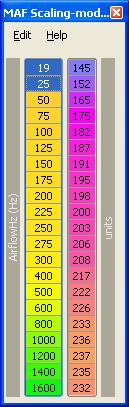
I changed the g/s value to uint8 from AirFlow8, so just the decimal values in the ROM are displayed. That is where the 145, etc, comes from. The values aren't g/s, so I didn't want to use that g/s scaling.
For the Hz scaling, you are almost right. This is a 16 bit number, so the max should be 65535 decimal (2^16).
Here are the screenshots that show how my map looks.
Eric
I changed the g/s value to uint8 from AirFlow8, so just the decimal values in the ROM are displayed. That is where the 145, etc, comes from. The values aren't g/s, so I didn't want to use that g/s scaling.
For the Hz scaling, you are almost right. This is a 16 bit number, so the max should be 65535 decimal (2^16).
Here are the screenshots that show how my map looks.
Eric
Last edited by l2r99gst; Feb 2, 2007 at 03:30 PM.
With the old g/s value now scaled in uint8 to simply show the 8 bit decimal value, you see that some values are close to the 255 max value.
For this reason you won't have much adjustment to go richer in these cells. However, there is a MAF adder value that is added to this maf scaling table that is used to get the final airflow value used by the ECU to eventually calculate the IPW.
I have that adder map set for my 05 Rom, too, but I haven't tried altering that yet and I don't want to post too much information about that, since I'm not 100% positive if changing it won't affect anything else.
I think I explained the adder in my spreadsheet and jcsbanks commented the code that I posted in that thread about the maf scaling. You should be able to find the address in your Rom if you can diassemble it or ask someone who has your Rom.
Eric
For this reason you won't have much adjustment to go richer in these cells. However, there is a MAF adder value that is added to this maf scaling table that is used to get the final airflow value used by the ECU to eventually calculate the IPW.
I have that adder map set for my 05 Rom, too, but I haven't tried altering that yet and I don't want to post too much information about that, since I'm not 100% positive if changing it won't affect anything else.
I think I explained the adder in my spreadsheet and jcsbanks commented the code that I posted in that thread about the maf scaling. You should be able to find the address in your Rom if you can diassemble it or ask someone who has your Rom.
Eric

I'm assuming I am right...
but this applies to EVO IX's as well correct?
All you are doing is converting the axis...so in effect it doesn't have any sort of bearing on what the car does. Simply makes it more readable because it converts it to Hz.
?
but this applies to EVO IX's as well correct?
All you are doing is converting the axis...so in effect it doesn't have any sort of bearing on what the car does. Simply makes it more readable because it converts it to Hz.
?

