


LogWorks2 is awesome, question for Logworks users


Thread Starter
Evolved Member
iTrader: (55)
Joined: May 2005
Posts: 3,589
Likes: 37
From: Central PA
LogWorks2 is awesome, question for Logworks users
wow, Logworks2 is NICE. should have tried using this before buying EvoScan last week. oh well, i can still use EvoScan to clear engine code and HP feature.
here's the question. my speed and load is not matching up. what do i need to change in the channel config to correct the speed and load. it seems that my speed is showing up half of what the actuall speed is. and load is showing up more than 260% but EcuFlash table max out at 260%.
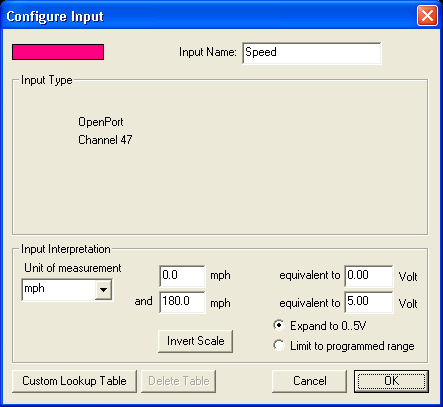
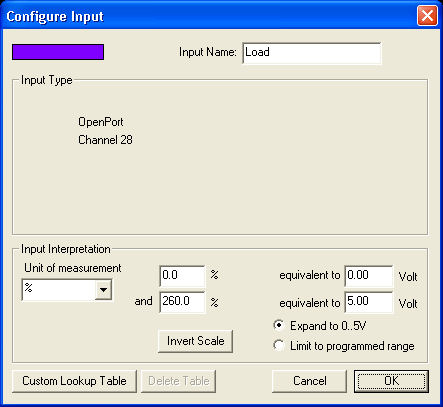
here's the question. my speed and load is not matching up. what do i need to change in the channel config to correct the speed and load. it seems that my speed is showing up half of what the actuall speed is. and load is showing up more than 260% but EcuFlash table max out at 260%.

Thread Starter
Evolved Member
iTrader: (55)
Joined: May 2005
Posts: 3,589
Likes: 37
From: Central PA
yes, there's a knock sum channel. it should be on the list when you start the OpenPort1.3 connection. it doesn't log as much things as EvoScan but all the import ones are there.

when you try to add a channel you must delete a channel if you are at ten samples.
its a little odd how it actuates but if you fiddle with it you will get the channels you want. the grayed out add and remove buttons are key.
as far as the original poster, sorry I have not tried logging speed, and load is for another day.
I have a feeling logworks 3 is a few days or weeks away.
I agree with you though, for basic logging it is easy and very well designed. On my laptop I get boost and afr along with the ten openport channels.
you might try the calc with 0 speed as 2.5 volts
its a little odd how it actuates but if you fiddle with it you will get the channels you want. the grayed out add and remove buttons are key.
as far as the original poster, sorry I have not tried logging speed, and load is for another day.
I have a feeling logworks 3 is a few days or weeks away.
I agree with you though, for basic logging it is easy and very well designed. On my laptop I get boost and afr along with the ten openport channels.
you might try the calc with 0 speed as 2.5 volts
Last edited by nothere; Apr 23, 2007 at 06:11 PM.

The load you are trying to log is MAF based(OBDII) load and will not display as the calculated load in Evoscan . You will need to calculate the load after logging using the math library in Logworks2. instructions are in the link.
http://www.innovatemotorsports.com/f...&postcount=110
http://www.innovatemotorsports.com/f...&postcount=110
Thread Starter
Evolved Member
iTrader: (55)
Joined: May 2005
Posts: 3,589
Likes: 37
From: Central PA
The load you are trying to log is MAF based(OBDII) load and will not display as the calculated load in Evoscan . You will need to calculate the load after logging using the math library in Logworks2. instructions are in the link.
http://www.innovatemotorsports.com/f...&postcount=110
http://www.innovatemotorsports.com/f...&postcount=110

http://www.innovatemotorsports.com/f...&postcount=125
Seems to work well for my use.
I like the graphing of Logworks over EvoScan. And EvoScan is about worthless when it comes to reading and clearing codes. It always throws false codes that mean nothing. Here is what you want for code clearing. It will report all the OBD required PIDs too!
I played with Data Log Lab a bit too and for $35 its one hell of an app. it will do your power and torque curves as well and its very easy.
Trending Topics
Thread Starter
Evolved Member
iTrader: (55)
Joined: May 2005
Posts: 3,589
Likes: 37
From: Central PA
I am using the version a few pages after that here:
http://www.innovatemotorsports.com/f...&postcount=125
Seems to work well for my use.
I like the graphing of Logworks over EvoScan. And EvoScan is about worthless when it comes to reading and clearing codes. It always throws false codes that mean nothing. Here is what you want for code clearing. It will report all the OBD required PIDs too!
I played with Data Log Lab a bit too and for $35 its one hell of an app. it will do your power and torque curves as well and its very easy.
http://www.innovatemotorsports.com/f...&postcount=125
Seems to work well for my use.
I like the graphing of Logworks over EvoScan. And EvoScan is about worthless when it comes to reading and clearing codes. It always throws false codes that mean nothing. Here is what you want for code clearing. It will report all the OBD required PIDs too!
I played with Data Log Lab a bit too and for $35 its one hell of an app. it will do your power and torque curves as well and its very easy.
so, with this formula, you only need to log AirFlow and RPM?
do you still use this same line in the xml
<datachannel id="#32" name="AFR MAP" selected="0" units="MAP" min="0" max="255" expr="x" type="0"/>
can you give me the exact code for the formular entry.
MC(LoadAF;load;0;260) = AirFlow/RPM*852
so, with this formula, you only need to log AirFlow and RPM?
do you still use this same line in the xml
<datachannel id="#32" name="AFR MAP" selected="0" units="MAP" min="0" max="255" expr="x" type="0"/>
can you give me the exact code for the formular entry.
so, with this formula, you only need to log AirFlow and RPM?
do you still use this same line in the xml
<datachannel id="#32" name="AFR MAP" selected="0" units="MAP" min="0" max="255" expr="x" type="0"/>
can you give me the exact code for the formular entry.
I didn't put anything in the XML, maybe I didn't do it right, but it seems to be working well enough for what I need.
When you open a log file in Log Works 2, go to Tools > Formula Calculator
Then on the left of this new box you enter that formula. Using the proper variable names for AirFlow and RPM. After entering what you have above (don't forget the stuff in parenthasis) you can hit calculate and it will add it to your log. You can also click the add to math library so its always there. Thats it.
I am not sure where the 852 comes from, I haven't looked into it far enough. I'd like to see the formula Mitsubishi is using. As of 2005 there is a standardized formula that they have to use for reporting the PID of load to OBD. And thats what formula I will probably eventually use in mine, but it has some constants that I don't know right now and I have been too lazy to look into it. I'll post it up sometime when I remember to look it up

Newbie
Joined: Jan 2007
Posts: 28
Likes: 0
Hi,
Just as a tip: instead of typing in the formula you can cut and paste it directly out of the post above. Highlight it with your cursor in the post. Then hit Ctrl-C (copy). Then bring LogWorks to front, open the calculator, click in the edit window and hit Ctrl-V (paste). Presto.
-Klaus
When you open a log file in Log Works 2, go to Tools > Formula Calculator
Then on the left of this new box you enter that formula.
Then on the left of this new box you enter that formula.
-Klaus


Hi,
Just as a tip: instead of typing in the formula you can cut and paste it directly out of the post above. Highlight it with your cursor in the post. Then hit Ctrl-C (copy). Then bring LogWorks to front, open the calculator, click in the edit window and hit Ctrl-V (paste). Presto.
-Klaus
Just as a tip: instead of typing in the formula you can cut and paste it directly out of the post above. Highlight it with your cursor in the post. Then hit Ctrl-C (copy). Then bring LogWorks to front, open the calculator, click in the edit window and hit Ctrl-V (paste). Presto.
-Klaus
Anyhow, YOUR PRODUCT DELIVERS!
CANT WAIT TIL 3.0

Thread Starter
Evolved Member
iTrader: (55)
Joined: May 2005
Posts: 3,589
Likes: 37
From: Central PA

Thread
Thread Starter
Forum
Replies
Last Post
vegasboy301
Evo Show / Shine
61
May 11, 2006 07:38 PM
