


vista 64-bit and evoscan and ecuflash


vista 64-bit and evoscan and ecuflash
vista 64-bit and evoscan and ecuflash
Are they compatible? I'm about to get a new laptop and wondering if it made a difference for 64-bit or 32-bit.
Thanks
Are they compatible? I'm about to get a new laptop and wondering if it made a difference for 64-bit or 32-bit.
Thanks

64bit processors are backwards compatible with 32bit programs and os's. (really even 16,8, etc..) if you have Windows XP installed (non 64bit edition) your 64bit processor will be computing 32bit.

64Bit Vista
WONT WORK. I have to have 32 and 64 on my computer to use it, only 32 bit will work. e-mail me and ask if you want k6031@yahoo.com EVO9MR

Trending Topics

using vista 64bit and evoscan 2.5 returns all zeros when logging...
anyone came up with a solution to that?
bug fix list in 2.5 says it was fixed, but i still have that issue.
anyone came up with a solution to that?
bug fix list in 2.5 says it was fixed, but i still have that issue.


I don't think Hamish has worked out all the bugs with 64bit Vista yet. I was still having problems logging all zeros as of the last release (v2.5) I'm dual booting 64bit Vista and XP as a work around since my laptop cames preloaded with 64bit. I would recommend going with 32bit Vista since you can always upgrade to 64bit Vista later.


I am running EcuFlash 1.41 and EvoScan v2.6 Beta 14 on my laptop with Windows Vista 64-bit and Windows 7 RC 64-bit with no issues.
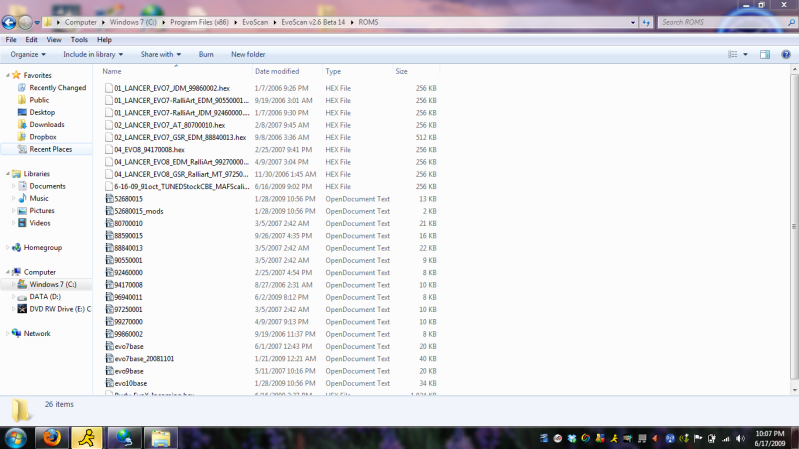
With EvoScan...you must have the XML/definition files from ECUFlash and a ROM with your current modifications (for example...load axis rescaling, Tehpra 5.10, etc...) within the ROMS folder in the directory.
Also, try running the program in administrator mode if all else fails.
With EvoScan...you must have the XML/definition files from ECUFlash and a ROM with your current modifications (for example...load axis rescaling, Tehpra 5.10, etc...) within the ROMS folder in the directory.
Also, try running the program in administrator mode if all else fails.
What you just said makes no sense to me, lulz.
I tried running it in admin mode, which only got me around halfway to where I needed to be with EvoScan.
I can only open ECUFlash and change stuff, but can't actually flash my car (can't remember the message it yells at me).
Then, on top of this, I can't get my USB-serial adapter to work with Vista. FML.
Tony (is pretty much computer stupid)
I tried running it in admin mode, which only got me around halfway to where I needed to be with EvoScan.
I can only open ECUFlash and change stuff, but can't actually flash my car (can't remember the message it yells at me).
Then, on top of this, I can't get my USB-serial adapter to work with Vista. FML.
Tony (is pretty much computer stupid)

What you just said makes no sense to me, lulz.
I tried running it in admin mode, which only got me around halfway to where I needed to be with EvoScan.
I can only open ECUFlash and change stuff, but can't actually flash my car (can't remember the message it yells at me).
Then, on top of this, I can't get my USB-serial adapter to work with Vista. FML.
Tony (is pretty much computer stupid)
I tried running it in admin mode, which only got me around halfway to where I needed to be with EvoScan.
I can only open ECUFlash and change stuff, but can't actually flash my car (can't remember the message it yells at me).
Then, on top of this, I can't get my USB-serial adapter to work with Vista. FML.
Tony (is pretty much computer stupid)
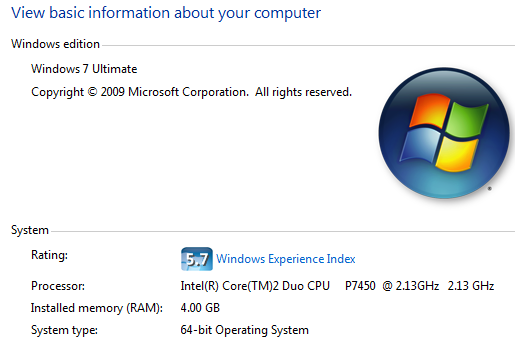
Here is a full datalog and complete MapTrace done with EvoScan v2.6 Beta 14 under 64-Bit

I have found through trial and error that in order for the MapTracer function to work properly you must have the XML files (ie evo7base or evo9base along with the XML for your ROM ID, 96940011 for example) and a current copy of your HEX/ROM file. Also, when loading the HEX file, they wont load from any other folders but this one.
Also, make sure that you are trying to log with the correct options depending on your tactrix cable (1.3, 2.0, etc...)
And another thing, by default, EvoScan doesnt log any load readings...so make sure you chose 2 byte load or load calculated. This is another reason the MapTracer function wont work.

As far as your ECUFlash problem...put up a screen shot of the error so one of us can try to figure out what the problem is.