


Periphery bits - advice required


Thread Starter
Registered User
Joined: Nov 2007
Posts: 1,507
Likes: 2
From: Trinidad
Periphery bits - advice required
i have a JDM Evo IX but recently changed to rom 88580014 (AUDM rom id).
i have these lines in my evo9base to remove the CELs for rear O2, EGR etc.
can anyone interpret what this means? i am guessing each represents each of the periphery things. e.g.
^ this turns off the entire FEA Periphery 4 series in the spreadsheet??
i know how the regular periphery bits work in the other format but i keep getting a "no match" error coming up as seen below:
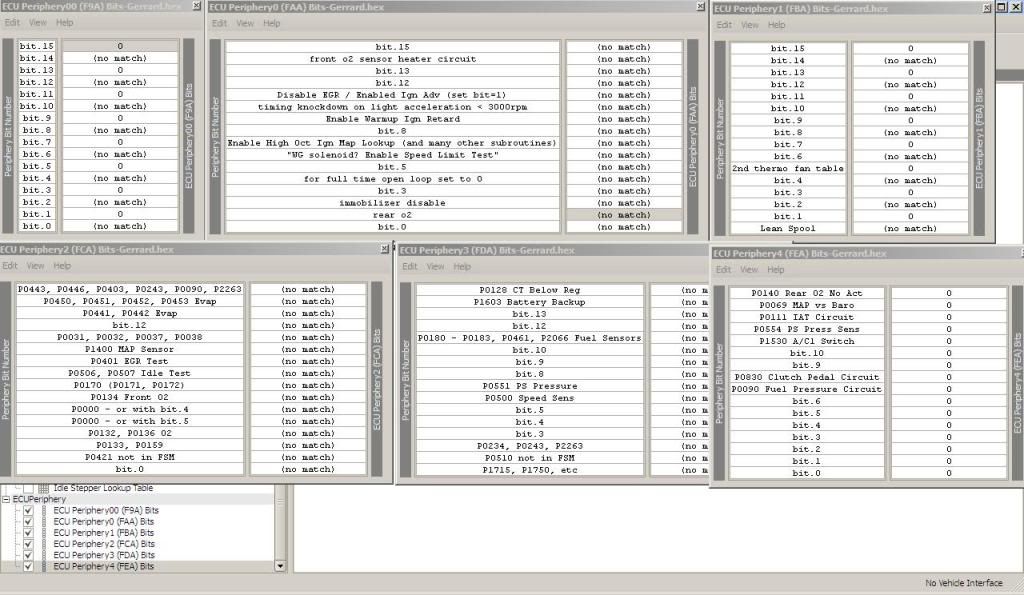
Any help will be greatly appreciated Thanks
i have these lines in my evo9base to remove the CELs for rear O2, EGR etc.
<table name="Periphery 4" category="Misc" address="fea" type="1D" level="1" scaling="Hex16"/>
<table name="Periphery 3" category="Misc" address="fda" type="1D" level="1" scaling="Hex16"/>
<table name="Periphery 2" category="Misc" address="fca" type="1D" level="1" scaling="Hex16"/>
<table name="Periphery 1" category="Misc" address="fba" type="1D" level="1" scaling="Hex16"/>
<table name="Periphery 3" category="Misc" address="fda" type="1D" level="1" scaling="Hex16"/>
<table name="Periphery 2" category="Misc" address="fca" type="1D" level="1" scaling="Hex16"/>
<table name="Periphery 1" category="Misc" address="fba" type="1D" level="1" scaling="Hex16"/>
<table name="Periphery 4" category="Misc" address="fea" type="1D" level="1" scaling="Hex16"/>
i know how the regular periphery bits work in the other format but i keep getting a "no match" error coming up as seen below:
Any help will be greatly appreciated Thanks


Thread Starter
Registered User
Joined: Nov 2007
Posts: 1,507
Likes: 2
From: Trinidad
<scaling name="blobbits" storagetype="bloblist" storagebits="1">
<data name="0" value="00"/>
<data name="1" value="01"/>
</scaling>
<data name="0" value="00"/>
<data name="1" value="01"/>
</scaling>
also, anyone understand how this works:
<table name="Periphery 4" category="Misc" address="fea" type="1D" level="1" scaling="Hex16"/>
<table name="Periphery 3" category="Misc" address="fda" type="1D" level="1" scaling="Hex16"/>
<table name="Periphery 2" category="Misc" address="fca" type="1D" level="1" scaling="Hex16"/>
<table name="Periphery 1" category="Misc" address="fba" type="1D" level="1" scaling="Hex16"/>
<table name="Periphery 3" category="Misc" address="fda" type="1D" level="1" scaling="Hex16"/>
<table name="Periphery 2" category="Misc" address="fca" type="1D" level="1" scaling="Hex16"/>
<table name="Periphery 1" category="Misc" address="fba" type="1D" level="1" scaling="Hex16"/>

The numbers you are seeing are pointing to the same thing. They are a different (normal) form of displaying the blobbits. A different view if you will. This has been covered quite a bit also. MrFred has posted a spreadsheet to convert blobbits to hex, however your best bet is to upgrade to the newest ecuflash version. You might be able to see your launch control stuff then also.


It is absolutely because you have ecuflash 1.34. This has been covered alot of times.
The numbers you are seeing are pointing to the same thing. They are a different (normal) form of displaying the blobbits. A different view if you will. This has been covered quite a bit also. MrFred has posted a spreadsheet to convert blobbits to hex, however your best bet is to upgrade to the newest ecuflash version. You might be able to see your launch control stuff then also.
The numbers you are seeing are pointing to the same thing. They are a different (normal) form of displaying the blobbits. A different view if you will. This has been covered quite a bit also. MrFred has posted a spreadsheet to convert blobbits to hex, however your best bet is to upgrade to the newest ecuflash version. You might be able to see your launch control stuff then also.
Thread Starter
Registered User
Joined: Nov 2007
Posts: 1,507
Likes: 2
From: Trinidad
The numbers you are seeing are pointing to the same thing. They are a different (normal) form of displaying the blobbits. A different view if you will. This has been covered quite a bit also. MrFred has posted a spreadsheet to convert blobbits to hex, however your best bet is to upgrade to the newest ecuflash version. You might be able to see your launch control stuff then also.
does anyone have ecuflash 1.35 OR one that does not require XP SP 3?
i cannot update to SP3 here (company laptop).
Trending Topics
Here you go bro:
http://openecu.org/downloads/
http://openecu.org/downloads/

Thread
Thread Starter
Forum
Replies
Last Post
senate6268
Lancer Engine Management / Tuning Forums
272
Jun 25, 2024 08:27 AM
tephra
Evo X Engine Management / Tuning Forums
57
Dec 23, 2023 09:14 AM
