


Can't edit XML File


Can't edit XML File
[IMG]file:///C:/Users/Matt/AppData/Local/Temp/moz-screenshot.jpg[/IMG][IMG]file:///C:/Users/Matt/AppData/Local/Temp/moz-screenshot-1.jpg[/IMG]Everytime I try and Edit my XML I run into several problems. First it makes me correct a bunch of grammatical errors, and than this comes up...
[IMG]file:///C:/Users/Matt/AppData/Local/Temp/moz-screenshot-4.jpg[/IMG]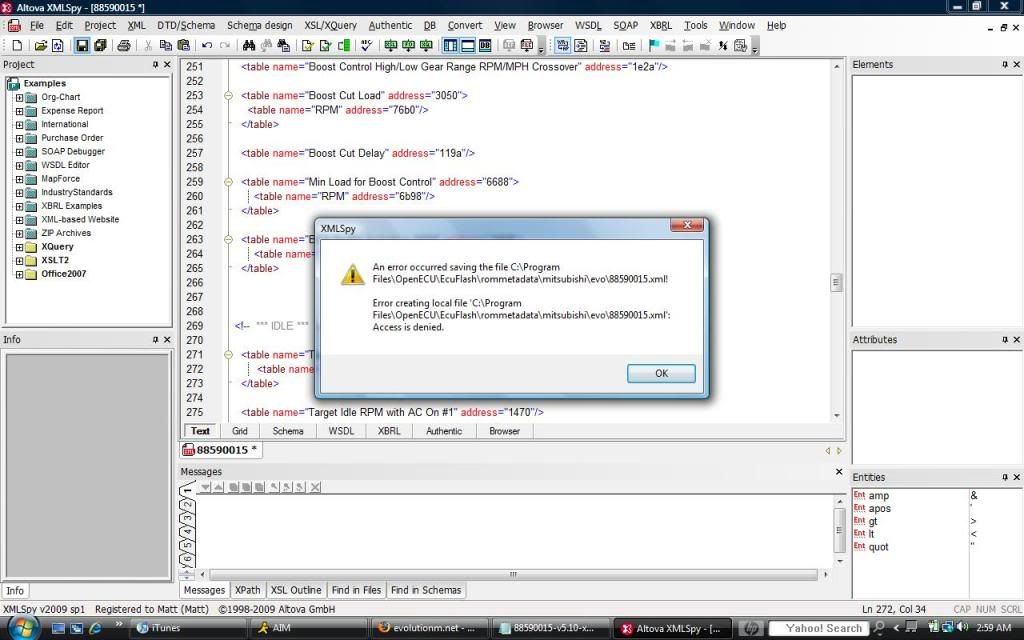
Any ideas?
[IMG]file:///C:/Users/Matt/AppData/Local/Temp/moz-screenshot-4.jpg[/IMG]
Any ideas?

Administrator /folder privileges... use notepad...
Make sure ecuflash is closed. Open the rommeta data folder, if it won't let you right click / edit / save. Drag the xml file onto the desktop and try it. I had that problem initially. (I don't any longer after going in and altering my folder privileges...)
But seriously just go in and set your folder options in the control panel... problem solved.
Make sure ecuflash is closed. Open the rommeta data folder, if it won't let you right click / edit / save. Drag the xml file onto the desktop and try it. I had that problem initially. (I don't any longer after going in and altering my folder privileges...)
But seriously just go in and set your folder options in the control panel... problem solved.
Sounds like a solid solution, unfortunately I don't know how to do any of that either lol. I went to administrative options, folder options, and frmo what I can tell I have pretty much maximum accesibility as is. But if someone could post up in detail how to change my folder privileges that would be awesome.


Another simpler option is to simply run notepad/whatever xml editor as an administrator. Right click on the notepad icon and select "Run as Administrator" that should work.
I really think the BS will stop if you set your user permissions for your folder options as high as you can for every category.
Are you Vista 32bit Home or 64 bit? I'm also running a Vista HP laptop and that worked for me.
Figured it might for you, since we're running on similar equipment / OS. Thus my suggestion.
Are you Vista 32bit Home or 64 bit? I'm also running a Vista HP laptop and that worked for me.
Figured it might for you, since we're running on similar equipment / OS. Thus my suggestion.

Thread
Thread Starter
Forum
Replies
Last Post
Evol21
For Sale - Wheels / Tires
14
Dec 6, 2010 09:20 AM
Sxhawnn
For Sale/WTB - Engine / Drivetrain / Power
19
Aug 24, 2007 11:54 AM
