


Fuel maps don't line up?


For starters, do your high octane and low octane fuel tables match? If not, are you logging any knock?
I'm pretty sure you can safely go by just the high octane map if you don't have knock. If you do have knock, the computer is going to start to blend the high and low octane maps.
That's why I have my high octane and low octane maps equal, for now, to cut out that variable.
So that said, can you post up a screen shot of your fuel table and a graph of your pull?
I'm pretty sure you can safely go by just the high octane map if you don't have knock. If you do have knock, the computer is going to start to blend the high and low octane maps.
That's why I have my high octane and low octane maps equal, for now, to cut out that variable.
So that said, can you post up a screen shot of your fuel table and a graph of your pull?

Thread Starter
Evolving Member
Joined: Aug 2009
Posts: 128
Likes: 0
From: Herndon, VA
Lean spool was the culprit!
Referencing a lean spool thread, I disabled Lean spool using the Periphery bits. I disabled ECU Periphery1 (FBA) bit 0, by changing it's value from 1 to 0.
I then ran a pull, and it immediately felt better, so I did a second pull as well.
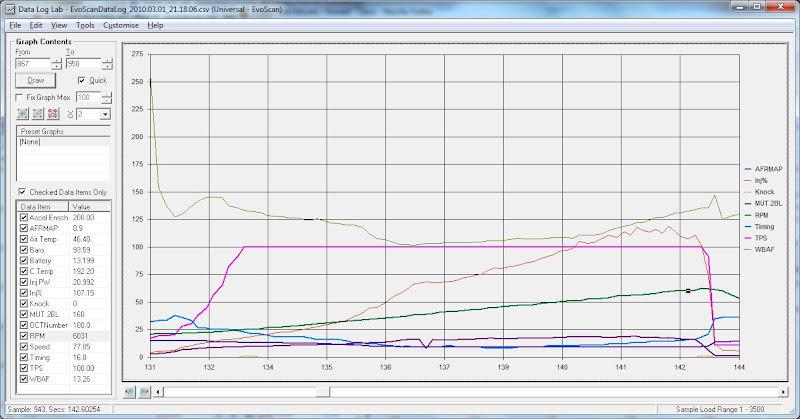
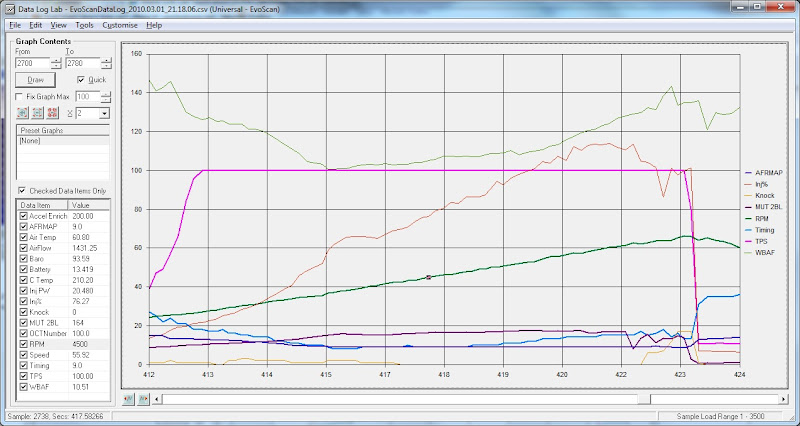
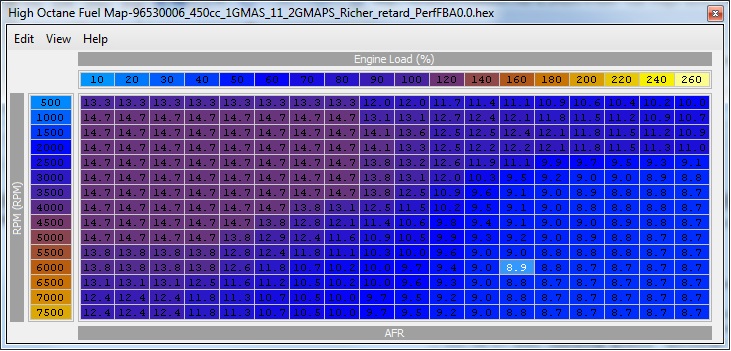
As you can see by the logs and fuel table below; RPM, 2Byte Load, and AFRMAP correlate with my fuel map perfectly.

l2r99gst if you ever find yourself in Northern VA, send me a PM! I owe you a beer for pointing me in the right direction.

3.1.10 First Pull 3rd Gear WOT
3.1.10 Second Pull 3rd Gear WOT
3.1.10 High Octane Fuel table (matching low octane fuel table for troubleshooting purposes at the time of this post)
Last edited by Seijuro; Mar 1, 2010 at 07:03 PM.
Glad to hear you got yours figured out Seijuro 
So here is my high octane fuel map

And here is a WOT in 3rd, I highlighted the rpm, ecuload, wideband, and afrmap columns and highlighted the closest rpms to my map ie, 2500 3000 3500 etc.

Example here 2500rpm, 126 load afrmap says 11.83, look up in my actual fuel map and it shows 13.2 at 2500 and 130. The closets to that is in the 150 load column at 11.9. WTF?
Now at 3000 and 136 load its at 10.94 but in my fuel map its 10.6, once again my closest to that is at 150 load at 10.8. Am I missing something?? Also right at 3000 you can see the afrmap flatline at 10.01 is this normal?? no significant knock and 100 octane flag throughout
So here is my high octane fuel map
And here is a WOT in 3rd, I highlighted the rpm, ecuload, wideband, and afrmap columns and highlighted the closest rpms to my map ie, 2500 3000 3500 etc.
Example here 2500rpm, 126 load afrmap says 11.83, look up in my actual fuel map and it shows 13.2 at 2500 and 130. The closets to that is in the 150 load column at 11.9. WTF?
Now at 3000 and 136 load its at 10.94 but in my fuel map its 10.6, once again my closest to that is at 150 load at 10.8. Am I missing something?? Also right at 3000 you can see the afrmap flatline at 10.01 is this normal?? no significant knock and 100 octane flag throughout
Last edited by 03lances; Mar 1, 2010 at 09:55 PM.
Ok so I had to post this, I have a log of just driving with a couple of light acceleration spots in the log, I have been looking at every spot in the log where the afrmap drops below 14.7 and whats wierd is no matter what load I am at, it looks like my afr map reflects closes to the 150 load column which is also my max load column as you can see. this leads me to believe that my fuel maps are registering at a load higher than my max of 150. Not sure how I can confirm this though since I cannot log 2byte load with my ecu.
Thread Starter
Evolving Member
Joined: Aug 2009
Posts: 128
Likes: 0
From: Herndon, VA
The correlation between what you're logging, and your fuel map, is even worse than mine. At least mine consistently logged a higher load than would correlate on the map.
Yours is crossing at about 3250 rpms.
Below ~3250 rpms, the load that corresponds with the AFRMAP value is higher than the recorded load.
Above ~3250 rpms, the load that corresponds with the AFRMAP value is lower than the recorded load.
What you have here is in my opinion useless. You can't tune with that.
Yours is crossing at about 3250 rpms.
Below ~3250 rpms, the load that corresponds with the AFRMAP value is higher than the recorded load.
Above ~3250 rpms, the load that corresponds with the AFRMAP value is lower than the recorded load.
What you have here is in my opinion useless. You can't tune with that.
Exactly my friend and I dont know why lol. My afrs have pretty much always been all over and never could find out why until I came across this thread talking about the afrmap and found this result. I will figure this out and when I do I will post what I found
I have found from another thread in the base lancer forums another dude had his afrmap flatten at 10.01 too. This leads me to believe it actaully is refrenceing a higher load above 3250 also just the afrmap will reflect nothing lower than the 10.01
Thread Starter
Evolving Member
Joined: Aug 2009
Posts: 128
Likes: 0
From: Herndon, VA
I would put in something like 11.5 across the board (you come up with a number that works for you). Put this in every cell. Go drive the car but keep it out of boost initially. See if your AFRMAP is actually reading 11.5 or whatever you choose.
If it is, fine.
If not, there's something else influencing the target AFR. That influence may not always be present. So you'll need to test at different rpms and different loads. What you want to see, is 11.5 for AFRMAP no matter what you do.
You need at least nail down 2 consistent reliable readings, from there you can work on deciphering the rest.
You can trust the RPM, but right now you don't know that you can actually trust anything else.
my mapped afr and timing follows wat ever my 1 byte load is... all the time ive logged so i never looked into compensated vs uncompensated. reading over your thread im starting to think that your asking why isnt the actual afr matching your mapped afr? like `5000rpm and 250 load mapped afr 10.1 and your wide band is reading 11.3. is that what you mean? if so then the answer is they rarely if ever will match up. maybe close but not going to be exact. let me know if thats what you mean.

not an answer but... if you locate what load you are in by comparing timing and rpm and then adjust your afr in that cell... does the wideband suggest you have made a change at that load or not?
No if I just alter the map according to my load I see it does not reflect a change. Telling .e I am altering the wrong cell. I flashed some new fuel parameters ignoring the load and using the afrmap as a guide with I think promising results. I was only able to drive it to work but seems more pepp. I will not know for sure untill I log. UT will keep you updated. Looking like I might have to tune Afr using the afrmap log as my guide
I did some logging today and confirmed for sure that the fuel map follows some higher load. Anything that registers 100+ load in evoscan will refrence my highest load column (150) in the fuel table. Now I dont quite know how this all works yet but at one point I seen 4500 rpms and a 45 load value, the ecu clearly refrenced the 80 load column in the fuel table. Another one had 4750rpms 50% load and it was clearly referencing 100 load column. Now I assume this will not be a linear thing (ie evoscan says 70 load so my fuel table references around 110 120 load column) Or would it be? At this point I really think my best option is to lower the maf size to drop my load values down. Its hard enough to try and tune for 150 load with my ecu maps but looks like left as is I would have to scale my fuel map to around 200-210 load to tune it which means I would be jumping 20-30 load per column. I logged loadcalc along with ecuload today and found they were always within 10% load of eachother so no help there. I still dont know why it is referencing this other load value, but for all I know this is normal for the lancer ecu as there isnt a lot of support for this ecu for obvious reasons.
If I havent said it yet I greatly appreciate you guys taking the time to help me figure this all out.
If I havent said it yet I greatly appreciate you guys taking the time to help me figure this all out.
Last edited by 03lances; Mar 5, 2010 at 01:21 AM.
Thread Starter
Evolving Member
Joined: Aug 2009
Posts: 128
Likes: 0
From: Herndon, VA
I did some logging today and confirmed for sure that the fuel map follows some higher load. Anything that registers 100+ load in evoscan will refrence my highest load column (150) in the fuel table. Now I dont quite know how this all works yet but at one point I seen 4500 rpms and a 45 load value, the ecu clearly refrenced the 80 load column in the fuel table. Another one had 4750rpms 50% load and it was clearly referencing 100 load column. Now I assume this will not be a linear thing (ie evoscan says 70 load so my fuel table references around 110 120 load column) Or would it be? At this point I really think my best option is to lower the maf size to drop my load values down. Its hard enough to try and tune for 150 load with my ecu maps but looks like left as is I would have to scale my fuel map to around 200-210 load to tune it which means I would be jumping 20-30 load per column. I logged loadcalc along with ecuload today and found they were always within 10% load of eachother so no help there. I still dont know why it is referencing this other load value, but for all I know this is normal for the lancer ecu as there isnt a lot of support for this ecu for obvious reasons.
If I havent said it yet I greatly appreciate you guys taking the time to help me figure this all out.
If I havent said it yet I greatly appreciate you guys taking the time to help me figure this all out.
About the map size. Bigger maps are preferred, but jumping 20-30 load actually isn't that bad. The ECU will interpolate or "split the difference" between the columns. So, if you have for example;
@ 4000 rpm @ 100 load = 12.0 &
@ 4000 rpm @ 140 load = 10.0
If you're @ 4000 rpm @120 load, your AFRMAP will be 11.0
Also, you don't need to keep even steppings across the maps. You can have jumps of 30 load in one area, and jumps of only 10 in the next. You probably don't need the granularity all of the time, so increase the jumps in the areas you're not as concerned about, so you can decrease the jumps in the others.
Finally, there is no functional difference between rescaling your fuel map, and playing with your MAF size/scaling. Either way, you are trading resolution for range.
I would suggest rescaing the fuel maps over altering your MAF parameters to alter the logged load value because altering your MAF parameters will will have a broad impact. Your timing table, for example, is also load based and will no longer be accurate.
I doubt it's going to be linear, but we can only guess because we really don't know what the real value is, or how it's determined.
About the map size. Bigger maps are preferred, but jumping 20-30 load actually isn't that bad. The ECU will interpolate or "split the difference" between the columns. So, if you have for example;
@ 4000 rpm @ 100 load = 12.0 &
@ 4000 rpm @ 140 load = 10.0
If you're @ 4000 rpm @120 load, your AFRMAP will be 11.0
Also, you don't need to keep even steppings across the maps. You can have jumps of 30 load in one area, and jumps of only 10 in the next. You probably don't need the granularity all of the time, so increase the jumps in the areas you're not as concerned about, so you can decrease the jumps in the others.
Finally, there is no functional difference between rescaling your fuel map, and playing with your MAF size/scaling. Either way, you are trading resolution for range.
I would suggest rescaing the fuel maps over altering your MAF parameters to alter the logged load value because altering your MAF parameters will will have a broad impact. Your timing table, for example, is also load based and will no longer be accurate.
About the map size. Bigger maps are preferred, but jumping 20-30 load actually isn't that bad. The ECU will interpolate or "split the difference" between the columns. So, if you have for example;
@ 4000 rpm @ 100 load = 12.0 &
@ 4000 rpm @ 140 load = 10.0
If you're @ 4000 rpm @120 load, your AFRMAP will be 11.0
Also, you don't need to keep even steppings across the maps. You can have jumps of 30 load in one area, and jumps of only 10 in the next. You probably don't need the granularity all of the time, so increase the jumps in the areas you're not as concerned about, so you can decrease the jumps in the others.
Finally, there is no functional difference between rescaling your fuel map, and playing with your MAF size/scaling. Either way, you are trading resolution for range.
I would suggest rescaing the fuel maps over altering your MAF parameters to alter the logged load value because altering your MAF parameters will will have a broad impact. Your timing table, for example, is also load based and will no longer be accurate.