


Preliminary Dyno Result


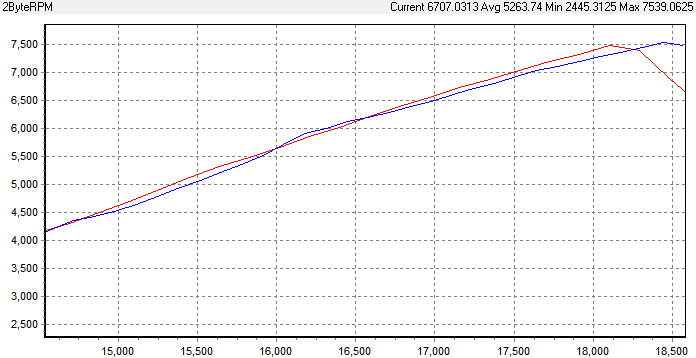
Red plot shows no slip, blue shows slip, and skews the dyno software:
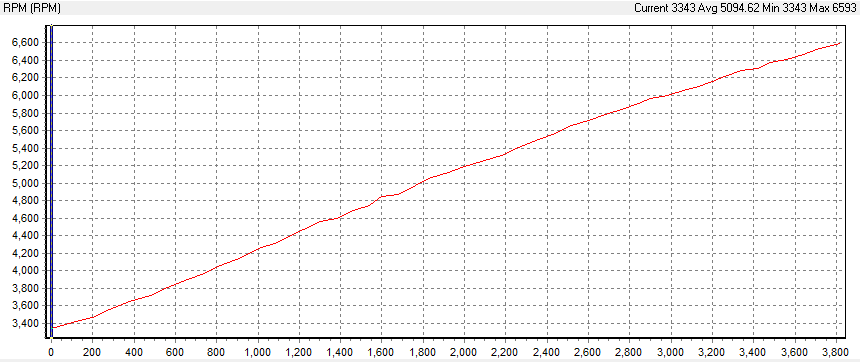
Another example, notice the plot is not linear, but has little bumps and such:

If you would like to send me your log, I can visualize it through the same system.
Last edited by razorlab; Nov 18, 2011 at 09:42 AM.

Thread Starter
Evolved Member
Joined: Feb 2011
Posts: 769
Likes: 0
From: Montreal, QC
It was a bad pull and could be why things are screwy but here it is regardless:
http://www.youfile.net/download.php?...dad7e2e02adb5b
http://www.youfile.net/download.php?...dad7e2e02adb5b
It was a bad pull and could be why things are screwy but here it is regardless:
http://www.youfile.net/download.php?...dad7e2e02adb5b
http://www.youfile.net/download.php?...dad7e2e02adb5b
Thread Starter
Evolved Member
Joined: Feb 2011
Posts: 769
Likes: 0
From: Montreal, QC
Do you have Excel 2007?
If so, highlight column A, go to tab Data, then Text to Columns, keep hitting next, it will arrange it.
If that doesn't work, I'll re-format it then send it over.
If so, highlight column A, go to tab Data, then Text to Columns, keep hitting next, it will arrange it.
If that doesn't work, I'll re-format it then send it over.
Thread Starter
Evolved Member
Joined: Feb 2011
Posts: 769
Likes: 0
From: Montreal, QC


Thread Starter
Evolved Member
Joined: Feb 2011
Posts: 769
Likes: 0
From: Montreal, QC
So what can I do to stop the clutches from slipping? As I said, I'm going to do a couple more runs with this tune and see how they look.
Razorlab, what are you using for that RPM data?
Razorlab, what are you using for that RPM data?
I think the idea is to increase the SST Torque table by the applicable increase in actual torque (i.e. if torque is increased by 20%, increase the table values by 20%).
As for RPM plots, RPM is Y, looks like either time or speed can be X??
As for RPM plots, RPM is Y, looks like either time or speed can be X??
Thread Starter
Evolved Member
Joined: Feb 2011
Posts: 769
Likes: 0
From: Montreal, QC
Thanks Razorlab/SStEvoJr for the clutch slip info.
Because of your info, Mitch @ AMS sent me a revised tune (rev6) that I'm going to load up tonight. It's the same tune as rev5 except he's modified the SST torque tables to reduce slipping.
Because of your info, Mitch @ AMS sent me a revised tune (rev6) that I'm going to load up tonight. It's the same tune as rev5 except he's modified the SST torque tables to reduce slipping.
Let us know how it goes, I'm trying to combat some slippage as well. Mine is at spool up tho (peak torque), looks like yours is later in the pull at 5250-5750 (peak power). Unfortunately I don't access to the SST tables  ; maybe it will keep me from getting in too much trouble
; maybe it will keep me from getting in too much trouble
Last edited by sstevojr; Nov 22, 2011 at 07:36 AM.
Thread Starter
Evolved Member
Joined: Feb 2011
Posts: 769
Likes: 0
From: Montreal, QC
haha maybe! I'll put up the dyno tonight of it and post the link to the log. Maybe Razorlab can plug it in to his software again.
I know Mitch had upped the torque tables I guess it wasn't enough for that tune.
I know Mitch had upped the torque tables I guess it wasn't enough for that tune.
I'm under the impression AMS has pretty good access to the ECU/SST.