


ECUEdit Now Supports EVO Logging!!!!


I'd definitely want to try it out more, but I don't have a definition for the ECU I'm working with right now.. I really want to see how it compares to other stuff since it already has alot of the features I was writing into my software.. If there's something that already does it I'd like to use it..
Is the Eval version hiding any features though? Because I didn't see anything other than the ability to log and edit, and some other stuff that didn't really portray the ability to map trace, calculate load, etc..
If it does all that stuff, I don't want to be reinventing the wheel..
Is the Eval version hiding any features though? Because I didn't see anything other than the ability to log and edit, and some other stuff that didn't really portray the ability to map trace, calculate load, etc..
If it does all that stuff, I don't want to be reinventing the wheel..
Originally Posted by epifan
Twice price of EvoScan for logger with advanced log viewer (more useful features then DataLog Lab), map tracer, fast graphs and dash, calculated log params (for example on-line Load calculation) and other stuff? Is this expencive? 

Newbie
Joined: Sep 2006
Posts: 21
Likes: 0
Originally Posted by MalibuJack
I'd definitely want to try it out more, but I don't have a definition for the ECU I'm working with right now..
Originally Posted by MalibuJack
Is the Eval version hiding any features though?
Originally Posted by MalibuJack
Because I didn't see anything other than the ability to log and edit, and some other stuff that didn't really portray the ability to map trace, calculate load, etc..
Look at basic screenshots (there), you can find map tracer (on actual ROM map) and calculated table (like map) in LogViewer.
ECUID Is 94170008 I actually think it was posted, but it might have been incomplete..
I'm a HUGE fan of Delphi.. Most of my PE type code is done using it.. My logger is actually VB.NET (an excuse to get up to speed on it for work)
PM me if you want me to do an actual evaluation/Review of the program for Here and Aktivematrix..
I figured the advanced features were tucked away somewhere not as obvious.. Check out Aktivematrix if you feel like sharing ideas..
I'm a HUGE fan of Delphi.. Most of my PE type code is done using it.. My logger is actually VB.NET (an excuse to get up to speed on it for work)
PM me if you want me to do an actual evaluation/Review of the program for Here and Aktivematrix..
I figured the advanced features were tucked away somewhere not as obvious.. Check out Aktivematrix if you feel like sharing ideas..
Newbie
Joined: Sep 2006
Posts: 21
Likes: 0
Originally Posted by MalibuJack
Sweet.. If its on your forum I'll download it and check out the program this afternoon.
http://forums.openecu.org/viewtopic.php?t=273
Originally Posted by epifan
I have complete description of this ECU 
I found a post on OpenECU with it pasted into one of the threads... But its incomplete (clipped at the last lines)
Can you PM me a link to the right def?


Does this version support a mitsu hex editor or is it just strictly logging?
I was abou to buy the AEM but it's developments like this that keep me runnin gthe stock ecu
I was abou to buy the AEM but it's developments like this that keep me runnin gthe stock ecu
Newbie
Joined: Sep 2006
Posts: 21
Likes: 0
Originally Posted by MalibuJack
That definition looks interesting, but causes an Access violation, most of the axis are funky, and many of the tables don't work or don't display correctly...
I'll try to find the one that actually threw the error.. It was one of the 3d maps though..
I may just bite the bullet and create a new one.. But it was too much effort just to evaluate the program.. It looks really cool though.
I may just bite the bullet and create a new one.. But it was too much effort just to evaluate the program.. It looks really cool though.
Newbie
Joined: Sep 2006
Posts: 21
Likes: 0
Example of how to calc Load in ecuEdit and some features
Ok, I show how quickly you can build custom calculated logs in ecuEdit, built log based map table and some other features...
All this features are availiable in TRIAL version of ecuEdit. Also all this features included in registered ecuEdit Logger Edition suite
1. Open Log file in ecuEdit by [Ctrl]+[L]
2. Press right mouse button on Log param list box and choose Add Custom Log..

Input log param name and expression for calculation, for exampe Load: 5*513*([value]-0,432)/[value2]
and choose Param for [value] - Injector Pulse Width and for [value2] - AFRMap.
Press [Add] button. Now we have new calculated log parameter.
You can save all selected parameters as full log or save only selected log area.
3. Select WOT interval to analyse ECU data by pressing [Ctrl]+[F]

There you are choose Log parameter and "data from/to" interval for selecting.
You can adjust selected interval by changing Start/End trackbars (blue highlighted on screenshot)

4. Now select Custom Page by pressing [Alt+5]
Select "Load" for X Axis, "RPM" for Y Axis and any parameter for "Data"
Activating Round functions for X and Y axis. Input 10 for Load and 500 for RPM round.

After double click on table cell you can view all log entry in this cell.
5. You can view this table as bubble 2d chart

Bigger bubble have bigger value of log entries.
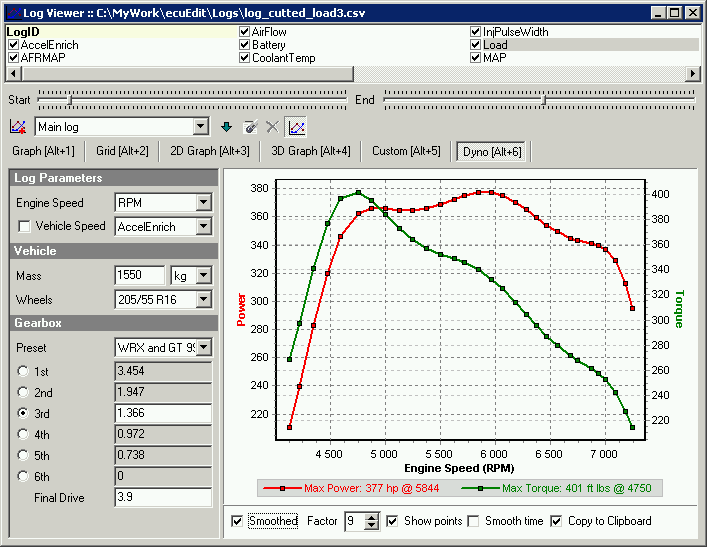
6. You can view "road dyno" for this WOT on "Dyno" Page by pressing [Alt+6]
Better build DYNO by RPM method, so unchek "Vehicle Speed" check box.
Power and Torque values will be not correct (because gear rates and mass on mitsu different, i'm not include mitsu data in XML yet) , but you can view power/torque curves - they are approximately right
Next example will show a real map trace
All this features are availiable in TRIAL version of ecuEdit. Also all this features included in registered ecuEdit Logger Edition suite
1. Open Log file in ecuEdit by [Ctrl]+[L]
2. Press right mouse button on Log param list box and choose Add Custom Log..
Input log param name and expression for calculation, for exampe Load: 5*513*([value]-0,432)/[value2]
and choose Param for [value] - Injector Pulse Width and for [value2] - AFRMap.
Press [Add] button. Now we have new calculated log parameter.
You can save all selected parameters as full log or save only selected log area.
3. Select WOT interval to analyse ECU data by pressing [Ctrl]+[F]
There you are choose Log parameter and "data from/to" interval for selecting.
You can adjust selected interval by changing Start/End trackbars (blue highlighted on screenshot)
4. Now select Custom Page by pressing [Alt+5]
Select "Load" for X Axis, "RPM" for Y Axis and any parameter for "Data"
Activating Round functions for X and Y axis. Input 10 for Load and 500 for RPM round.
After double click on table cell you can view all log entry in this cell.
5. You can view this table as bubble 2d chart
Bigger bubble have bigger value of log entries.
6. You can view "road dyno" for this WOT on "Dyno" Page by pressing [Alt+6]
Better build DYNO by RPM method, so unchek "Vehicle Speed" check box.
Power and Torque values will be not correct (because gear rates and mass on mitsu different, i'm not include mitsu data in XML yet) , but you can view power/torque curves - they are approximately right
Next example will show a real map trace
Last edited by epifan; Sep 29, 2006 at 06:32 AM.