


ECUEdit Now Supports EVO Logging!!!!


Originally Posted by epifan
Ok, I show how quickly you can build custom calculated logs in ecuEdit, built log based map table and some other features...
All this features are availiable in TRIAL version of ecuEdit. Also all this features included in registered ecuEdit Logger Edition suite
1. Open Log file in ecuEdit by [Ctrl]+[L]
2. Press right mouse button on Log param list box and choose Add Custom Log..

Input log param name and expression for calculation, for exampe Load: 5*513*([value]-0,432)/[value2]
and choose Param for [value] - Injector Pulse Width and for [value2] - AFRMap.
Press [Add] button. Now we have new calculated log parameter.
You can save all selected parameters as full log or save only selected log area.
3. Select WOT interval to analyse ECU data by pressing [Ctrl]+[F]

There you are choose Log parameter and "data from/to" interval for selecting.
You can adjust selected interval by changing Start/End trackbars (blue highlighted on screenshot)

4. Now select Custom Page by pressing [Alt+5]
Select "Load" for X Axis, "RPM" for Y Axis and any parameter for "Data"
Activating Round functions for X and Y axis. Input 10 for Load and 500 for RPM round.

After double click on table cell you can view all log entry in this cell.
5. You can view this table as bubble 2d chart

Bigger bubble have bigger value of log entries.
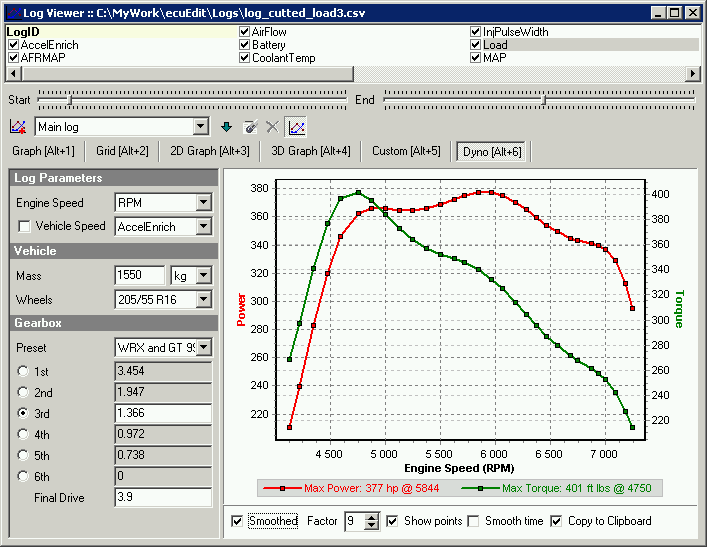
6. You can view "road dyno" for this WOT on "Dyno" Page by pressing [Alt+6]
Better build DYNO by RPM method, so unchek "Vehicle Speed" check box.
Power and Torque values will be not correct (because gear rates and mass on mitsu different, i'm not include mitsu data in XML yet) , but you can view power/torque curves - they are approximately right
Next example will show a real map trace
All this features are availiable in TRIAL version of ecuEdit. Also all this features included in registered ecuEdit Logger Edition suite
1. Open Log file in ecuEdit by [Ctrl]+[L]
2. Press right mouse button on Log param list box and choose Add Custom Log..
Input log param name and expression for calculation, for exampe Load: 5*513*([value]-0,432)/[value2]
and choose Param for [value] - Injector Pulse Width and for [value2] - AFRMap.
Press [Add] button. Now we have new calculated log parameter.
You can save all selected parameters as full log or save only selected log area.
3. Select WOT interval to analyse ECU data by pressing [Ctrl]+[F]
There you are choose Log parameter and "data from/to" interval for selecting.
You can adjust selected interval by changing Start/End trackbars (blue highlighted on screenshot)
4. Now select Custom Page by pressing [Alt+5]
Select "Load" for X Axis, "RPM" for Y Axis and any parameter for "Data"
Activating Round functions for X and Y axis. Input 10 for Load and 500 for RPM round.
After double click on table cell you can view all log entry in this cell.
5. You can view this table as bubble 2d chart
Bigger bubble have bigger value of log entries.
6. You can view "road dyno" for this WOT on "Dyno" Page by pressing [Alt+6]
Better build DYNO by RPM method, so unchek "Vehicle Speed" check box.
Power and Torque values will be not correct (because gear rates and mass on mitsu different, i'm not include mitsu data in XML yet) , but you can view power/torque curves - they are approximately right
Next example will show a real map trace
When using the desktop dyno it's saying i have 15,000+ hp and 15000+ tq, lol
i used the same setting that you did.
Any chances you will get the XML definitions for ECU jm9693 incorporated any time soon?
I just realized i can't even lod correctly without it.

Newbie
Joined: Sep 2006
Posts: 21
Likes: 0
Originally Posted by Noogles
When using the desktop dyno it's saying i have 15,000+ hp and 15000+ tq, lol

Originally Posted by Noogles
Any chances you will get the XML definitions for ECU jm9693 incorporated any time soon?
I just realized i can't even lod correctly without it.
I just realized i can't even lod correctly without it.


Originally Posted by mchuang
Wow nice, can it actually edit the ecu since it is called ecu edit lol maybe i need to go read up on it. I do see a load calculation
Can it edit and flash EVO maps yet??
Newbie
Joined: Sep 2006
Posts: 21
Likes: 0
Originally Posted by Evo_Kid
+1
Can it edit and flash EVO maps yet??
Can it edit and flash EVO maps yet??
ecuEdit can't flash EVO, yet...

Originally Posted by epifan
Yes, ecuEdit can edit any ECU bin files (by maps), including EVO. I have some EVO XML descriptions collection, but only for registered users. You can see on map trace screenshots window with EVO maps list
ecuEdit can't flash EVO, yet...
ecuEdit can't flash EVO, yet...
Newbie
Joined: Sep 2006
Posts: 21
Likes: 0
Originally Posted by mchuang
So then you still have to use ecu flash to write the edited bin to ecu or can you edit bin on the fly realtime?
Realtime flash is impossible.
I got it working now, boy do i feel stupid but this real time logger and map tracer is absolutely amazing.
I've got it to hit almost every single cell on the map in one drive to work and my drivability is much better. Can't wait for the sektop dyno to include the evo 8 info so that it'll be more accurate.
I've got it to hit almost every single cell on the map in one drive to work and my drivability is much better. Can't wait for the sektop dyno to include the evo 8 info so that it'll be more accurate.

ECUedit
Newbie
Joined: Sep 2006
Posts: 21
Likes: 0
Please advise where i can downlaod a trial of this program as it looks really interesting I can be emailed at roberttonge@cwdom.dm


Whats the difference between Pro, Standard, and Logger besides the price. Could you post a few screen shots of the real time logger and map tracer. I was just getting ready to purchase DLL and I might just buy Ecuedit instead. I just want to see what all it offers. I downloaded the trial version and like what I saw there.
Newbie
Joined: Sep 2006
Posts: 21
Likes: 0
Standard = Logger version + Map Editor (with map tracer and etc)
Pro = Standard + Flash support (Subaru 2.0turbo, Evo7-9)
Logger screenshots you can see here


