


Gauges for Evoscan v0.97


Thread Starter
Account Disabled
iTrader: (465)
Joined: May 2005
Posts: 8,824
Likes: 2
From: Central FL
Originally Posted by Rob W.
As Evo4Mad said, I manually added a SavedSettings directory, then copied an XML file into there, renamed it "EvoScan.xml", and deleted it's entire contents. The first time you rerun the program, you'll get an error message and the channel list will be blank. Just close and rerun it. Now, it's back to normal operation, except all the settings save perfectly!
THANKS!
THANKS!

Originally Posted by evo4mad
Also if your settings aren't saving make sure this blank file exists:
c:\program files\evoscan\evoscan v0.97\SavedSettings\EvoScan.xml
Edit: turns out the "savedsettings" dir/ was not created during install
Also the background container thing I'll check this out..
c:\program files\evoscan\evoscan v0.97\SavedSettings\EvoScan.xml
Edit: turns out the "savedsettings" dir/ was not created during install
Also the background container thing I'll check this out..
Seems everything saves but the Device Setup (Com port).
It defaults to FTDI FT232.
Please add to next version?


Here is the download for these gauges:

Click Here: http://home.mchsi.com/~deviaant/Devgauges.zip
Unzip shiftknockvolttps.xml to your GaugeLayouts folder
Unzip the other 3 files to your GaugeTemplates folder
Go to Gauges -> Load Gauge Layout -> select shiftknockvolttps
Feel free to distribute (for free) and edit as required.
Click Here: http://home.mchsi.com/~deviaant/Devgauges.zip
Unzip shiftknockvolttps.xml to your GaugeLayouts folder
Unzip the other 3 files to your GaugeTemplates folder
Go to Gauges -> Load Gauge Layout -> select shiftknockvolttps
Feel free to distribute (for free) and edit as required.

made a few gauges
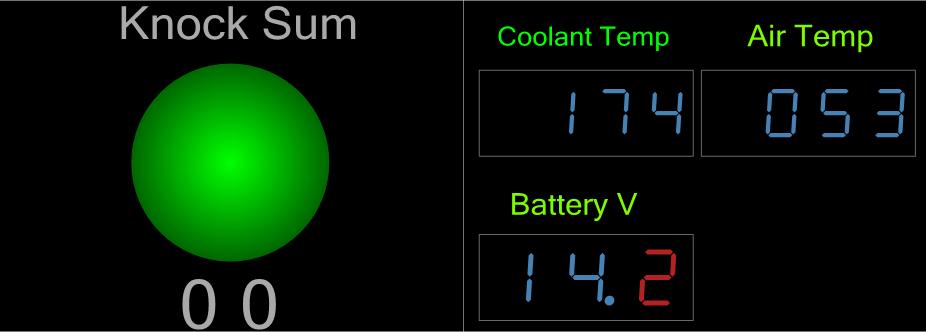
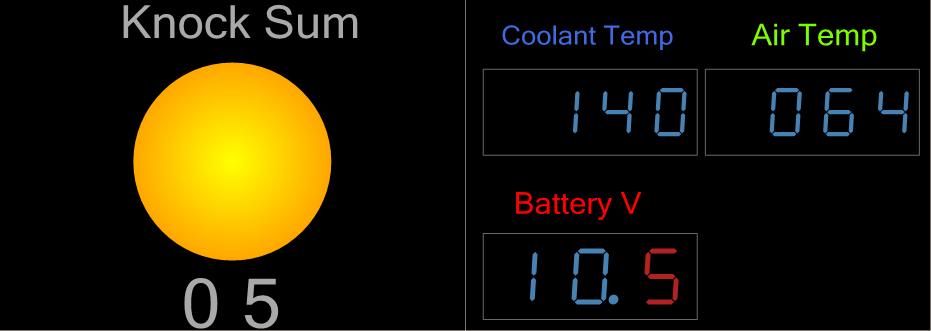
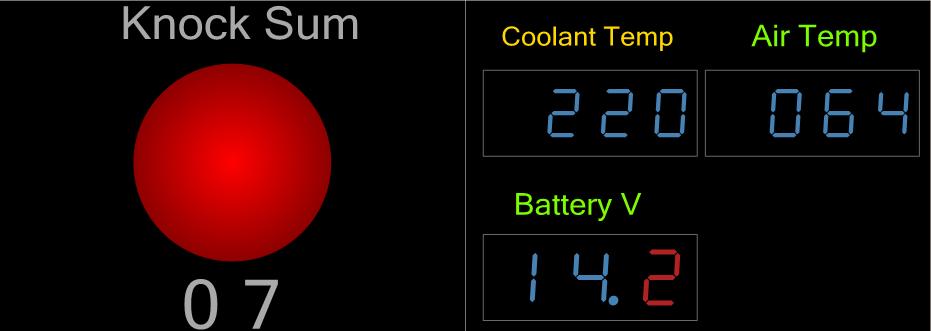
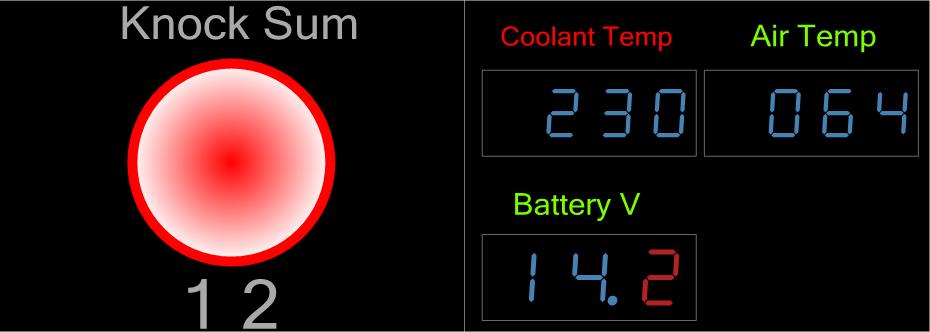
I had some time today, so I started working on some gauges. I'm not done by any means, but this is what I have so far. I am thinking about adding timing and calculated load.
I have state indicators on everything so that you can customize the colors, etc, for values that you want. For knock, I have it cylce through 4 different colors, depending on the value, and for the digital gauges on the right, I change the color of the text, depending on value.
Here are the screenshots. I made some test data to show how the state indicators change with different values (this data isn't from my logs). Let me know what you guys think and if anyone wants them, or the finished product, I can post them.
Eric
I have state indicators on everything so that you can customize the colors, etc, for values that you want. For knock, I have it cylce through 4 different colors, depending on the value, and for the digital gauges on the right, I change the color of the text, depending on value.
Here are the screenshots. I made some test data to show how the state indicators change with different values (this data isn't from my logs). Let me know what you guys think and if anyone wants them, or the finished product, I can post them.
Eric
Last edited by l2r99gst; Nov 13, 2006 at 06:03 PM.

Originally Posted by l2r99gst
I had some time today, so I started working on some gauges. I'm not done by any means, but this is what I have so far. I am thinking about adding timing and calculated load.
I have state indicators on everything so that you can customize the colors, etc, for values that you want. For knock, I have it cylce through 4 different colors, depending on the value, and for the digital gauges on the right, I change the color of the text, depending on value.
Here are the screenshots. I made some test data to show how the state indicators change with different values (this data isn't from my logs). Let me know what you guys think and if anyone wants them, or the finished product, I can post them.
Eric
I have state indicators on everything so that you can customize the colors, etc, for values that you want. For knock, I have it cylce through 4 different colors, depending on the value, and for the digital gauges on the right, I change the color of the text, depending on value.
Here are the screenshots. I made some test data to show how the state indicators change with different values (this data isn't from my logs). Let me know what you guys think and if anyone wants them, or the finished product, I can post them.
Eric
OK, here are the files for what you see above. I will add timing and load sometime soon, but these are the files you need for the gauges in the screenshots above.
The zip file with the two files are the gauge templates. Put them in your GaugeTemplates folder. The zip file with the one file is the gauge layout. Put that in your GaugeLayouts folder.
Eric
The zip file with the two files are the gauge templates. Put them in your GaugeTemplates folder. The zip file with the one file is the gauge layout. Put that in your GaugeLayouts folder.
Eric

Newbie
Joined: May 2006
Posts: 17
Likes: 0
From: Auckland
Just made myself a beginers gauge, for my 6" lcd
runs the speed (KPH) and rpm as large linears and then digital readouts with a boost reading in bar, prob have to alter you data.xml to have the line
<DataListItem DataLog="Y" Display="Boost (Bar)" LogReference="Boost (bar)" RequestID="38" Eval="0.01x-1" Unit="bar" MetricEval="" MetricUnit="" ResponseBytes="1" GaugeMin="0" GaugeMax="3" ChartMin="0" ChartMax="3"/>
this may be an incorrect formula worked for as a demo in my JDM 7.
the whole screen will become green as you approch a low shift of 4-5k rpm and return to normal then red if you running up to 6-7k rpm. was set lower on the top end for the demo.
constructive criticism always welcome.

im still learnin so no trashing please.
runs the speed (KPH) and rpm as large linears and then digital readouts with a boost reading in bar, prob have to alter you data.xml to have the line
<DataListItem DataLog="Y" Display="Boost (Bar)" LogReference="Boost (bar)" RequestID="38" Eval="0.01x-1" Unit="bar" MetricEval="" MetricUnit="" ResponseBytes="1" GaugeMin="0" GaugeMax="3" ChartMin="0" ChartMax="3"/>
this may be an incorrect formula worked for as a demo in my JDM 7.
the whole screen will become green as you approch a low shift of 4-5k rpm and return to normal then red if you running up to 6-7k rpm. was set lower on the top end for the demo.
constructive criticism always welcome.
im still learnin so no trashing please.


