
Notices
ECU Flash

Tuning with Evoscan

Thread Tools
 
Search this Thread
 
Old Aug 19, 2007 | 07:41 AM
  #16  
Jorge T's Avatar
Evolved Member
iTrader: (18)
 
Joined: May 2004
Posts: 1,494
Likes: 1
From: Houston, TX
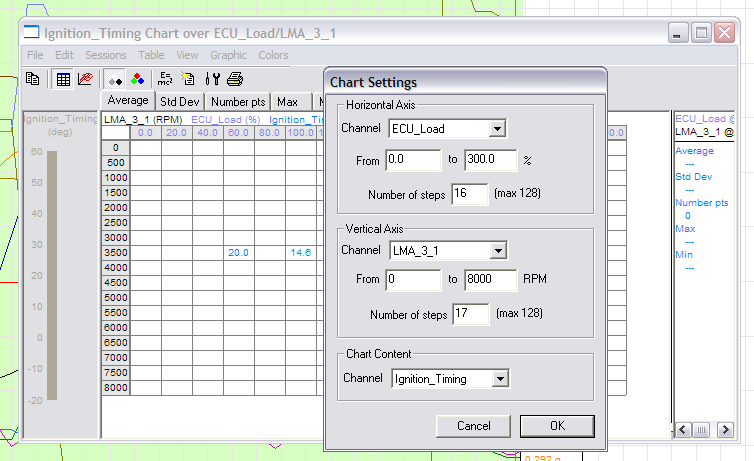
These are the settings for creating a LW chart with load in 20% increments and RPM in 500 rpm increments.

If you want to see load in 10% increments add 31 as the number of steps in the horizontal axis and 33 in the vertical axis to see rpm in 250 increments.

Attached Thumbnails Tuning with Evoscan-lw3-chart-settings.png  
Reply
Old Aug 26, 2007 | 10:02 AM
  #17  
nj1266's Avatar
Thread Starter
Evolved Member
iTrader: (6)
 
Joined: Nov 2004
Posts: 3,254
Likes: 13
From: USA
Originally Posted by kreionic
Awsome thank NJ. One last thing. I didn't see the jdm map in that file. I thought you used that too? If its not a hassle could you add that in there aswell. Thanks
This is an updated template. It has a PSI column. I have the columns arganized the same way as they appear in my Evoscan version 0.99. This way I copy the whole section of data from Evoscan and post it in the template. Then you can follow the same directions that I posted before.
Attached Files
File Type: zip
My_LW_Template.zip (752 Bytes, 28 views)
Reply
Old Aug 26, 2007 | 06:34 PM
  #18  
kreionic's Avatar
Evolved Member
iTrader: (14)
 
Joined: Apr 2006
Posts: 2,258
Likes: 0
From: MD/ NY
NJ, The second template you posted doesn't work for me. The first one you posted on the previous page works fine. When I open the file with logworks after saving it with .log nothing reads right. a/f stays at 7.35 etc.. everything stays at the minimums that you put
Reply
Old Aug 26, 2007 | 08:21 PM
  #19  
nj1266's Avatar
Thread Starter
Evolved Member
iTrader: (6)
 
Joined: Nov 2004
Posts: 3,254
Likes: 13
From: USA
Originally Posted by kreionic
NJ, The second template you posted doesn't work for me. The first one you posted on the previous page works fine. When I open the file with logworks after saving it with .log nothing reads right. a/f stays at 7.35 etc.. everything stays at the minimums that you put
You must remove columns that you do not use from the template. If you leave empty columns then Logworks gets confused.
Reply
Old Aug 27, 2007 | 04:15 PM
  #20  
kreionic's Avatar
Evolved Member
iTrader: (14)
 
Joined: Apr 2006
Posts: 2,258
Likes: 0
From: MD/ NY
Gotcha thanks
Reply
Old Aug 29, 2007 | 06:03 PM
  #21  
kreionic's Avatar
Evolved Member
iTrader: (14)
 
Joined: Apr 2006
Posts: 2,258
Likes: 0
From: MD/ NY
Last thing NJ. When you remove the columns. ARe you also talking about the formula at the top? And do I need to change the names from lm1 to lc1?
Reply
Old Aug 29, 2007 | 07:58 PM
  #22  
nj1266's Avatar
Thread Starter
Evolved Member
iTrader: (6)
 
Joined: Nov 2004
Posts: 3,254
Likes: 13
From: USA
Originally Posted by kreionic
Last thing NJ. When you remove the columns. ARe you also talking about the formula at the top? And do I need to change the names from lm1 to lc1?
Yes remove the formula as well. That is what worked for me. You have try the LC1 to LM1 change and see if it works for you.
Reply
Old Aug 30, 2007 | 04:03 PM
  #23  
kreionic's Avatar
Evolved Member
iTrader: (14)
 
Joined: Apr 2006
Posts: 2,258
Likes: 0
From: MD/ NY
This is odd. No matter what I do I can not get the second file you poosted to work. The first one you made without psi, etc.. works fine with no issues? I dont get it
Reply
Related Topics
Thread
Thread Starter
Forum
Replies
Last Post
NS@AEM
Water / Methanol Injection / Nitrous Oxide
30
Mar 24, 2015 07:53 PM
BellyD
Northwest Region
126
Feb 8, 2012 01:49 PM
dyezak
Evo Electrical / Audio / Security
66
May 14, 2010 11:36 AM
nj1266
ECU Flash
45
Jan 17, 2008 08:08 AM


All times are GMT -7. The time now is 05:01 AM.