


Log Viewers!! Which one is best??


Thread Starter

Joined: May 2004
Posts: 1,581
Likes: 10
From: Philadelphia
Log Viewers!! Which one is best??
So I am sick of viewing my logs in EVOSCAN graphs, whenever I slide the cursor over the line it displays incorrect values for the other lines shown in the log, so I have to then move the cursor directly vertical of that point to get a reading of the other parameter log during the same log instance.
I am not particularly fond of importing to an excel worksheet everytime to get synchronized data readings, but I am wondering what else is out the that works, or that can be made to work with things like the JDM MAP sensor, 2byte, ect.
Can Dataloglab work with my ROM mods/patches with some editing or is there anything else out there like logworks that might be better then EVOSCAN at viewing logs graphically??
I don't mind paying for software, I just want somthing that works well and is easy to see/read
I am not particularly fond of importing to an excel worksheet everytime to get synchronized data readings, but I am wondering what else is out the that works, or that can be made to work with things like the JDM MAP sensor, 2byte, ect.
Can Dataloglab work with my ROM mods/patches with some editing or is there anything else out there like logworks that might be better then EVOSCAN at viewing logs graphically??
I don't mind paying for software, I just want somthing that works well and is easy to see/read


Here is one example:
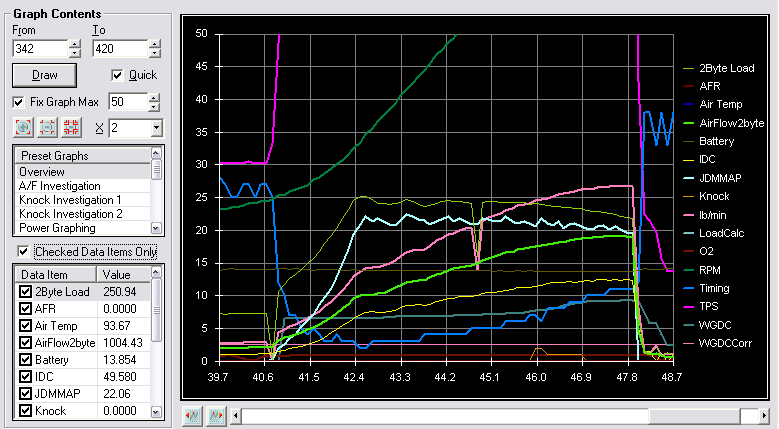
http://www.dataloglab.com
The *only* beef I have with it is that you can't do overlays.
http://www.dataloglab.com
The *only* beef I have with it is that you can't do overlays.
Thread Starter
Joined: May 2004
Posts: 1,581
Likes: 10
From: Philadelphia
Here is one example:
http://www.dataloglab.com
The *only* beef I have with it is that you can't do overlays.
http://www.dataloglab.com
The *only* beef I have with it is that you can't do overlays.

Can you scale or change those values however you want or does it only do it automaticly?
If you could share your DEF. file that would be great. I didn't know people had this stuff working!
Last edited by PeteyTurbo; Jun 25, 2008 at 03:27 PM.


Before you go spending money....download LogWorks and test it out. In my opinion, it has an excellent log viewer and allows you to zoom in out, mark specific points and see the values, etc, etc. Similar to what Bryan posted of DLL, but more features.
If you don't have an MTS device, all you have to do is setup a definition/template file for your logs from EvoScan or whatever you are using to log from.
If you don't have an MTS device, all you have to do is setup a definition/template file for your logs from EvoScan or whatever you are using to log from.
Thread Starter
Joined: May 2004
Posts: 1,581
Likes: 10
From: Philadelphia
I have logworks, I just never installed it. I'm not sure how to go about setting up the definition file. But looking at the screenshots would this allow me to make a 2byte load vs. 2 byte rpm AFR chart mimicing the stock tables?
Before you go spending money....download LogWorks and test it out. In my opinion, it has an excellent log viewer and allows you to zoom in out, mark specific points and see the values, etc, etc. Similar to what Bryan posted of DLL, but more features.
If you don't have an MTS device, all you have to do is setup a definition/template file for your logs from EvoScan or whatever you are using to log from.
If you don't have an MTS device, all you have to do is setup a definition/template file for your logs from EvoScan or whatever you are using to log from.
Trending Topics
I thought I have seen the dyno sim do overlays? In any case I am buying it you sold me..I was under the impression that it was JUST the dyno simulator..I like how the values on the side are actually scaled correctly and can be read throught the graph without holding a ruler to the screen
Can you scale or change those values however you want or does it only do it automaticly?
If you could share your DEF. file that would be great. I didn't know people had this stuff working!
Can you scale or change those values however you want or does it only do it automaticly?
If you could share your DEF. file that would be great. I didn't know people had this stuff working!
Yes the dyno sim has overlays but not the log visualization.
You can change the scale of any entry in the prefs. You can also change color, line width, etc etc.
My desktop DLL evoscan def attached below:
I think nj1266 uses screenshots of charts and graphs using LogWorks in his 'How to tune and Evo thread'. Take a look there if you want to see what it can do. Also, I don't have any links handy, but I always use LogWorks screenshots when I add them to my threads as well.
But, yes, you can do charting, graphing, etc. As far as the def file, just search this forum for logworks definition or logworks template and you will probably find the thread.


excel...
might not be as "complicated' as DLL, but I think thats a good thing
I use evoscan to "find" my pull (30 min drive isn't easy to look at in excel) then goto the time in excel and copy the pull out to another excel sheet, then graph what I need...
might not be as "complicated' as DLL, but I think thats a good thing
I use evoscan to "find" my pull (30 min drive isn't easy to look at in excel) then goto the time in excel and copy the pull out to another excel sheet, then graph what I need...


Since when did Mitsulogger have a log visualizer?
That would drive me insane. Here is my "work flow" when I am tuning on the dyno:
1. Do a pull, logging with evoscan
2. Stop the dyno
3. Open the log in DataLogLab, click "draw", check over the log visually
4. Make changes to the Rom
5. Rinse and repeat
1. Do a pull, logging with evoscan
2. Stop the dyno
3. Open the log in DataLogLab, click "draw", check over the log visually
4. Make changes to the Rom
5. Rinse and repeat