


Log Viewers!! Which one is best??


Evolving Member
Joined: Jun 2005
Posts: 282
Likes: 5
From: Kuala Lumpur
I second that... Excel graphing and window freezing can make your scrolling better


Thread Starter

Joined: May 2004
Posts: 1,581
Likes: 10
From: Philadelphia
I don't know if it is because it is a trial or what but it will not work for me..I got the definition in the right place and pointing to it, but when I look at the log it will only display 2byteload and looks all messed up when I hit draw..Do I need to do something with a bin file?? I can't find anything from searching on how to get this working..
Now that I am looking, 2 byte load throws the numbers on the side waaaay off when I disply it, and stuff like WB02, 2brpm, 2bairflow, don't work..Mabye I need to change stuff around in the def. file??
Now that I am looking, 2 byte load throws the numbers on the side waaaay off when I disply it, and stuff like WB02, 2brpm, 2bairflow, don't work..Mabye I need to change stuff around in the def. file??
Since when did Mitsulogger have a log visualizer?
That would drive me insane. Here is my "work flow" when I am tuning on the dyno:
1. Do a pull, logging with evoscan
2. Stop the dyno
3. Open the log in DataLogLab, click "draw", check over the log visually
4. Make changes to the Rom
5. Rinse and repeat
That would drive me insane. Here is my "work flow" when I am tuning on the dyno:
1. Do a pull, logging with evoscan
2. Stop the dyno
3. Open the log in DataLogLab, click "draw", check over the log visually
4. Make changes to the Rom
5. Rinse and repeat
Last edited by PeteyTurbo; Jun 25, 2008 at 08:00 PM.


You probably have to tweak the def a little to match whatever column headers your Evoscan is spitting out.
Example:
[Column]
Name=AirFlow2byte
Description=Air Flow
ColumnTitle=AirFlow2Byte
DataItemID=52
Type=1
ColumnDecimalPlaces=4
DisplayDecimalPlaces=2
That "ColumnTitle=" needs to be whatever your 2byte airflow column title is in the log file.
For the big # log items like 2byte airflow that is 19XX or whatever, if you want it down where timing and such is in the graph then you need to change the scale from 10 to .5 or whatever works for you.
Example:
[Column]
Name=AirFlow2byte
Description=Air Flow
ColumnTitle=AirFlow2Byte
DataItemID=52
Type=1
ColumnDecimalPlaces=4
DisplayDecimalPlaces=2
That "ColumnTitle=" needs to be whatever your 2byte airflow column title is in the log file.
For the big # log items like 2byte airflow that is 19XX or whatever, if you want it down where timing and such is in the graph then you need to change the scale from 10 to .5 or whatever works for you.
Thread Starter
Joined: May 2004
Posts: 1,581
Likes: 10
From: Philadelphia
Thanks, I'll give it a shot!
You probably have to tweak the def a little to match whatever column headers your Evoscan is spitting out.
Example:
[Column]
Name=AirFlow2byte
Description=Air Flow
ColumnTitle=AirFlow2Byte
DataItemID=52
Type=1
ColumnDecimalPlaces=4
DisplayDecimalPlaces=2
That "ColumnTitle=" needs to be whatever your 2byte airflow column title is in the log file.
For the big # log items like 2byte airflow that is 19XX or whatever, if you want it down where timing and such is in the graph then you need to change the scale from 10 to .5 or whatever works for you.
Example:
[Column]
Name=AirFlow2byte
Description=Air Flow
ColumnTitle=AirFlow2Byte
DataItemID=52
Type=1
ColumnDecimalPlaces=4
DisplayDecimalPlaces=2
That "ColumnTitle=" needs to be whatever your 2byte airflow column title is in the log file.
For the big # log items like 2byte airflow that is 19XX or whatever, if you want it down where timing and such is in the graph then you need to change the scale from 10 to .5 or whatever works for you.
Thread Starter
Joined: May 2004
Posts: 1,581
Likes: 10
From: Philadelphia
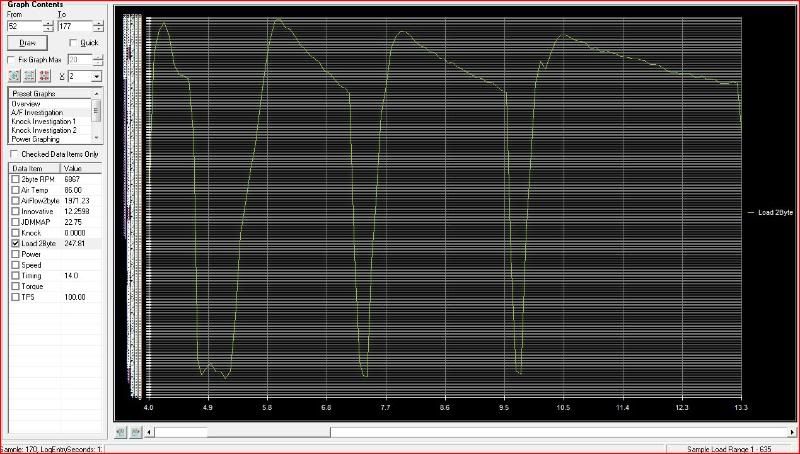
Its not the scaling of the numbers on the side, when I select 2 byteload, there are like 5 sets of overlapped numbers over there and they look like they go up into the thousands..
This only happens when I select 2 byte load.
Could it be because I am running evoscan 2.1 and mabye you are using an earlier version?? Wasn't the formula different in 2.1??
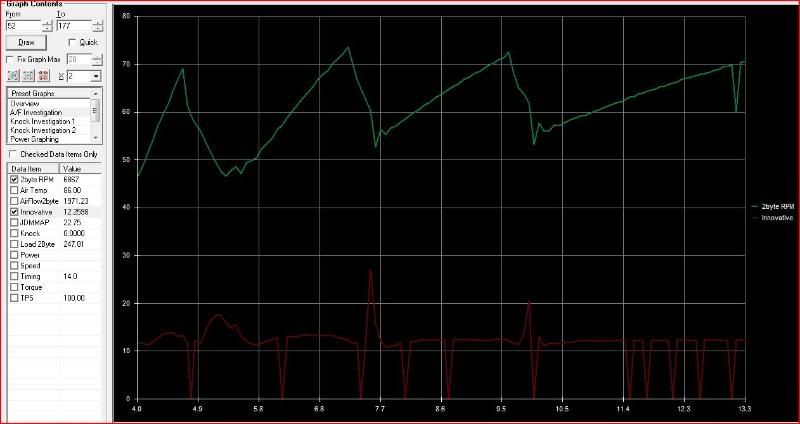
Looks like I got everything else to work from changing up the column headers except the WB02 is ULTRA jumpy, it spikes to zero at least once a second


This only happens when I select 2 byte load.
Could it be because I am running evoscan 2.1 and mabye you are using an earlier version?? Wasn't the formula different in 2.1??
Looks like I got everything else to work from changing up the column headers except the WB02 is ULTRA jumpy, it spikes to zero at least once a second
You probably have to tweak the def a little to match whatever column headers your Evoscan is spitting out.
Example:
[Column]
Name=AirFlow2byte
Description=Air Flow
ColumnTitle=AirFlow2Byte
DataItemID=52
Type=1
ColumnDecimalPlaces=4
DisplayDecimalPlaces=2
That "ColumnTitle=" needs to be whatever your 2byte airflow column title is in the log file.
For the big # log items like 2byte airflow that is 19XX or whatever, if you want it down where timing and such is in the graph then you need to change the scale from 10 to .5 or whatever works for you.
Example:
[Column]
Name=AirFlow2byte
Description=Air Flow
ColumnTitle=AirFlow2Byte
DataItemID=52
Type=1
ColumnDecimalPlaces=4
DisplayDecimalPlaces=2
That "ColumnTitle=" needs to be whatever your 2byte airflow column title is in the log file.
For the big # log items like 2byte airflow that is 19XX or whatever, if you want it down where timing and such is in the graph then you need to change the scale from 10 to .5 or whatever works for you.
Last edited by PeteyTurbo; Jun 25, 2008 at 10:40 PM.
Its not the scaling of the numbers on the side, when I select 2 byteload, there are like 5 sets of overlapped numbers over there and they look like they go up into the thousands..
This only happens when I select 2 byte load.
Could it be because I am running evoscan 2.1 and mabye you are using an earlier version?? Wasn't the formula different in 2.1??
Looks like I got everything else to work from changing up the column headers except the WB02 is ULTRA jumpy, it spikes to zero at least once a second
I will post pictures as soon as photobucket lets me back in..
This only happens when I select 2 byte load.
Could it be because I am running evoscan 2.1 and mabye you are using an earlier version?? Wasn't the formula different in 2.1??
Looks like I got everything else to work from changing up the column headers except the WB02 is ULTRA jumpy, it spikes to zero at least once a second
I will post pictures as soon as photobucket lets me back in..
Thread Starter
Joined: May 2004
Posts: 1,581
Likes: 10
From: Philadelphia
Nope never saw this, at least the AFR like that..I don't know what to think of the 2byte load?!
Last edited by PeteyTurbo; Jun 25, 2008 at 10:51 PM.

Thread
Thread Starter
Forum
Replies
Last Post
RA09
09+ Ralliart Engine/Turbo/Drivetrain
10
Feb 4, 2013 09:19 AM
