


Help please with adjustment boost


Thread Starter
Evolving Member
Joined: Feb 2005
Posts: 123
Likes: 0
From: Moscow, Russia
Help please with adjustment boost
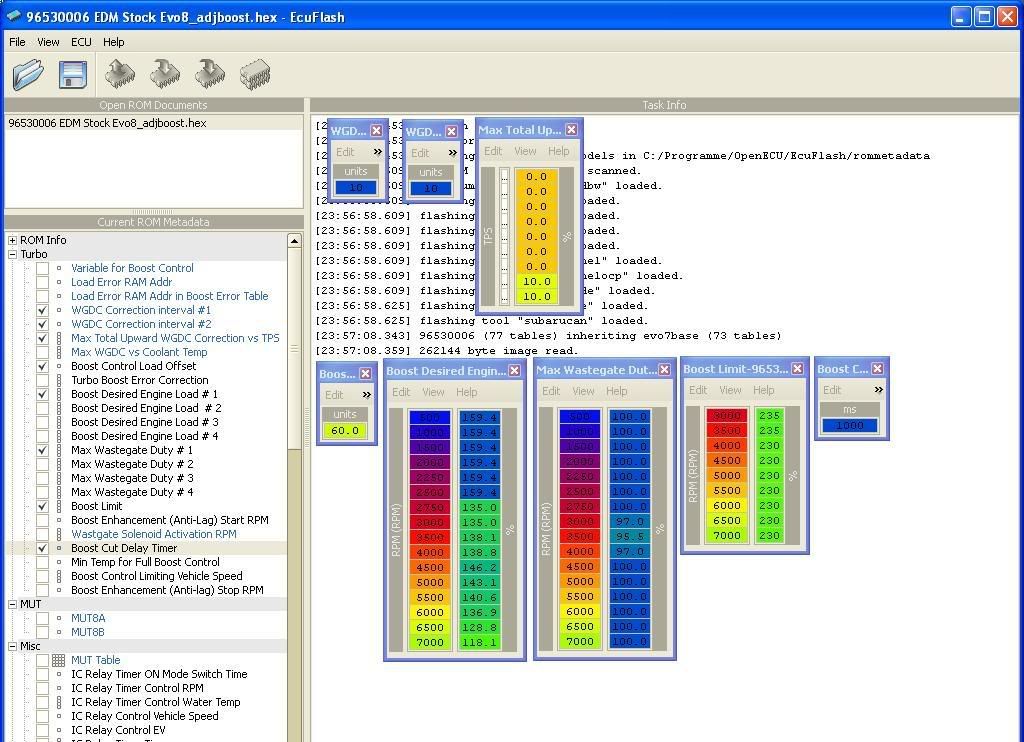
Hi friends, my ROMs and 4-gear loggs are on photo.
I want to liquidate a failure of Engine Load(Calc) between 3000 and 4500 rpm, but I don't want to increase maximum number of EL(C). How it to make?
http://photofile.ru/users/aik_evo/135158378/
Excuse for my way to place a photo...
Thanks for the help.
I want to liquidate a failure of Engine Load(Calc) between 3000 and 4500 rpm, but I don't want to increase maximum number of EL(C). How it to make?
http://photofile.ru/users/aik_evo/135158378/
Excuse for my way to place a photo...
Thanks for the help.


Start by increasing the boost limit table by 10 all the way down. So, the current value of "235" at 3000 RPM would be increased to "245." Also, slightly increase the Boost Cut Delay Timer value. "1500" should be a good setting. This will keep the boost cut from activating.
Next, create a smooth curve in the Boost Desired Engine Load table. You're asking for 195% load @ 3000 RPM (BDEL + Boost Control Load Offset) and that's what you are receiving. This is my suggested change ...
Boost Control Load Offset = 70
Boost Desired Engine Load
500 - 2500 = 150
3000 = 145
3500 = 145
4000 = 145
4500 = 145
5000 = 143
5500 = 140
6000 = 135
6500 = 128
7000 = 120
These settings will stabilize your boost curve. you can fine tune from this point. If you need help, e-mail me @ matt@projecttuning.com.
Next, create a smooth curve in the Boost Desired Engine Load table. You're asking for 195% load @ 3000 RPM (BDEL + Boost Control Load Offset) and that's what you are receiving. This is my suggested change ...
Boost Control Load Offset = 70
Boost Desired Engine Load
500 - 2500 = 150
3000 = 145
3500 = 145
4000 = 145
4500 = 145
5000 = 143
5500 = 140
6000 = 135
6500 = 128
7000 = 120
These settings will stabilize your boost curve. you can fine tune from this point. If you need help, e-mail me @ matt@projecttuning.com.
Thread Starter
Evolving Member
Joined: Feb 2005
Posts: 123
Likes: 0
From: Moscow, Russia
I use EcuFlash for flash too, and use EcuEdit for log. I has compared logdefs files in Evoscan and EcuEdit and seen that the description of many parametres are completely equivalent in these programs, some only have different names (for example "knock summ" in Evoscan = "knock retard" in EcuEdit).
Thread Starter
Evolving Member
Joined: Feb 2005
Posts: 123
Likes: 0
From: Moscow, Russia
TouringBubble
I will tell in more details
1. My first step was To liquidate knocks by means of a card "high octane ignition map" (has reduced corners in some points).
2. I reflash "high octane fuel map" - replaced my stock Evo8 EDM card to Evo8 Rallyart EDM card (which approximately equal with the stock Evo8 JDM card), and I don't see new knocks.
3. I want only to stabilize my boost curve, but don't increaze the boost.
I am afraid because i have no walbro (255 l\h) fuel pump and have no posibility to log real AFR (have no LC-1 or something similar), now i see only knock.
Whether I will be right if I'll change only BDEL now as you write?
And I'll change BL, BCDT and BCLO as you write after walbro and LC-1 installation?
Many thanks for the help. I'll e-mail you if if there will be new questions.
I will tell in more details
1. My first step was To liquidate knocks by means of a card "high octane ignition map" (has reduced corners in some points).
2. I reflash "high octane fuel map" - replaced my stock Evo8 EDM card to Evo8 Rallyart EDM card (which approximately equal with the stock Evo8 JDM card), and I don't see new knocks.
3. I want only to stabilize my boost curve, but don't increaze the boost.
I am afraid because i have no walbro (255 l\h) fuel pump and have no posibility to log real AFR (have no LC-1 or something similar), now i see only knock.
Whether I will be right if I'll change only BDEL now as you write?
And I'll change BL, BCDT and BCLO as you write after walbro and LC-1 installation?
Many thanks for the help. I'll e-mail you if if there will be new questions.

Newbie
Joined: Jan 2008
Posts: 25
Likes: 0
From: Switzerland
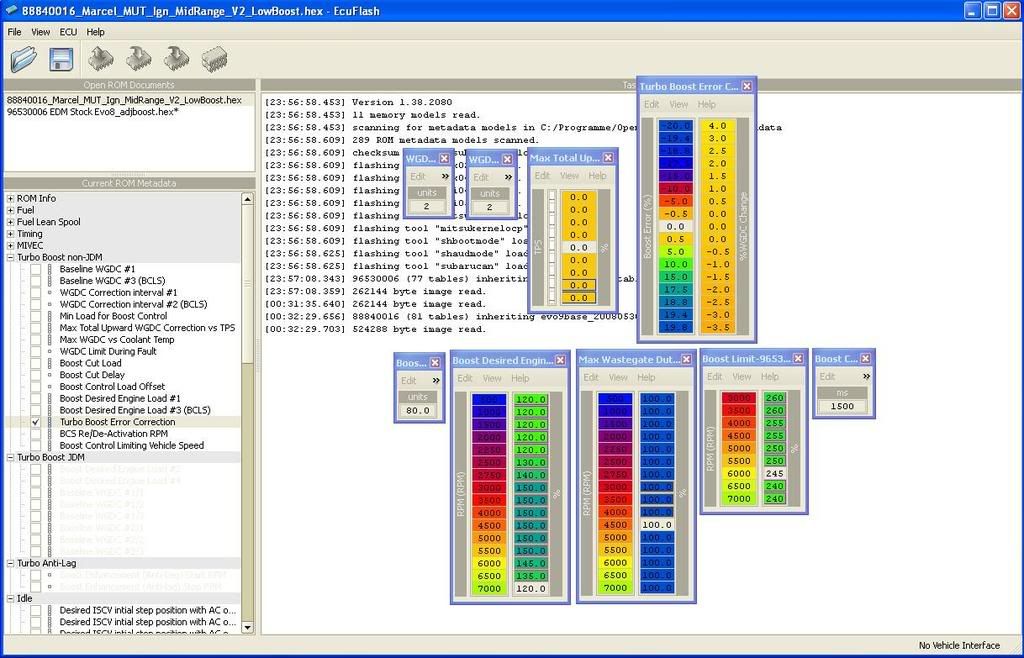
What about the value in your WGDC Correction Interval #1 + #2?
1) Go for a value of 2 or 3
2) Decrease the values in your TBEC table: the max. upward correctio +4 ; downward to -3
3) BDEL as follow :
500 - 2500 = 140
3000 = 145
3500 = 150
4000 = 150
4500 = 150
5000 = 150
5500 = 150
6000 = 150
6500 = 140
7000 = 125
Boost Control Load Offset=80
-->The more linear the curve is the less Load Errors you will have
4) Max.WasteGateDutyCycle:
set all values to 100
-->The more linear the curve is the less Load Errors you will have
Marcel
1) Go for a value of 2 or 3
2) Decrease the values in your TBEC table: the max. upward correctio +4 ; downward to -3
3) BDEL as follow :
500 - 2500 = 140
3000 = 145
3500 = 150
4000 = 150
4500 = 150
5000 = 150
5500 = 150
6000 = 150
6500 = 140
7000 = 125
Boost Control Load Offset=80
-->The more linear the curve is the less Load Errors you will have
4) Max.WasteGateDutyCycle:
set all values to 100
-->The more linear the curve is the less Load Errors you will have
Marcel
Last edited by h101171; Oct 4, 2008 at 09:50 AM.
Thread Starter
Evolving Member
Joined: Feb 2005
Posts: 123
Likes: 0
From: Moscow, Russia
h101171
What about the value in your WGDC Correction Interval #1 + #2?
*****#1 - 3000 - 97
3500 - 95.5
4000 - 97, all the others - 100
#2 - all - 100
Or you ask about log of WGDC Correction ? I don't log it.
1) Go for a value of 2 or 3
******How it to make, and what for?
2) Decrease the values in your TBEC table: the max. upward correctio +4 ;
downward to -3
*******I decrease from +27/-10 in stock to +8/-11. You suggest to reduce still?
3) BDEL as follow :
500 - 2500 = 140
3000 = 145 *** Why you reduce BDEL when the turbine does not blow?
3500 = 150
4000 = 150
4500 = 150
5000 = 150
5500 = 150
6000 = 150
6500 = 140
7000 = 125
Boost Control Load Offset=80
-->The more linear the curve is the less Load Errors you will have
4) Max.WasteGateDutyCycle:
set all values to 100
-->The more linear the curve is the less Load Errors you will have
****************Thanks for the help and new opinion.
What about the value in your WGDC Correction Interval #1 + #2?
*****#1 - 3000 - 97
3500 - 95.5
4000 - 97, all the others - 100
#2 - all - 100
Or you ask about log of WGDC Correction ? I don't log it.
1) Go for a value of 2 or 3
******How it to make, and what for?
2) Decrease the values in your TBEC table: the max. upward correctio +4 ;
downward to -3
*******I decrease from +27/-10 in stock to +8/-11. You suggest to reduce still?
3) BDEL as follow :
500 - 2500 = 140
3000 = 145 *** Why you reduce BDEL when the turbine does not blow?
3500 = 150
4000 = 150
4500 = 150
5000 = 150
5500 = 150
6000 = 150
6500 = 140
7000 = 125
Boost Control Load Offset=80
-->The more linear the curve is the less Load Errors you will have
4) Max.WasteGateDutyCycle:
set all values to 100
-->The more linear the curve is the less Load Errors you will have
****************Thanks for the help and new opinion.
Trending Topics
Newbie
Joined: Jan 2008
Posts: 25
Likes: 0
From: Switzerland
h101171
What about the value in your WGDC Correction Interval #1 + #2?
*****#1 - 3000 - 97
3500 - 95.5
4000 - 97, all the others - 100
#2 - all - 100
Or you ask about log of WGDC Correction ? I don't log it.
This means, how many times per second the ECU checks the LoadError and how many times the ECU corrects this Error. Means, the table TBEC must have smaller values the faster the ECU corrects the LoadError.
1) Go for a value of 2 or 3
******How it to make, and what for?
2) Decrease the values in your TBEC table: the max. upward correctio +4 ;
downward to -3
*******I decrease from +27/-10 in stock to +8/-11. You suggest to reduce still?
3) BDEL as follow :
500 - 2500 = 140
3000 = 145 *** Why you reduce BDEL when the turbine does not blow?
Because it prevents the turbo from overshooting and the turbo blows anyway
3500 = 150
4000 = 150
4500 = 150
5000 = 150
5500 = 150
6000 = 150
6500 = 140
7000 = 125
Boost Control Load Offset=80
-->The more linear the curve is the less Load Errors you will have
4) Max.WasteGateDutyCycle:
set all values to 100
-->The more linear the curve is the less Load Errors you will have
****************Thanks for the help and new opinion.
What about the value in your WGDC Correction Interval #1 + #2?
*****#1 - 3000 - 97
3500 - 95.5
4000 - 97, all the others - 100
#2 - all - 100
Or you ask about log of WGDC Correction ? I don't log it.
This means, how many times per second the ECU checks the LoadError and how many times the ECU corrects this Error. Means, the table TBEC must have smaller values the faster the ECU corrects the LoadError.
1) Go for a value of 2 or 3
******How it to make, and what for?
2) Decrease the values in your TBEC table: the max. upward correctio +4 ;
downward to -3
*******I decrease from +27/-10 in stock to +8/-11. You suggest to reduce still?
3) BDEL as follow :
500 - 2500 = 140
3000 = 145 *** Why you reduce BDEL when the turbine does not blow?
Because it prevents the turbo from overshooting and the turbo blows anyway
3500 = 150
4000 = 150
4500 = 150
5000 = 150
5500 = 150
6000 = 150
6500 = 140
7000 = 125
Boost Control Load Offset=80
-->The more linear the curve is the less Load Errors you will have
4) Max.WasteGateDutyCycle:
set all values to 100
-->The more linear the curve is the less Load Errors you will have
****************Thanks for the help and new opinion.
After:
Marcel
Last edited by h101171; Oct 4, 2008 at 03:41 PM.
Thread Starter
Evolving Member
Joined: Feb 2005
Posts: 123
Likes: 0
From: Moscow, Russia
Marcel
There is such questions:
"WGDC correction interval #1, #2" and "Max total Upward..." - these are standard parametres for EcuFlash 1.38... or its Your completion?
I am using EcuFlash 1.28... and I don't see them.
Whether I can do the changes specified in your first post without the pump Walbro (255 l/h)? Now my fuel pump stock yet...
Thanks you again
There is such questions:
"WGDC correction interval #1, #2" and "Max total Upward..." - these are standard parametres for EcuFlash 1.38... or its Your completion?
I am using EcuFlash 1.28... and I don't see them.
Whether I can do the changes specified in your first post without the pump Walbro (255 l/h)? Now my fuel pump stock yet...
Thanks you again
Last edited by AIK; Oct 5, 2008 at 03:54 PM.
Newbie
Joined: Jan 2008
Posts: 25
Likes: 0
From: Switzerland
You really have to download Ecuflash 1.38 and you will see all the new tables and parameters. This Version is a lot better than the one you are using now.
There is no reason why your OEM fuel pump should not work properly for this soft tuning.
Marcel
There is no reason why your OEM fuel pump should not work properly for this soft tuning.
Marcel

AIK. Simply examine the curve you have set in the Boost Desired Engine Load table. That is why you have the dip. Remove the dip from that table and you'll remove the dip from the log. It's not a difficult fix. I think you are thinking too deeply in to it.
Thread Starter
Evolving Member
Joined: Feb 2005
Posts: 123
Likes: 0
From: Moscow, Russia
http://photofile.ru/users/aik_evo/135159784/
The next step I want change
- BDEL 2250 from 150 to 145
- MWGDC all to 100
- BCDT, Boost Limit and BCLO - as you write in your 1st post.

Evolved Member
Joined: Jan 2006
Posts: 953
Likes: 2
From: Oxfordshire
I think you are seeing the boost system overshooting, correcting and then under shooting. The reason is that the system is trying to compensate for the lack of boost during spool. Try getting your curve to look like mine. It won't make the spool bad either
MB
MB
Thread Starter
Evolving Member
Joined: Feb 2005
Posts: 123
Likes: 0
From: Moscow, Russia
What value BCLO you use at your table BDEL - 160-170 ???