


Advanced fuel control options


We also had no idea it affected WOT fueling...
Or that it was fixed at 128.
The fact that it's fixed at 128 and used at WOT kind of ruins my intial plan to make low = idle, mid = light throttle, high = cruise.
It seems like my car usually cruises around 250-300 Hz, but I'd have to grab some more logs. I don't recall seeing over 500 in closed loop though. Could probably back calculate it though from the highest load and RPM that will stay in closed loop.

Or that it was fixed at 128.
The fact that it's fixed at 128 and used at WOT kind of ruins my intial plan to make low = idle, mid = light throttle, high = cruise.
It seems like my car usually cruises around 250-300 Hz, but I'd have to grab some more logs. I don't recall seeing over 500 in closed loop though. Could probably back calculate it though from the highest load and RPM that will stay in closed loop.
Last edited by 03whitegsr; Dec 10, 2009 at 08:45 AM.

Dumb question for clarity: the 3 Decel IPW tables are the equivelent of the decel fuel cut tables (4 the 88580015 rom) , correct? Looking to cure a lil throttle hang...

Hey just a quick note on the table posted for 96530006 for the Async accel multiplier vs TPS Delta...if you end up adding the percent sign in with the numbers between the <data> bulletins, it will end up displaying all your values in a straight line vertically. Also, the Mult128 scaling does not work for me at all, it changes the values of the tables as it should, but when I go to make changes (any change, plus or minus) to the values, they automatically drop to 0.
I've been playing with it for the last 3 hours getting pretty pissed off too, figured I had something major screwed up in my xml for a while lol.
I've been playing with it for the last 3 hours getting pretty pissed off too, figured I had something major screwed up in my xml for a while lol.

Also, the Mult128 scaling does not work for me at all, it changes the values of the tables as it should, but when I go to make changes (any change, plus or minus) to the values, they automatically drop to 0.
I've been playing with it for the last 3 hours getting pretty pissed off too, figured I had something major screwed up in my xml for a while lol.
I've been playing with it for the last 3 hours getting pretty pissed off too, figured I had something major screwed up in my xml for a while lol.
With regards to scaling equations, people need to realize the increment value matters.
You need to have the increment value set to something that will induce a correct response. If you have a table that varies from 0-1 in 0.01 increments and then set the increment setting to 1, you can only set the table to 1 or 0, nothing inbetween unless you type it in.
Any time I add a new scaling, I check the resolution and set the increment size to an appropriate value. Typically just to what one raw bit count would change the output by. Unless it's a 16 bit scaling, then doing that is usually way too fine and makes the +/- key worthless.
You need to have the increment value set to something that will induce a correct response. If you have a table that varies from 0-1 in 0.01 increments and then set the increment setting to 1, you can only set the table to 1 or 0, nothing inbetween unless you type it in.
Any time I add a new scaling, I check the resolution and set the increment size to an appropriate value. Typically just to what one raw bit count would change the output by. Unless it's a 16 bit scaling, then doing that is usually way too fine and makes the +/- key worthless.
Last edited by 03whitegsr; Dec 14, 2009 at 02:35 PM.

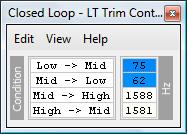
Is this the correct table for 9653XXX6
Code:
    <table name="Closed Loop - LT Trim Control" address="35e5" category="Closed Loop Control" type="2D" level="2" scaling="AirFlow Hz">
        <table name="Condition" type="Static Y Axis" elements="4">
            <data>Low -> Mid</data>
            <data>Mid -> Low</data>
            <data>Mid -> High</data>
            <data>High -> Mid</data>
        </table>
    </table>

Sure seems right to me.
If it doesn't display right, check the scaling. My "Airflow Hz" may not match what you have for scaling. Here is what I have.
<scaling name="AirFlow Hz" units="Hz" toexpr="x*6.25" frexpr="x/6.25" format="%.0f" min="0" max="1593.75" inc="6.25" storagetype="uint8" endian="big"/>
These are not the stock values for the low end.
If it doesn't display right, check the scaling. My "Airflow Hz" may not match what you have for scaling. Here is what I have.
<scaling name="AirFlow Hz" units="Hz" toexpr="x*6.25" frexpr="x/6.25" format="%.0f" min="0" max="1593.75" inc="6.25" storagetype="uint8" endian="big"/>
These are not the stock values for the low end.
Last edited by 03whitegsr; Dec 15, 2009 at 06:59 AM.

Evolving Member
Joined: May 2008
Posts: 346
Likes: 0
From: Dallas, TX
With regards to scaling equations, people need to realize the increment value matters.
You need to have the increment value set to something that will induce a correct response. If you have a table that varies from 0-1 in 0.01 increments and then set the increment setting to 1, you can only set the table to 1 or 0, nothing inbetween unless you type it in.
Any time I add a new scaling, I check the resolution and set the increment size to an appropriate value. Typically just to what one raw bit count would change the output by. Unless it's a 16 bit scaling, then doing that is usually way too fine and makes the +/- key worthless.
You need to have the increment value set to something that will induce a correct response. If you have a table that varies from 0-1 in 0.01 increments and then set the increment setting to 1, you can only set the table to 1 or 0, nothing inbetween unless you type it in.
Any time I add a new scaling, I check the resolution and set the increment size to an appropriate value. Typically just to what one raw bit count would change the output by. Unless it's a 16 bit scaling, then doing that is usually way too fine and makes the +/- key worthless.
edit - nevermind - there was a typo in the formula. It works now. Thanks guys.
Last edited by shadow1; Dec 15, 2009 at 10:16 AM.

I am trying to edit the Async Accel Multiplier vs TPS Delta on my 96530006 ROM, here is what I have:

When I try and change any of the values it just goes to 0, what am I doing wrong, I know it's something stupid....
When I try and change any of the values it just goes to 0, what am I doing wrong, I know it's something stupid....

Noticed there were TWO of these scalings now both are included
Change this scaling
<scaling name="Mult128-16" units="Multiplication Factor" toexpr="x/128" frexpr="x/128" format="%.2f" min="0" max="5" inc="0.02" storagetype="uint16" endian="big"/>
<scaling name="Mult128" units="Factor" toexpr="x/128" frexpr="x/128" format="%.2f" min="0" max="5" inc="0.02" storagetype="uint8" endian="big"/>
To this Scaling (just of memory i may have reversed the two
 )
)<scaling name="Mult128-16" units="Multiplication Factor" toexpr="x/128" frexpr="x*128" format="%.2f" min="0" max="5" inc="0.02" storagetype="uint16" endian="big"/>
<scaling name="Mult128" units="Factor" toexpr="x/128" frexpr="x*128" format="%.2f" min="0" max="5" inc="0.02" storagetype="uint8" endian="big"/>
Last edited by RoadSpike; Dec 16, 2009 at 04:37 PM.