


Big Maps are too small...(smoothing your maps)


Big Maps are too small...(smoothing your maps)
Ok, so this is partially a jab at the guy who claimed that the big maps were too big, and partially a thank you to Tephra for incorporating big maps into his ROM's. I have included screenshots to help illustrate my point, any anyone who isn't retarded, blind, or jaded will be able to see my point just by looking at the maps below without explination.
My original timing map (tuned) looked like this:
This was after tuning; looks bad huh? Like a Lego rendition of the Mona Lisa using 200 Lego’s; you sort of recognize it as a piece of art but really don't know what it's supposed to be.
When I decided to go to Tephra v7 I used the big map translator and got this map:

Notice how it already looks smoother? This smoothing was just from the increased level of resolution the more data points gave me. Already my Mona Lisa looks better, I used 400 Lego’s to make her so I can start to figure out that it's a person.
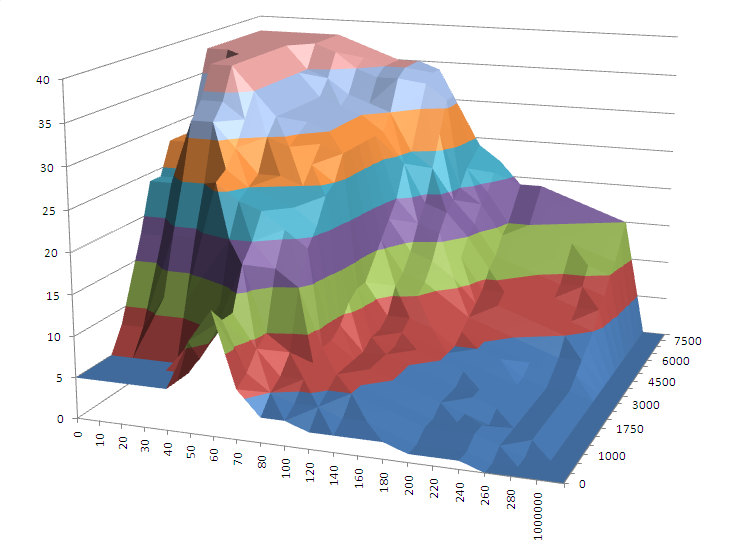
I then decided to add in a weighted average smoothing algorithm to the big map translator:

Well hey there beautiful! I can see what the Lego sculpture is supposed to be now!! As you can imagine this could never be done with the stock map. Smoothing to this level (a very light smooth) would have yielded far too much lost resolution in some key areas. Actually if the maps could be even bigger I would move further with the smoothing, but as it is, I think I'm happy with the map like it looks now.
As we know, there has been a lot of talk on the boards about smooth maps and how they help drivability. I can certainly say that the smooth map above is 10x better in terms of daily around town drivability than my standard map I started with. Off boost the car actually feels peppy. It transitions to boost smoother, at about 1-200rpm sooner and hits harder too. Full boost at WOT there isn't any more power but I don't drive around everywhere all the time at WOT.
This map (and the corresponding Tephra v7 Big Maps that allowed it to happen) are a godsend.
My original timing map (tuned) looked like this:
This was after tuning; looks bad huh? Like a Lego rendition of the Mona Lisa using 200 Lego’s; you sort of recognize it as a piece of art but really don't know what it's supposed to be.
When I decided to go to Tephra v7 I used the big map translator and got this map:
Notice how it already looks smoother? This smoothing was just from the increased level of resolution the more data points gave me. Already my Mona Lisa looks better, I used 400 Lego’s to make her so I can start to figure out that it's a person.
I then decided to add in a weighted average smoothing algorithm to the big map translator:
Well hey there beautiful! I can see what the Lego sculpture is supposed to be now!! As you can imagine this could never be done with the stock map. Smoothing to this level (a very light smooth) would have yielded far too much lost resolution in some key areas. Actually if the maps could be even bigger I would move further with the smoothing, but as it is, I think I'm happy with the map like it looks now.
As we know, there has been a lot of talk on the boards about smooth maps and how they help drivability. I can certainly say that the smooth map above is 10x better in terms of daily around town drivability than my standard map I started with. Off boost the car actually feels peppy. It transitions to boost smoother, at about 1-200rpm sooner and hits harder too. Full boost at WOT there isn't any more power but I don't drive around everywhere all the time at WOT.
This map (and the corresponding Tephra v7 Big Maps that allowed it to happen) are a godsend.


I'll load it up...it has a small issue I'm trying to work out. Switching between fuel and timing maps give it a hickup as the conditional formatting for decimal places has issues when going between different workbooks.


Trending Topics

Drives the argument home with relative ease. The higher the resolution, the more control we have over what the ECU is doing throughout the maps.
What did you use to make the 3d tables? They look much different than ECUFlash's 3d tables(obviously). lol.
I'm always trying to smooth my tables even more and could really use the big maps translator smoothing tool. That would be ****!
What did you use to make the 3d tables? They look much different than ECUFlash's 3d tables(obviously). lol.
I'm always trying to smooth my tables even more and could really use the big maps translator smoothing tool. That would be ****!

Drives the argument home with relative ease. The higher the resolution, the more control we have over what the ECU is doing throughout the maps.
What did you use to make the 3d tables? They look much different than ECUFlash's 3d tables(obviously). lol.
I'm always trying to smooth my tables even more and could really use the big maps translator smoothing tool. That would be ****!
What did you use to make the 3d tables? They look much different than ECUFlash's 3d tables(obviously). lol.
I'm always trying to smooth my tables even more and could really use the big maps translator smoothing tool. That would be ****!

There will be "tuners" out there that will make the claim that you don't need "smooth" tables. We will see if any of them chime in.
I've found on several cars that the smoother the tables, the smoother the car will drive in all conditions. If smoother is faster, I really can't answer. But to sacrifice a few hp for a car that drives better than stock, I am all for it.
The timing table is difficult to get as smooth as the fuel table especially when you are in the transition going to peak load and winding out to peak rpm. The 1 and 2 degree jumps makes for a rough looking graph, but a smooth running car.
Oh and +1 for the smoothing calculator. That sure would save a ton of time.
Paul
I've found on several cars that the smoother the tables, the smoother the car will drive in all conditions. If smoother is faster, I really can't answer. But to sacrifice a few hp for a car that drives better than stock, I am all for it.
The timing table is difficult to get as smooth as the fuel table especially when you are in the transition going to peak load and winding out to peak rpm. The 1 and 2 degree jumps makes for a rough looking graph, but a smooth running car.
Oh and +1 for the smoothing calculator. That sure would save a ton of time.
Paul

appauld,
there is no way I could smooth my fuel map. on the other hand, the hand that counts, my afr is where it should be. I don't see ANY advantage of a smooth map over a correct fuel ratio.
as to the importance of the timing map I think you have a point.
there is no way I could smooth my fuel map. on the other hand, the hand that counts, my afr is where it should be. I don't see ANY advantage of a smooth map over a correct fuel ratio.
as to the importance of the timing map I think you have a point.
nothere, I agree on the fuel map, I tried smoothing it and it didn't make a big difference like the timing map did. I believe that the increased resolution you achieve with the ability to tune to the hundereth (XX.xx) opposed to tuning with full numbers (XX) in the timing table means that the fuel table is already going to be fairly smooth. I did note one spot where fuel smoothing is beneficial, that's on the transition area from open to close loop. Other than that I found no benefit to smoothing the fuel map. But I'll try it out and see what I get once I get happy with my timing map.
I am sure it is smoothed to a point. i.e. not a ton of peaks and valleys like a stock tune. What I was getting at is that the transitions will be smoother, but you will always have areas that will be what they are based on the AFR needed for that specific region.
I fully agree that you can do your best to try and make is "smooth" but some times it just isn't possible.
I found that scaling to your peak load and not much more will allow you less room between cells and therefore allow for a little more "smoothness". Also, scaling the rpm will have a similar result. It also helps to have even variance from cell to cell, i.e. 10 load between each cell or 20 load between each cell and so forth. Sometimes, in order to get the necessary load, some odd interval between cells is necessary. I've see 13 load between cells. Whatever the case I try to keep the transitions from cell to cell in equal values.
I fully agree that you can do your best to try and make is "smooth" but some times it just isn't possible.
I found that scaling to your peak load and not much more will allow you less room between cells and therefore allow for a little more "smoothness". Also, scaling the rpm will have a similar result. It also helps to have even variance from cell to cell, i.e. 10 load between each cell or 20 load between each cell and so forth. Sometimes, in order to get the necessary load, some odd interval between cells is necessary. I've see 13 load between cells. Whatever the case I try to keep the transitions from cell to cell in equal values.


