


not sure i believe my boost error...


Thread Starter
Evolved Member
iTrader: (20)
Joined: Mar 2009
Posts: 2,389
Likes: 11
From: Big city, Bright lights
not sure i believe my boost error...
or i'm misunderstanding something else...
from 1000 to 6000rpm my boost table is set to 14.5 + boost adder of 10 =24.5psi request, and then tapers to 22psi from 6000 to redline.
i have gotten to the point where im happy with the curve and would like to try turning error correction on...but my logged boost error seems odd to me.
error is logged in psi correct?
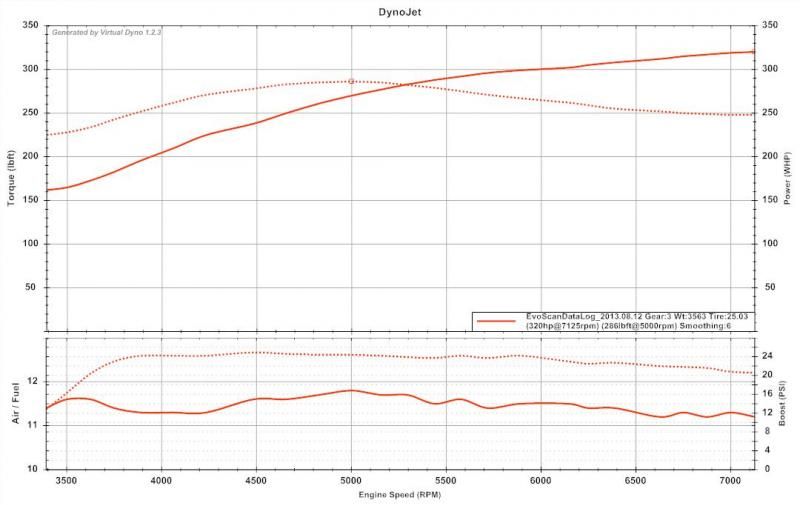
heres a graph from today:
heres the excel log:
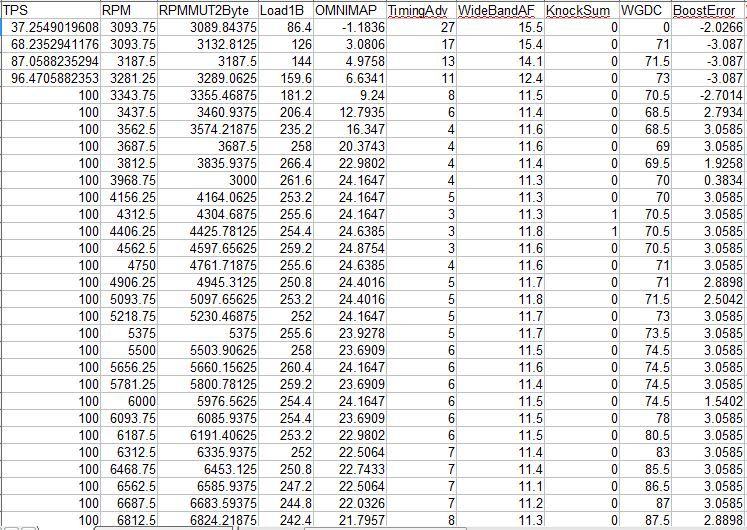
on this pull from 3000-5000rpm my logged boost is within 0.5psi of my target request or even closer, yet im showing an error of 2-3 which is the same as when my logged boost is off by 1+ psi from target from 6000 and up.
does this seem right? or am i doing something wrong here?
from 1000 to 6000rpm my boost table is set to 14.5 + boost adder of 10 =24.5psi request, and then tapers to 22psi from 6000 to redline.
i have gotten to the point where im happy with the curve and would like to try turning error correction on...but my logged boost error seems odd to me.
error is logged in psi correct?
heres a graph from today:

heres the excel log:

on this pull from 3000-5000rpm my logged boost is within 0.5psi of my target request or even closer, yet im showing an error of 2-3 which is the same as when my logged boost is off by 1+ psi from target from 6000 and up.
does this seem right? or am i doing something wrong here?

In you cal file, right click on the boost error correct, and edit. Be sure the correct map sensor is selected there. Do the same for your boost target table and the boost adder.
You will find one or all have the incorrect map sensor selected. Change them and exit back, reopen and ensure that they are still set right. Mine I had to edit the XML to make it stay, another guy on here, his worked properly and retained the change.
You will find one or all have the incorrect map sensor selected. Change them and exit back, reopen and ensure that they are still set right. Mine I had to edit the XML to make it stay, another guy on here, his worked properly and retained the change.

Thread Starter
Evolved Member
iTrader: (20)
Joined: Mar 2009
Posts: 2,389
Likes: 11
From: Big city, Bright lights
i have the correction table fully zero'd so its possible that i forgot to zero the max correction table. i have wgdc correction on that log (its zero since my table is zero'd) i just cut it out.
but how would the max correction table cause the error to be wacky?
but how would the max correction table cause the error to be wacky?
Trending Topics


Thread Starter
Evolved Member
iTrader: (20)
Joined: Mar 2009
Posts: 2,389
Likes: 11
From: Big city, Bright lights
like this?
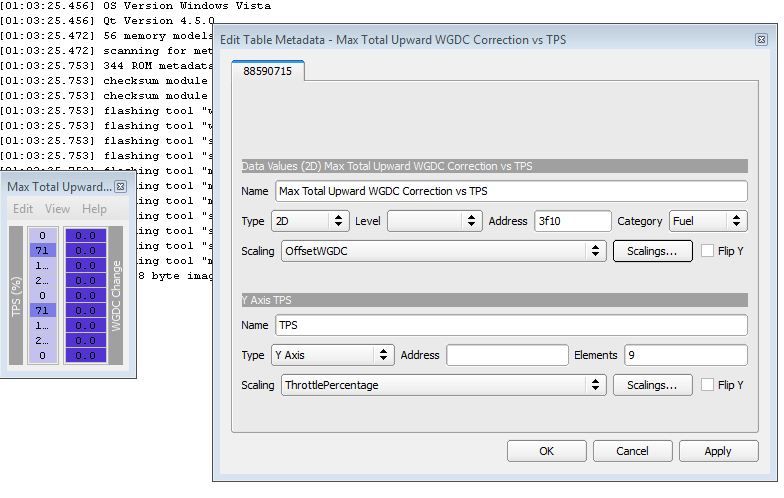
if i change it to "throttlepercentage8" i get a somewhat coherent table, but im not knowledgeable enough to know what the difference is between the two.
could this be something wrong in evoscan?

if i change it to "throttlepercentage8" i get a somewhat coherent table, but im not knowledgeable enough to know what the difference is between the two.
could this be something wrong in evoscan?
Thread Starter
Evolved Member
iTrader: (20)
Joined: Mar 2009
Posts: 2,389
Likes: 11
From: Big city, Bright lights
discovered a slight mismatch between the pressures im using in my evoscan map sensor formula and boost adder (14.45 in evoscan vs 14.2 boost adder), but i dont think thats enough to be a big issue.
Thread Starter
Evolved Member
iTrader: (20)
Joined: Mar 2009
Posts: 2,389
Likes: 11
From: Big city, Bright lights
welp...double and triple checked some stuff and still gotten nowhere with this...
whats the difference between psi8a and psi16a?
whats the difference between psi8a and psi16a?
Last edited by killerpenguin21; Aug 20, 2013 at 09:56 AM.

I'm also confused on the TPS max Upward correction table. If I change the values in the table to make sense and flash the rom, the car won't even start. If I set it back to the crazy values all is normal. I haven't tried setting it to "throttlepercentage8" maybe that will work.
I'm guessing your on 88590715 as well?
I'm guessing your on 88590715 as well?
Well I found this thread by MRFRED, https://www.evolutionm.net/forums/ec...ard-wgdcc.html, about changing the OffsetWGDC scaling to different scalings, Not sure if we are still supposed to do that or not, I will try it out tonight.
I also found why the Upward WGDC table looks weird, there it is not pointing to an address, if you click on edit and under TPS address put in 7284 it should make the tps table look normal.
Not sure if this will help you but just sharing.
I also found why the Upward WGDC table looks weird, there it is not pointing to an address, if you click on edit and under TPS address put in 7284 it should make the tps table look normal.
Not sure if this will help you but just sharing.