


Pioneer DEH-P6900UB and USB Port


I was looking on some computer sites for these ports and could only find cards and so forth with minimum of 2 ports. They were all attached to a circuit board type thing also, so I wouldn't know how to wire that back up to the USB port on the back of the head unit.
If you know where to find something that will help please let me know. I spent like 2 hours searching yesterday!
[edit... I found something that looks like it might work. Just have to clean up the slot I make for the USB input somehow]
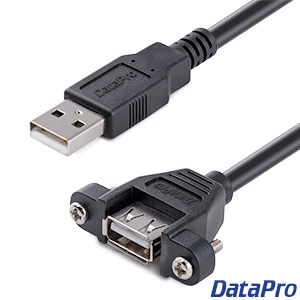
[edit again.. here's another one that might look cleaner]

Does anyone know of any stores that would sell these types of items so I don't have to order them?
If you know where to find something that will help please let me know. I spent like 2 hours searching yesterday!
[edit... I found something that looks like it might work. Just have to clean up the slot I make for the USB input somehow]
[edit again.. here's another one that might look cleaner]
Does anyone know of any stores that would sell these types of items so I don't have to order them?
Last edited by mrich82; Jul 7, 2007 at 03:09 PM.

I was looking on some computer sites for these ports and could only find cards and so forth with minimum of 2 ports. They were all attached to a circuit board type thing also, so I wouldn't know how to wire that back up to the USB port on the back of the head unit.
If you know where to find something that will help please let me know. I spent like 2 hours searching yesterday!
[edit... I found something that looks like it might work. Just have to clean up the slot I make for the USB input somehow]
[edit again.. here's another one that might look cleaner]
Does anyone know of any stores that would sell these types of items so I don't have to order them?
If you know where to find something that will help please let me know. I spent like 2 hours searching yesterday!
[edit... I found something that looks like it might work. Just have to clean up the slot I make for the USB input somehow]
[edit again.. here's another one that might look cleaner]
Does anyone know of any stores that would sell these types of items so I don't have to order them?
radioshack probably has something like this... maybe best buy/circuit city too...
I installed my Premier 690 and my Apline Type-s speakers this weekend... still thinking about how I'm going to mount the usb port... I'm leaning toward doing something on the dash/console.
Have you figured out how you're mounting yours yet?
Have you figured out how you're mounting yours yet?
I ordered this adapter thing from L-com - http://www.l-com.com/item.aspx?id=4753. I also ordered a USB cable that is type A male on one end and type b male on the other to work with the other side of the adapter.
I got my head unit in this weekend also! I like it a lot too. Right now I just have a thumb drive hanging from the USB cable behind my dash, lol. I should get this USB adapter tomorrow. I'll be installing it under the armrest so I can leave a hard drive in the console. As soon as I get it all in I'll post some pics.
I got my head unit in this weekend also! I like it a lot too. Right now I just have a thumb drive hanging from the USB cable behind my dash, lol. I should get this USB adapter tomorrow. I'll be installing it under the armrest so I can leave a hard drive in the console. As soon as I get it all in I'll post some pics.
Last edited by mrich82; Jul 15, 2007 at 03:55 PM.
Ok, I finally got everything installed. I have the SSL package and this head unit really woke everything up. I think it sounds great. I used a USB coupler to extend the port to my center console under the armrest and velcro'd my Western Digital 60 GB hard drive in there. It was an easy install and now I have my whole music collection in my car all the time... and I can easily take out the hard drive and update whenever I want. Here are some pics...


clean install! i like it a lot man! i still haven't mounted mine yet... i have a 80 GB western digital hdd and 2.5" enclosure on order... should have it weds i think. i'll take pics of what i finally do and post them. i'm still back and forth between the armrest and the glove compartment. i think im leaning towards something similar to what you did though.
don't you LOVE how the trim for the pioneer deck matches our trim so perfectly?
don't you LOVE how the trim for the pioneer deck matches our trim so perfectly?

Nice work! Very clean install  Does it display the music on the screen for you to select or does it just play it randomly??
I got this to go with my pioneer headunit. It works good for the ipod, a little slow on the response, but not too bad

Does it display the music on the screen for you to select or does it just play it randomly??I got this to go with my pioneer headunit. It works good for the ipod, a little slow on the response, but not too bad
Last edited by wickdaddy; Jul 23, 2007 at 11:08 AM.

 . This will pull up all the folders you have on the hard drive and you can scroll through them. Or you can just start playing or playing at random. It plays playlists also, so thats what I've been using more than anything. You can also set the display so it scrolls information across the screen.. artist, song, folder, album... in many combinations.
I couldn't be happier to have all my music whenever I want it. And you can easily load your new music and play away. It does take about 5 seconds or so to read the hard drive before it plays right when you turn it on, but after that its quick to go from song to song.
It has a list button to the left of the big all-in-one do everything button . This will pull up all the folders you have on the hard drive and you can scroll through them. Or you can just start playing or playing at random. It plays playlists also, so thats what I've been using more than anything. You can also set the display so it scrolls information across the screen.. artist, song, folder, album... in many combinations.
I couldn't be happier to have all my music whenever I want it. And you can easily load your new music and play away. It does take about 5 seconds or so to read the hard drive before it plays right when you turn it on, but after that its quick to go from song to song.
. This will pull up all the folders you have on the hard drive and you can scroll through them. Or you can just start playing or playing at random. It plays playlists also, so thats what I've been using more than anything. You can also set the display so it scrolls information across the screen.. artist, song, folder, album... in many combinations.I couldn't be happier to have all my music whenever I want it. And you can easily load your new music and play away. It does take about 5 seconds or so to read the hard drive before it plays right when you turn it on, but after that its quick to go from song to song.
 it sounds like your's is pretty much scroll and it's there...
The folders pop up right away and there is no delay in switching from folder to folder or scrolling through songs. The screen shows 3 folders or songs at a time... it can be a pain if you have a lot of songs or folders. I have all my folders by artist, so normally I'll just select an artist by playing the whole folder and skip through the songs while driving. Driving and scrolling through 50 folders could be dangerous
