


Tactrix OpenPort 2.0 Connection Instructions


Thread Starter
Evolved Member
Joined: May 2008
Posts: 900
Likes: 1
From: Ashburn, VA
Tactrix OpenPort 2.0 Connection Instructions
I am just trying to get someone who knows their way around the X to post detailed instructions using Pictures to show how the Tactrix cable needs to be connected to the ECU on the X. Of-Course, we'd also like to know the pre-requisite(disconnect fan, turn off power-save on laptop etc) and post-install steps to ensure a safe and proper flash. Thanks in advance! happy posting....
--EDIT--12/08/08-12:29AM
Well, So i decided to take the plunge and do this. some of this might be different for a JDM/right hand side steering model. Here are the Steps
1) Make sure the Engine is turned off. Turn off all accessories including A/C, lights, wipers etc. (Just a precaution)
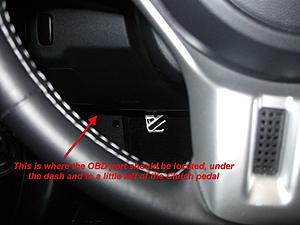
2) The OBD Port is located as shown in the Picture below. It is a little bit to the left of the clutch pedal on left hand drive EVO.
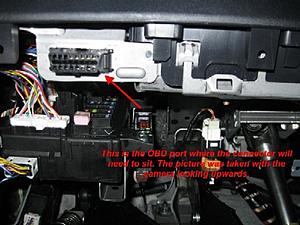
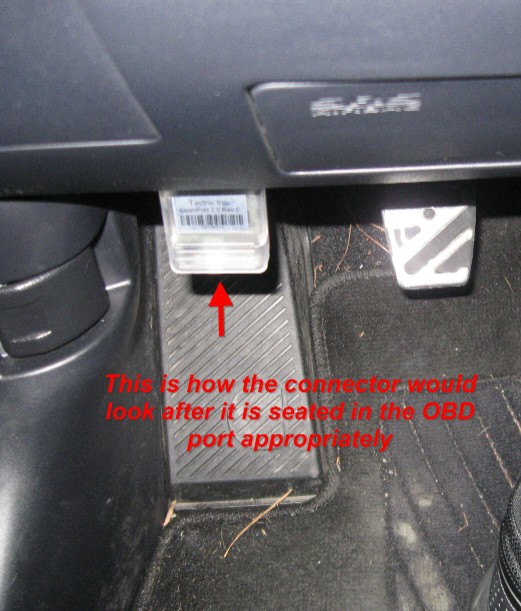
3) here's a bottom view picture of the port.
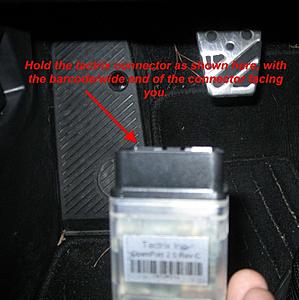
4) Handle the tactrix connector as shown in the picture below, so that the wide side of the connector is towards you (you can also think of it as the bar code facing you)
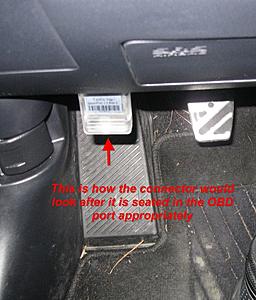
5) You do not need to be looking at the OBD port to get the connector in. With a little searching, the connector should snap right into place. Remember, if you are forcing the connector fit, you are doing something wrong.
6) Once the Tactrix adapter is connected, you will need to turn the Key to the "ON" Position. Do not turn on the Engine. At this point, you should see the connector glowing in multiple shades of red, yellow and blue.
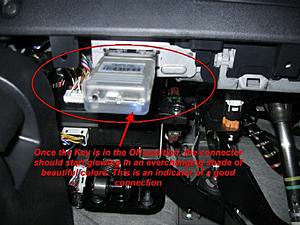
7) You can now connect the mini-usb cable to the adapter, and the other end to the PC/Laptop. Software instructions will be made available once the release is made public. I will edit this post to put the addendum.
--EDIT--12/08/08-12:29AM
Well, So i decided to take the plunge and do this. some of this might be different for a JDM/right hand side steering model. Here are the Steps
1) Make sure the Engine is turned off. Turn off all accessories including A/C, lights, wipers etc. (Just a precaution)
2) The OBD Port is located as shown in the Picture below. It is a little bit to the left of the clutch pedal on left hand drive EVO.

3) here's a bottom view picture of the port.

4) Handle the tactrix connector as shown in the picture below, so that the wide side of the connector is towards you (you can also think of it as the bar code facing you)

5) You do not need to be looking at the OBD port to get the connector in. With a little searching, the connector should snap right into place. Remember, if you are forcing the connector fit, you are doing something wrong.
6) Once the Tactrix adapter is connected, you will need to turn the Key to the "ON" Position. Do not turn on the Engine. At this point, you should see the connector glowing in multiple shades of red, yellow and blue.

7) You can now connect the mini-usb cable to the adapter, and the other end to the PC/Laptop. Software instructions will be made available once the release is made public. I will edit this post to put the addendum.
Last edited by CatalystGod; Dec 7, 2008 at 10:23 PM.


Thread Starter
Evolved Member
Joined: May 2008
Posts: 900
Likes: 1
From: Ashburn, VA
What position is the key supposed to be in etc. We can go back and forth all day with my silly questions, that's the reason I am looking for someone to post up detailed Instructions with appropriate illustrations. If I do figure it out, I'd be more than happy to do it myself.

Yup, its that easy.
under the left side of the dash below everything is an OBD port. Simply plug in the cable here *carefully but assuredly* and then hookup to your laptop USB port.
Turn the key to the ON position, but do not start the car.
ALWAYS DO A TEST WRITE before flashing.
There is no need to disconnect any fans as the flashing process only takes about 30 seconds.
Sorry i dont have any illustrations. And i hate to say it, but if this is at all confusing you might want to ask someone who has already flashed their car to show you in person or, just have them do it.
under the left side of the dash below everything is an OBD port. Simply plug in the cable here *carefully but assuredly* and then hookup to your laptop USB port.
Turn the key to the ON position, but do not start the car.
ALWAYS DO A TEST WRITE before flashing.
There is no need to disconnect any fans as the flashing process only takes about 30 seconds.
Sorry i dont have any illustrations. And i hate to say it, but if this is at all confusing you might want to ask someone who has already flashed their car to show you in person or, just have them do it.
Last edited by Rguy; Dec 4, 2008 at 08:58 AM.
Thread Starter
Evolved Member
Joined: May 2008
Posts: 900
Likes: 1
From: Ashburn, VA
Yup, its that easy.
under the left side of the dash below everything is an OBD port. Simply plug in the cable here *carefully but assuredly* and then hookup to your laptop USB port.
Turn the key to the ON position, but do not start the car.
ALWAYS DO A TEST WRITE before flashing.
There is no need to disconnect any fans as the flashing process only takes about 30 seconds.
Sorry i dont have any illustrations. And i hate to say it, but if this is at all confusing you might want to ask someone who has already flashed their car to show you in person or, just have them do it.
under the left side of the dash below everything is an OBD port. Simply plug in the cable here *carefully but assuredly* and then hookup to your laptop USB port.
Turn the key to the ON position, but do not start the car.
ALWAYS DO A TEST WRITE before flashing.
There is no need to disconnect any fans as the flashing process only takes about 30 seconds.
Sorry i dont have any illustrations. And i hate to say it, but if this is at all confusing you might want to ask someone who has already flashed their car to show you in person or, just have them do it.
No that was great man, I will give it a shot tonight when I get home. All I wanna do is a READ. I am not to the point of writing/flashing yet.
If I am able to do it right, I WILL post up all the steps with illustrations.
Thanks a bunch to everyone.
Thread Starter
Evolved Member
Joined: May 2008
Posts: 900
Likes: 1
From: Ashburn, VA
partially successful
OK, so I found the port and connected the tactrix connector and it started changing colors as an indicator that i put it on right. I then proceeded to open ECUFlash 1.40 and I get the error "cannot detect mitsucan" or something to that effect. So, I downloaded the latest XML using the link
https://www.evolutionm.net/forums/at...6&d=1224007632 at
https://www.evolutionm.net/forums/sh...=374898&page=3.
I then replaced the one that originally came with 1.40 and tried to Read the ROM. I did restart the software to make sure that the new XML was being used for startup load of definitions.
WHAT AM I MISSING !!!
BTW, I will definitely post up everything including illustrations on how to connect and read as soon as I am succesful at reading the ROM.
https://www.evolutionm.net/forums/at...6&d=1224007632 at
https://www.evolutionm.net/forums/sh...=374898&page=3.
I then replaced the one that originally came with 1.40 and tried to Read the ROM. I did restart the software to make sure that the new XML was being used for startup load of definitions.
WHAT AM I MISSING !!!
BTW, I will definitely post up everything including illustrations on how to connect and read as soon as I am succesful at reading the ROM.
Last edited by CatalystGod; Dec 4, 2008 at 10:42 AM.
You dont have a version of ecuflash that will read the evo x yet. It hasnt been released from beta testing yet. All reports from the beta testers say that it should be fairly soon. In the meantime you can do logging with PCMSCAN with the openport cable.
Trending Topics
Thread Starter
Evolved Member
Joined: May 2008
Posts: 900
Likes: 1
From: Ashburn, VA
so, not only do I need the XML I used, I will also need an updated version of the program itself that can sufficiently use this XML. In other words, there is no practical way for me to read my ECU right now. Is this right?
I just looked up PCMScan, and it seems its a software I'll need to purchase, so I'll have to think about that later. Will the free version be of any credible use?
I just looked up PCMScan, and it seems its a software I'll need to purchase, so I'll have to think about that later. Will the free version be of any credible use?
Free version allows very limited use. You will have to "purchase" it to get full functionality.
Thread Starter
Evolved Member
Joined: May 2008
Posts: 900
Likes: 1
From: Ashburn, VA
so i got a working copy of 1.41 ecuflash and was able to successfully read my ECU Tonight. Expect to see a full illustration based tutorial on using ECUFlash with the OpenPort 2.0 on a EVO X by Sunday.


How to hook up a cable and basics of ECUFlash: https://www.evolutionm.net/forums/sh...d.php?t=201146
And more detail on how to tune: https://www.evolutionm.net/forums/sh...d.php?t=303230
And how the hell do you go getting a non-public beta release and post about it?


Newbie
Joined: Jul 2008
Posts: 70
Likes: 0
From: So Cal
Make sure to show us the right end of the screw driver to hold and which gear puller you used when taking your steering wheel off.
LOL, please make sure you show us how to turn on the laptop and plug the cable-thingy into the hole....I'm so lost. Haha. Sorry dude. I just had to. It's way too easy to plug in a cable and read a ROM. I hardly doubt that if you asked for a how-to you can make a tutorial on how to tune, which is what everyone wants...