


Evo Car Computer Completed


I have updated my website with Current Uses, Future Uses, and an FAQ section. If you have any more questions, feel free to ask.
www.smanders.com
www.smanders.com

aight, I've started on a desktopX shell for this car pc 
i'll post up a download for both the program desktopX and the shell itself for all of you who may want to see it....
i'll just put up a zip file including:
- DesktopX
- The DesktopX shell I'm working on
- Winamp5 (yeah... it's hot)
- A few wallpapers
- and maybe a few other goodies
i'll post up a download for both the program desktopX and the shell itself for all of you who may want to see it....
i'll just put up a zip file including:
- DesktopX
- The DesktopX shell I'm working on
- Winamp5 (yeah... it's hot
)- A few wallpapers
- and maybe a few other goodies

I'm planning on doing this later, but using a docking station under the seat for my laptop. That way I can take it wheverever I go. Also, laptops have nice shock protection for the drives. No need building a new computer from scratch. I just did that last night for my desktop. OCed Athlon 3200+, 1GB of 400Mhz DDR RAM, Radeon 9800 Pro 128....life is good



Originally posted by Coolguy949
I'm planning on doing this later, but using a docking station under the seat for my laptop. That way I can take it wheverever I go. Also, laptops have nice shock protection for the drives. No need building a new computer from scratch. I just did that last night for my desktop. OCed Athlon 3200+, 1GB of 400Mhz DDR RAM, Radeon 9800 Pro 128....life is good
I'm planning on doing this later, but using a docking station under the seat for my laptop. That way I can take it wheverever I go. Also, laptops have nice shock protection for the drives. No need building a new computer from scratch. I just did that last night for my desktop. OCed Athlon 3200+, 1GB of 400Mhz DDR RAM, Radeon 9800 Pro 128....life is good
For those of you considering this: If you're looking for a system, and don't mind using an inverter, then this is a hell of a deal: http://www.newegg.com/app/viewproduc...&refer=B1zrat3
Bear in mind though that it's a barebones system with no CPU, RAM, graphic card, etc. Plus it only has one PCI slot and one AGP slot. But, it should work great for an in-car system.
[edit] I lied: It has built in VGA.
Last edited by UFO; Oct 27, 2003 at 11:05 AM.
I have a Dell Inspiron 8200 it has a really good stock cooling system in it (dual fans that go up to 11,000 RPM) I can control with a program called i8KFanGui. I can set the fans to run constant or to turn on at certain temps. You can monitor all your temps from the screen too...
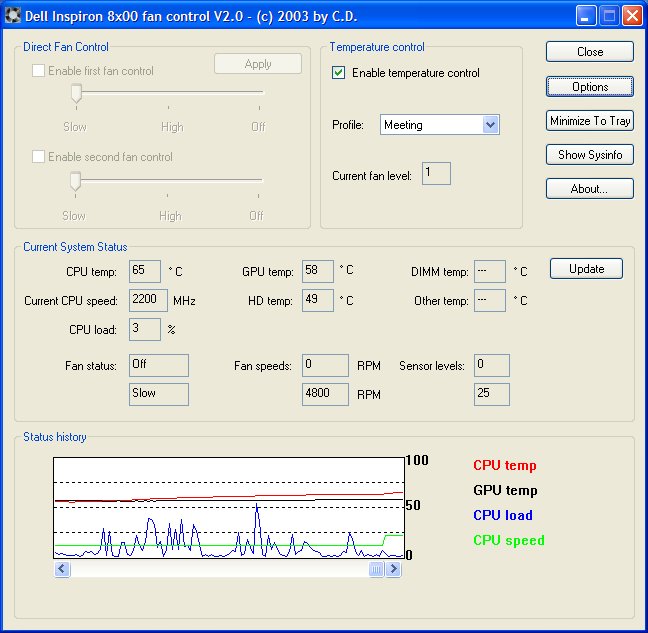
man i just got my stuff in for this and boy am i excited. heheh only thing left to get is the all important screen.
Oh well maybe next month hahah
Rob you are an uber nerd, very nice!
Oh well maybe next month hahah
Rob you are an uber nerd, very nice!

I think that depends on the specific CPU you are running.
A Crusoe based laptop is going to be much cooler and I believe the Banias based laptops run much cooler compared to p4/athlon based laptops and have decent 802.11b built into them.
A Crusoe based laptop is going to be much cooler and I believe the Banias based laptops run much cooler compared to p4/athlon based laptops and have decent 802.11b built into them.
Originally posted by UFO
The only thing to be weary of is that laptops get incredibly hot, especially on the bottom of the case. If you are going to put it under the seat then that will probably complicate matters. However, they do sell coolers for laptops, but they might or might not work depending on your docking station.
For those of you considering this: If you're looking for a system, and don't mind using an inverter, then this is a hell of a deal: http://www.newegg.com/app/viewproduc...&refer=B1zrat3
Bear in mind though that it's a barebones system with no CPU, RAM, graphic card, etc. Plus it only has one PCI slot and one AGP slot. But, it should work great for an in-car system.
[edit] I lied: It has built in VGA.
The only thing to be weary of is that laptops get incredibly hot, especially on the bottom of the case. If you are going to put it under the seat then that will probably complicate matters. However, they do sell coolers for laptops, but they might or might not work depending on your docking station.
For those of you considering this: If you're looking for a system, and don't mind using an inverter, then this is a hell of a deal: http://www.newegg.com/app/viewproduc...&refer=B1zrat3
Bear in mind though that it's a barebones system with no CPU, RAM, graphic card, etc. Plus it only has one PCI slot and one AGP slot. But, it should work great for an in-car system.
[edit] I lied: It has built in VGA.
If you have a p4 mobile (northwood .13 micron based - including centrino) processor the threshhold is 100 degrees celcius and the desktop p4 northwood is usually 75 degrees. The mobile processor idles around 48 - 55 and goes up to 65 on a full load. Dell states that with both fans on high at 100% load, their cooling systems wont let the chip reach past 72 - 75 degrees.
Crusoe and the new centrino's generate less heat than the others FWIW.
Crusoe and the new centrino's generate less heat than the others FWIW.
Originally posted by jansolo
I think that depends on the specific CPU you are running.
A Crusoe based laptop is going to be much cooler and I believe the Banias based laptops run much cooler compared to p4/athlon based laptops and have decent 802.11b built into them.
I think that depends on the specific CPU you are running.
A Crusoe based laptop is going to be much cooler and I believe the Banias based laptops run much cooler compared to p4/athlon based laptops and have decent 802.11b built into them.
UFO,
I think i8KFanGui may work for your laptop...
http://drs.yahoo.com/S=2766679/K=i8k...fer.de/i8kfan/
I think i8KFanGui may work for your laptop...
http://drs.yahoo.com/S=2766679/K=i8k...fer.de/i8kfan/

Thread
Thread Starter
Forum
Replies
Last Post
FS[SouthEast]: ExoX Stock Engine Parts
smanders
For Sale/WTB - Engine / Drivetrain / Power
0
Dec 11, 2016 06:51 PM
smanders
Evo X Electrical / Audio / Security
5
Apr 13, 2009 08:42 PM
