


Traqmate hawtness - why it rules

Thread Starter
Evolved Member
iTrader: (62)
Joined: Feb 2004
Posts: 3,336
Likes: 6
From: Redmond - Lake Tapps ,WA
Traqmate hawtness - why it rules
So after doing a ton of research into track data loggers I had myself a short list of candidates: Traqmate, G2X, IQ3, and DL1. This has been covered in other threads but I found very few that gave feedback after they bought the units. So here it is.
Traqmate Complete $999.
Dash is small but functions as a full controller for the unit as a standalone so you don't need your laptop to program things in the car. Big enough to read well if mounted on the steering column. The software is awesome, very user friendly, and more powerful then it appears.


Racepak G2X $945.
Dash is kinda ghetto with the red block numbers, but it's really easy to see at a quick glance. Data is stored on compact flash which is easy to transport. The software is very 1980's. At first glance I thought this software was the most comprehensive, mostly due to it's somewhat trying user interface. There's lots to it. But once I really got into it I realized much of it was useless, things like number of satellites used, choosing between GPS or accelerometers for G's. And most of the button icons along the side are useless or poorly implemented. I wanted to compare data and look at colored track maps. This is where the G2X was only OK. I'll go into it further below.


Racepak IQ3 $1395.
Super Cool looking and awesome dash. It doesn't have a logger module, it's built into the dash. What sucks about that is that you can't swap from car-to-car quickly because the dash mounting is critical. But it's less junk for a dedicated setup. The software is the same as the G2X. I would have ponied up for this had the software been better.

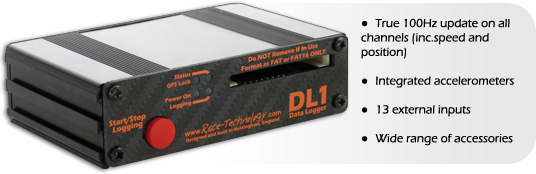
Race Technologies DL1 $965+ Dash.
Expensive - dash display costs $600 extra. Software was OK. User interface is nice looking, but the data isn't as easy to get at. I stopped using it when I took it off the list due to price.
To help me make the decision I downloaded each companies data analysis program with track logs and got familiar with the abilities of each. At first it seemed like they all were similar having just poked around on the surface of them. Then I started to use them as I would trying to make myself faster around the track. Looking at lines, breaking out info from segments, comparing braking points, speed through turns etc. This is where things got interesting. As I got better with each program I would switch from one to another looking to make the same comparisons.
So for me it came down to a showdown between the Racepak IQ3 and the Traqmate. I considered the hardware equal so this was the software making the decision for me.
Traqmate creates a color track map that exists in a pop-up window, visible at all times it can be scaled to any size on the screen. Racepak only allows you to view the map in a specific review mode, and it's simply a white line- and the size is fixed, a small fixed size. Traqmate color codes based on acceleration, so you can see braking zones and corning G's visually on the map. And you can see the map during any review mode.
Traqmates comparison module and segment review also has better features. Racepak will only compare two laps at a time. You set a reference lap and then toggle to another lap to compare against. Traqmate lets you compare as many as you want. Traqmate also has a really nice feature in the segment review that tabulates braking time and braking force. This gives you a quick snap shot of how long, and how hard you were on the brakes in a certain segment. Racepak has the data, but you have to go figure it out yourself and crunch the numbers. And there's no graphic correlation like the color map used with Traqmate.
Anyway, there's tons more to it but I'm out of breath. I went for a quick test run in the SUV and everything worked great. Can't wait to get my car back together and hit the track.
I was surprised how small the logger box was, it's not much bigger than the display unit.

Traqmate Complete $999.
Dash is small but functions as a full controller for the unit as a standalone so you don't need your laptop to program things in the car. Big enough to read well if mounted on the steering column. The software is awesome, very user friendly, and more powerful then it appears.
Racepak G2X $945.
Dash is kinda ghetto with the red block numbers, but it's really easy to see at a quick glance. Data is stored on compact flash which is easy to transport. The software is very 1980's. At first glance I thought this software was the most comprehensive, mostly due to it's somewhat trying user interface. There's lots to it. But once I really got into it I realized much of it was useless, things like number of satellites used, choosing between GPS or accelerometers for G's. And most of the button icons along the side are useless or poorly implemented. I wanted to compare data and look at colored track maps. This is where the G2X was only OK. I'll go into it further below.
Racepak IQ3 $1395.
Super Cool looking and awesome dash. It doesn't have a logger module, it's built into the dash. What sucks about that is that you can't swap from car-to-car quickly because the dash mounting is critical. But it's less junk for a dedicated setup. The software is the same as the G2X. I would have ponied up for this had the software been better.
Race Technologies DL1 $965+ Dash.
Expensive - dash display costs $600 extra. Software was OK. User interface is nice looking, but the data isn't as easy to get at. I stopped using it when I took it off the list due to price.
To help me make the decision I downloaded each companies data analysis program with track logs and got familiar with the abilities of each. At first it seemed like they all were similar having just poked around on the surface of them. Then I started to use them as I would trying to make myself faster around the track. Looking at lines, breaking out info from segments, comparing braking points, speed through turns etc. This is where things got interesting. As I got better with each program I would switch from one to another looking to make the same comparisons.
So for me it came down to a showdown between the Racepak IQ3 and the Traqmate. I considered the hardware equal so this was the software making the decision for me.
Traqmate creates a color track map that exists in a pop-up window, visible at all times it can be scaled to any size on the screen. Racepak only allows you to view the map in a specific review mode, and it's simply a white line- and the size is fixed, a small fixed size. Traqmate color codes based on acceleration, so you can see braking zones and corning G's visually on the map. And you can see the map during any review mode.
Traqmates comparison module and segment review also has better features. Racepak will only compare two laps at a time. You set a reference lap and then toggle to another lap to compare against. Traqmate lets you compare as many as you want. Traqmate also has a really nice feature in the segment review that tabulates braking time and braking force. This gives you a quick snap shot of how long, and how hard you were on the brakes in a certain segment. Racepak has the data, but you have to go figure it out yourself and crunch the numbers. And there's no graphic correlation like the color map used with Traqmate.
Anyway, there's tons more to it but I'm out of breath. I went for a quick test run in the SUV and everything worked great. Can't wait to get my car back together and hit the track.
I was surprised how small the logger box was, it's not much bigger than the display unit.
Last edited by jid2; Aug 19, 2008 at 09:07 AM.


I bought a traqmate this year and it's a lot of fun to work with. For example, 4 of us went to a new track this year and all had Traqmate's. After each session, we'd get together and download all the info onto the 2 laptops we had. Not only to compare laptimes and look at basic entry/exit speeds, but sooo much more. The quickest thing is the 'dot race'. Just line them all up at the same time (remember what color you are!) and watch how each made it around the track. You can move the start/finish to sync everyone up as well. Tons of options.
I was able to get a slight discount as a friend of mine became a vendor. If anyone is interested, PM me and I'll pass along his contact info.
I was able to get a slight discount as a friend of mine became a vendor. If anyone is interested, PM me and I'll pass along his contact info.
Thread Starter
Evolved Member
iTrader: (62)
Joined: Feb 2004
Posts: 3,336
Likes: 6
From: Redmond - Lake Tapps ,WA
I bought a traqmate this year and it's a lot of fun to work with. For example, 4 of us went to a new track this year and all had Traqmate's. After each session, we'd get together and download all the info onto the 2 laptops we had. Not only to compare laptimes and look at basic entry/exit speeds, but sooo much more. The quickest thing is the 'dot race'. Just line them all up at the same time (remember what color you are!) and watch how each made it around the track. You can move the start/finish to sync everyone up as well. Tons of options.
I was able to get a slight discount as a friend of mine became a vendor. If anyone is interested, PM me and I'll pass along his contact info.
I was able to get a slight discount as a friend of mine became a vendor. If anyone is interested, PM me and I'll pass along his contact info.

Yeah, the ease of moving it from car to car is what drawed me into the Traqmate. So fun to get data from others and compare and help each other.
One thing I haven't figured out really is the Time Trial timing function on it. I think it shows a realtime +/- compared to your best lap of that session??
One thing I haven't figured out really is the Time Trial timing function on it. I think it shows a realtime +/- compared to your best lap of that session??
Thread Starter
Evolved Member
iTrader: (62)
Joined: Feb 2004
Posts: 3,336
Likes: 6
From: Redmond - Lake Tapps ,WA
So true, you can go find somebody who is fast at the track and go install the unit in their car in no time. Then you can go and review the data against yours. And it's even better if lots of people have the system already.
I'm going to be looking for the GPS antenna on peoples roofs now so I can see if they are using Traqmate and we can get our share on.
I'm going to be looking for the GPS antenna on peoples roofs now so I can see if they are using Traqmate and we can get our share on.
Trending Topics

Awesome write up Jared. I was just looking into all these for my track car.
I will prob end up with the IQ3 just cause I like the display and can get it for pretty cheap.
If I didn't have this opportunity I would prob get the Traqmate.
When you gonna make it back out to MMP?
I will prob end up with the IQ3 just cause I like the display and can get it for pretty cheap.
If I didn't have this opportunity I would prob get the Traqmate.
When you gonna make it back out to MMP?
Thread Starter
Evolved Member
iTrader: (62)
Joined: Feb 2004
Posts: 3,336
Likes: 6
From: Redmond - Lake Tapps ,WA
Awesome write up Jared. I was just looking into all these for my track car.
I will prob end up with the IQ3 just cause I like the display and can get it for pretty cheap.
If I didn't have this opportunity I would prob get the Traqmate.
When you gonna make it back out to MMP?
I will prob end up with the IQ3 just cause I like the display and can get it for pretty cheap.
If I didn't have this opportunity I would prob get the Traqmate.
When you gonna make it back out to MMP?
What is your track car, the evo? Or did you build something else. I might try and make it down next year once the car is dialed in with the new motor/turbo/aero. I need to lay the smack down you know.

Let me know before you come down and I will make sure I am at that event so we can battle it out.
Even if they are not timing with can datalog lap time fight for who is faster :P

Just curious, I'm using a completely different GPS only based setup for telemetry. From some of the logging you guys have done, have you noticed much difference in choosing between GPS or accelerometers for G's? Are the lat and long Gs readouts between GPS and accelerometers identical/very close? Ofcourse I would assume accelerometer readouts would be slightly more accurate.
Thread Starter
Evolved Member
iTrader: (62)
Joined: Feb 2004
Posts: 3,336
Likes: 6
From: Redmond - Lake Tapps ,WA
I looked into that on the Racepak software, as you can view both. It was actually pretty close. The accelerometers react quicker and produce steeper slopes. The GPS has a little lag and looks smoother.
Typically the default is the accelerometers though. Some of the loggers use an algorithm based on both GPS and accelerometers, but the manuals said to use the accelerometers.
Typically the default is the accelerometers though. Some of the loggers use an algorithm based on both GPS and accelerometers, but the manuals said to use the accelerometers.
So true, you can go find somebody who is fast at the track and go install the unit in their car in no time. Then you can go and review the data against yours. And it's even better if lots of people have the system already.
I'm going to be looking for the GPS antenna on peoples roofs now so I can see if they are using Traqmate and we can get our share on.
I'm going to be looking for the GPS antenna on peoples roofs now so I can see if they are using Traqmate and we can get our share on.
someone brought up the use of accelerometers vs. telemetry data to determine acceleration. i'm curious what the traqmate uses and what it displays. i believe that the software outputs max g. with that, i wonder if there is a way to get an average maximum g, something based on a few consecutive data samples.
