

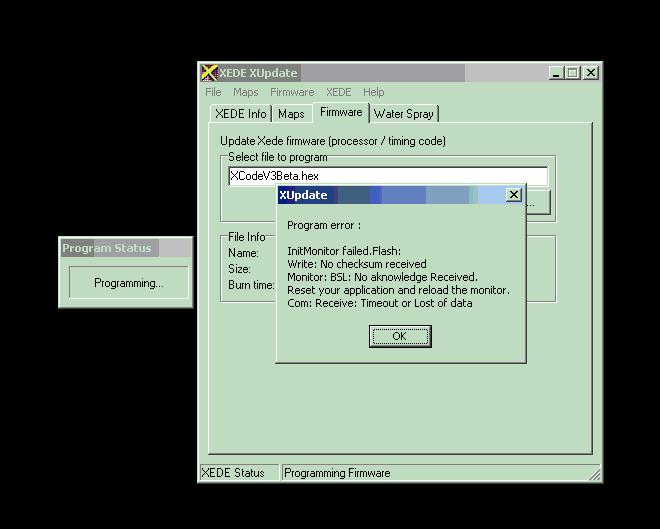
When using XUpdate to upload the new firmware file to my XEDE, the process crashes. It happens after the update process switches from erasing to writing.
Here's what appears on my screen:
Here's what appears on my screen:

Evolved Member
Just a guess do you have a good serial connection? It said it had a Timeout or Lost of data.

Evolved Member
i dont think you need to use XUpdate with v3... 
EDIT: nevermind i was thinking of the upload program from the early v2 software to upload maps
EDIT: nevermind i was thinking of the upload program from the early v2 software to upload maps


Evolved Member
Quote:
Here's what appears on my screen:
If you're not waiting long enough or, on the other hand, go to quickly, between the key off/on process, it can do this. All you really need is a 1 sec worth of key off just to ensure that all the power is killed. If you wait too long, the updating process will fail.Originally Posted by erioshi
When using XUpdate to upload the new firmware file to my XEDE, the process crashes. It happens after the update process switches from erasing to writing.Here's what appears on my screen:
Shiv
Thanks Shiv, I'll experiment with it a bit more.
I have tried several different serial port speeds and some different timings with the key. One thing I thought was odd, though, is that it did go throught the first part of the update. After turning the key to off then back to on, the PC would show the update window with the "erasing" message; shortly after the PC switched to writing the new firmware to the XEDE is when the check sum error appears.
I know the serial port connection hasn't been a problem in the past; I'm using the same laptop I've always used to tune as well as upload and download maps with V2. I even downloaded and backed up my maps immediately before putting the XEDE into boot mode to try the V3 update process.
I have tried several different serial port speeds and some different timings with the key. One thing I thought was odd, though, is that it did go throught the first part of the update. After turning the key to off then back to on, the PC would show the update window with the "erasing" message; shortly after the PC switched to writing the new firmware to the XEDE is when the check sum error appears.
I know the serial port connection hasn't been a problem in the past; I'm using the same laptop I've always used to tune as well as upload and download maps with V2. I even downloaded and backed up my maps immediately before putting the XEDE into boot mode to try the V3 update process.

Evolved Member
Maybe no one knows this but most programs including mine has ini files. Try increasing the time out in sec.
Quote:
That's exactly what worked for me. After messing around with different key timings for a few minutes I just started the car for the reflash and everything worked fine. V3 is installed and running - and I immediately noticed the big change in my idle, nice!Originally Posted by SuPeRNeT
did the same thing for me, i just started my car and it finished.
Now all I need to do is get the car onto the dyno and tune for my new cams and other parts.
Evolved Member
Yes, the engine needs to be started during the key on process. This is the only way the XEDE will get the 14v it needs to do the updating process. Otherwise, it only sees a bit over 12v. Someone just hit me for not mentioning that little bit of info in my tutorial
Revised instructions in sticky thread.
Shiv
Revised instructions in sticky thread.
Shiv

Evolved Member
Quote:
l8r)
Originally Posted by Ludikraut
^^Boot to the head!l8r)
OUCH!!!


Evolved Member
Man I was dying trying to do this without starting the car up until I called Justin.  . Then I didn't setup my maps right and it ran totally like total shi!! but I figured it out. It was a very interesting afternoon to say the least. Reminds me of doing a OS update on my computer sometime it works and othertimes well ....... ! Thanks for the update Shiv and tell Justin he saved my dinner date with my wife.
. Then I didn't setup my maps right and it ran totally like total shi!! but I figured it out. It was a very interesting afternoon to say the least. Reminds me of doing a OS update on my computer sometime it works and othertimes well ....... ! Thanks for the update Shiv and tell Justin he saved my dinner date with my wife. 
Former Sponsor
Hey man,
I just talked to Justin, and he said not a problem, and that he hope you enjoyed your dinner date. tehehehe.
I just talked to Justin, and he said not a problem, and that he hope you enjoyed your dinner date. tehehehe.
