


Found Thermo Fan Switch Conditions


Yeah, unfortunately I don't have time for real world testing. I've taken the car out of street commission so taking it out for a little road tune isn't an option any more. I've got too many other things I'll be testing this week at the track so I just can't log all the MUTs, much less take the time to learn how. (I log with ecu+ so I always have to figure out how you guys do it then translate that over to my software)

Logging custom mut ids isn't possible with ecu+, mybe you ask tom for an update 
When everything works out next weekend, i can do real world testing. And the ac fan stuff is the first thing i do.
When everything works out next weekend, i can do real world testing. And the ac fan stuff is the first thing i do.
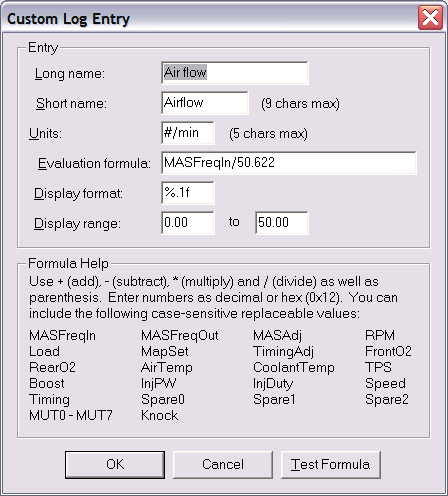
You can do this with MUT inputs too.
However, that doesn't mean I can figure out how to do any of this faster.

I'll wait to see what you come up with. As it stands right now my AC fan comes on every time my puller fan comes on. That will work for now, but I'd like to experiment with having it come on all the time.
I had some time the last days, because i broke some things on my car. Again...
I have found some new stuff for the fan fans.
You have the main fan and the ac fan.
Main fan is controlled with the known duty table. you can set any fan speed you like.
The second fan is the ac fan, is has only two different fan speeds. high and low.
We know the stationary and drive duty map for the main fan.
First map i call "AC Fan low Duty" it has two duty values and it controls the ac fan. Based on the duty values of the main fan.
Then we have "AC Fan" values: Vehicle speed, Engine rpm and Coolant temperatur.
They control when the AC fan comes on (don't know if high or low. Or even olny switch from low to high.).
Then two "Main Fan" values one for throttle position and one for coolant temp.
And there is a "Fan counter" i don't know what it does.
All this i have from the disassembly, i haven't had the chance to test it. Maybe some functions do work different like high and low switching on the ac fan.
Here is it for 90550001:
-------------------------------
<table name="AC Fan Low Duty" category="Fan control" address="2476" type="2D" scaling="Percent (128)">
<table name="Condition" type="Static Y Axis" elements="2">
<data>Off -> Low</data>
<data>Low -> High</data>
</table>
</table>
<table name="AC Fan High Speed" category="Fan control" address="1ad4" type="2D" scaling="VehicleSpeed">
<table name="Condition" type="Static Y Axis" elements="2">
<data>On</data>
<data>Off</data>
</table>
</table>
<table name="AC Fan High rpm" category="Fan control" address="1ad8" type="2D" scaling="RPMStatLimit">
<table name="Condition" type="Static Y Axis" elements="2">
<data>On</data>
<data>Off</data>
</table>
</table>
<table name="AC Fan High coolant" category="Fan control" address="1adc" type="2D" scaling="Temp">
<table name="Condition" type="Static Y Axis" elements="2">
<data>On</data>
<data>Off</data>
</table>
</table>
<table name="AC Main Coolant" category="Fan control" address="1ae6" type="2D" scaling="Temp">
<table name="Condition" type="Static Y Axis" elements="2">
<data>On</data>
<data>Off</data>
</table>
</table>
<table name="AC Main TPS" category="Fan control" address="1ae2" type="2D" scaling="ThrottlePercentage">
<table name="Condition" type="Static Y Axis" elements="2">
<data>On</data>
<data>Off</data>
</table>
</table>
<table name="Fan Counter" address="1afe" category="Fan control" type="1D" level="1" scaling="Hex16"/>
I have found some new stuff for the fan fans.
You have the main fan and the ac fan.
Main fan is controlled with the known duty table. you can set any fan speed you like.
The second fan is the ac fan, is has only two different fan speeds. high and low.
We know the stationary and drive duty map for the main fan.
First map i call "AC Fan low Duty" it has two duty values and it controls the ac fan. Based on the duty values of the main fan.
Then we have "AC Fan" values: Vehicle speed, Engine rpm and Coolant temperatur.
They control when the AC fan comes on (don't know if high or low. Or even olny switch from low to high.).
Then two "Main Fan" values one for throttle position and one for coolant temp.
And there is a "Fan counter" i don't know what it does.
All this i have from the disassembly, i haven't had the chance to test it. Maybe some functions do work different like high and low switching on the ac fan.
Here is it for 90550001:
-------------------------------
<table name="AC Fan Low Duty" category="Fan control" address="2476" type="2D" scaling="Percent (128)">
<table name="Condition" type="Static Y Axis" elements="2">
<data>Off -> Low</data>
<data>Low -> High</data>
</table>
</table>
<table name="AC Fan High Speed" category="Fan control" address="1ad4" type="2D" scaling="VehicleSpeed">
<table name="Condition" type="Static Y Axis" elements="2">
<data>On</data>
<data>Off</data>
</table>
</table>
<table name="AC Fan High rpm" category="Fan control" address="1ad8" type="2D" scaling="RPMStatLimit">
<table name="Condition" type="Static Y Axis" elements="2">
<data>On</data>
<data>Off</data>
</table>
</table>
<table name="AC Fan High coolant" category="Fan control" address="1adc" type="2D" scaling="Temp">
<table name="Condition" type="Static Y Axis" elements="2">
<data>On</data>
<data>Off</data>
</table>
</table>
<table name="AC Main Coolant" category="Fan control" address="1ae6" type="2D" scaling="Temp">
<table name="Condition" type="Static Y Axis" elements="2">
<data>On</data>
<data>Off</data>
</table>
</table>
<table name="AC Main TPS" category="Fan control" address="1ae2" type="2D" scaling="ThrottlePercentage">
<table name="Condition" type="Static Y Axis" elements="2">
<data>On</data>
<data>Off</data>
</table>
</table>
<table name="Fan Counter" address="1afe" category="Fan control" type="1D" level="1" scaling="Hex16"/>

For 94170015:
---------------------
<table name="AC Fan Low Duty" category="Fan control" address="2478" type="2D" scaling="Percent (128)">
<table name="Condition" type="Static Y Axis" elements="2">
<data>Off -> Low</data>
<data>Low -> High</data>
</table>
</table>
<table name="AC Fan High Speed" category="Fan control" address="1ad2" type="2D" scaling="VehicleSpeed">
<table name="Condition" type="Static Y Axis" elements="2">
<data>On</data>
<data>Off</data>
</table>
</table>
<table name="AC Fan High rpm" category="Fan control" address="1ada" type="2D" scaling="RPMStatLimit">
<table name="Condition" type="Static Y Axis" elements="2">
<data>On</data>
<data>Off</data>
</table>
</table>
<table name="AC Fan High coolant" category="Fan control" address="1ade" type="2D" scaling="Temp">
<table name="Condition" type="Static Y Axis" elements="2">
<data>On</data>
<data>Off</data>
</table>
</table>
<table name="AC Main Coolant" category="Fan control" address="1ae8" type="2D" scaling="Temp">
<table name="Condition" type="Static Y Axis" elements="2">
<data>On</data>
<data>Off</data>
</table>
</table>
<table name="AC Main TPS" category="Fan control" address="1ae4" type="2D" scaling="ThrottlePercentage">
<table name="Condition" type="Static Y Axis" elements="2">
<data>On</data>
<data>Off</data>
</table>
</table>
<table name="Fan Counter" address="1b00" category="Fan control" type="1D" level="1" scaling="Hex16"/>
---------------------
<table name="AC Fan Low Duty" category="Fan control" address="2478" type="2D" scaling="Percent (128)">
<table name="Condition" type="Static Y Axis" elements="2">
<data>Off -> Low</data>
<data>Low -> High</data>
</table>
</table>
<table name="AC Fan High Speed" category="Fan control" address="1ad2" type="2D" scaling="VehicleSpeed">
<table name="Condition" type="Static Y Axis" elements="2">
<data>On</data>
<data>Off</data>
</table>
</table>
<table name="AC Fan High rpm" category="Fan control" address="1ada" type="2D" scaling="RPMStatLimit">
<table name="Condition" type="Static Y Axis" elements="2">
<data>On</data>
<data>Off</data>
</table>
</table>
<table name="AC Fan High coolant" category="Fan control" address="1ade" type="2D" scaling="Temp">
<table name="Condition" type="Static Y Axis" elements="2">
<data>On</data>
<data>Off</data>
</table>
</table>
<table name="AC Main Coolant" category="Fan control" address="1ae8" type="2D" scaling="Temp">
<table name="Condition" type="Static Y Axis" elements="2">
<data>On</data>
<data>Off</data>
</table>
</table>
<table name="AC Main TPS" category="Fan control" address="1ae4" type="2D" scaling="ThrottlePercentage">
<table name="Condition" type="Static Y Axis" elements="2">
<data>On</data>
<data>Off</data>
</table>
</table>
<table name="Fan Counter" address="1b00" category="Fan control" type="1D" level="1" scaling="Hex16"/>

88840017 :
-------------------------------
<table name="AC Fan Low Duty" category="Fan control" address="2078" type="2D" scaling="Percent (128)">
<table name="Condition" type="Static Y Axis" elements="2">
<data>Off -> Low</data>
<data>Low -> High</data>
</table>
</table>
<table name="AC Fan High Speed" category="Fan control" address="16d6" type="2D" scaling="VehicleSpeed">
<table name="Condition" type="Static Y Axis" elements="2">
<data>On</data>
<data>Off</data>
</table>
</table>
<table name="AC Fan High rpm" category="Fan control" address="16da" type="2D" scaling="RPMStatLimit">
<table name="Condition" type="Static Y Axis" elements="2">
<data>On</data>
<data>Off</data>
</table>
</table>
<table name="AC Fan High coolant" category="Fan control" address="16de" type="2D" scaling="Temp">
<table name="Condition" type="Static Y Axis" elements="2">
<data>On</data>
<data>Off</data>
</table>
</table>
<table name="AC Main Coolant" category="Fan control" address="16e8" type="2D" scaling="Temp">
<table name="Condition" type="Static Y Axis" elements="2">
<data>On</data>
<data>Off</data>
</table>
</table>
<table name="AC Main TPS" category="Fan control" address="16e4" type="2D" scaling="ThrottlePercentage">
<table name="Condition" type="Static Y Axis" elements="2">
<data>On</data>
<data>Off</data>
</table>
</table>
<table name="Fan Counter" address="1700" category="Fan control" type="1D" level="1" scaling="Hex16"/>
-------------------------------
<table name="AC Fan Low Duty" category="Fan control" address="2078" type="2D" scaling="Percent (128)">
<table name="Condition" type="Static Y Axis" elements="2">
<data>Off -> Low</data>
<data>Low -> High</data>
</table>
</table>
<table name="AC Fan High Speed" category="Fan control" address="16d6" type="2D" scaling="VehicleSpeed">
<table name="Condition" type="Static Y Axis" elements="2">
<data>On</data>
<data>Off</data>
</table>
</table>
<table name="AC Fan High rpm" category="Fan control" address="16da" type="2D" scaling="RPMStatLimit">
<table name="Condition" type="Static Y Axis" elements="2">
<data>On</data>
<data>Off</data>
</table>
</table>
<table name="AC Fan High coolant" category="Fan control" address="16de" type="2D" scaling="Temp">
<table name="Condition" type="Static Y Axis" elements="2">
<data>On</data>
<data>Off</data>
</table>
</table>
<table name="AC Main Coolant" category="Fan control" address="16e8" type="2D" scaling="Temp">
<table name="Condition" type="Static Y Axis" elements="2">
<data>On</data>
<data>Off</data>
</table>
</table>
<table name="AC Main TPS" category="Fan control" address="16e4" type="2D" scaling="ThrottlePercentage">
<table name="Condition" type="Static Y Axis" elements="2">
<data>On</data>
<data>Off</data>
</table>
</table>
<table name="Fan Counter" address="1700" category="Fan control" type="1D" level="1" scaling="Hex16"/>


Looks like it should be the same as what Mattjin posted for 94170015.