


EVOscan love for PLX?


For the X guys w/ PLX, a simple solution until EVOSCAN fully supports it. The X stuff uses the CAN protocol to get the info, don't think that works on the 9's. If somebody gives me the info for the 9's, i'll take a whack at adding it to below.
The MODE 23 EVOXLogger w/ Wideband based off Tephra's is alive. I'd like to thank Tephra for sharing the power of his source :]
It's not a straight C program anymore (now C++/CLI ), so it requires the .NET framework version 3.5 SP1
Wideband Currently Supported
"PLX"
"LM1" <-- needs testing..
Widebands to be added
"LC1" <-- need info from Innovate to parse MTS packets
"ZT2" <-- need info from Zeitronix
"AEM" <-- need info from AEM
Monitors get configured as follows via file "monitors.config"
The wideband stuff like this via file "wb.config"
When you run the "evoxlogger.exe" it automatically creates a log file in the relative "logs" folder..
The autogenerated filename is generated with the following format - example: "EVOXLoggerDataLog-2009_10_01-22_58.csv"
If you run it as such "evoxlogger.exe C:\temp\mylog.csv" then it writes to the file file path passed in..
It's not a straight C program anymore (now C++/CLI ), so it requires the .NET framework version 3.5 SP1
Wideband Currently Supported
"PLX"
"LM1" <-- needs testing..
Widebands to be added
"LC1" <-- need info from Innovate to parse MTS packets
"ZT2" <-- need info from Zeitronix
"AEM" <-- need info from AEM
Monitors get configured as follows via file "monitors.config"
Code:
#
# Name:Source:HexAddress:ReturnBytes:RPNFormula:Priority
# 1) Make sure there are NO SPACES (including @ end)
# 2) Make sure your formula is correct - "x" is the value returned from the car.
#
TPS:OP2:0x8086F9:1:x,32,-,129,*,255,/:1
2ByteRPM:OP2:0x808746:2:x,3.90625,*:1
LoadFuel:OP2:0x80876E:2:x,10,*,32,/:1
TimingAdv:OP2:0x808A07:1:x,20,-:1
KnockSum:OP2:0x808A4B:1:x:1
PSIG:OP2:0x80871A:2:x,4,/,0.19347,*,14.5,-:1
WideBandAF:WB:0x000000:0:x:1
Code:
#
# Type:COMPORT:TestMode
#
PLX:COM4:false
The autogenerated filename is generated with the following format - example: "EVOXLoggerDataLog-2009_10_01-22_58.csv"
If you run it as such "evoxlogger.exe C:\temp\mylog.csv" then it writes to the file file path passed in..
Last edited by funks; Oct 2, 2009 at 11:38 AM.

Newbie
Joined: Nov 2011
Posts: 27
Likes: 0
From: Perth, Australia
Since this is still not supported, I wrote some C# to convert the PLX wideband into the AEM format (which is very simple). It uses the com0com serial port emulator to make a virtual serialport for evoscan to then connect to.
It works in theory, I will test it in the next day or two when the PLX wideband is up and running in my car, once it works, I'll release it for others to use. Need to test the timing too to make sure it doesn't come up too far out.
It works in theory, I will test it in the next day or two when the PLX wideband is up and running in my car, once it works, I'll release it for others to use. Need to test the timing too to make sure it doesn't come up too far out.


Newbie
Joined: Nov 2011
Posts: 27
Likes: 0
From: Perth, Australia
I have completed the first Beta of my program which converts the PLX iMFD protocol, to the AEM UEGO protocol, it is very rough but it works and allows you to log the PLX wideband with Evoscan.
Download: http://lathiat.net/files/PLXAEMConvertor.exe
You need to use VSPE to create some virtual serial ports, you can find it here:
http://www.eterlogic.com/Products.VSPE.html
Setup a basic com port "pair" in VSPE, then start the application (.NET 4.0 required) -- select the com port with your PLX wideband attached and then one half of the virtual com port pair you created in VSPE.
Then in evoscan set the wideband to "AEM", then select the other half of the virtual com port pair as the port. Then don't forget to enable the WDB item.
To connect the PLX SM-AFR to your computer, you can use the iMFD USB cable here:
http://www.plxdevices.com/datalogger.html
Or you can do what I did.. solder a couple of RCA jacks to some jumper wires, and poke those pins onto a FTDI board like this:
http://www.sparkfun.com/products/9873
Then use a standard 2xRCA => 3.5mm stereo headphone socket cable to connect them. Only RX is required for this program.
I tested it tonight and it worked great, however, I have not yet tested to see how much of a delay it introduces. I don't believe it is any/much but I haven't checked.
Here's a screenshot, forgot to take one while I was in the car / it was reading the values:
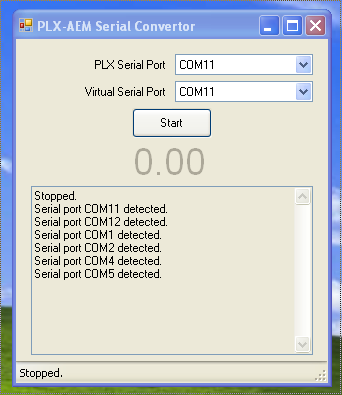
I will polish this up into a better application but I thought I'd release this early version so some folks can at least test it / use it if they so desire.
An obvious alternative is to use the analogue output via the ECU, however, I wanted to use that output to log Boost and right now we only know of 1 usable output (Legnum VR-4 7202 ECU).
Download: http://lathiat.net/files/PLXAEMConvertor.exe
You need to use VSPE to create some virtual serial ports, you can find it here:
http://www.eterlogic.com/Products.VSPE.html
Setup a basic com port "pair" in VSPE, then start the application (.NET 4.0 required) -- select the com port with your PLX wideband attached and then one half of the virtual com port pair you created in VSPE.
Then in evoscan set the wideband to "AEM", then select the other half of the virtual com port pair as the port. Then don't forget to enable the WDB item.
To connect the PLX SM-AFR to your computer, you can use the iMFD USB cable here:
http://www.plxdevices.com/datalogger.html
Or you can do what I did.. solder a couple of RCA jacks to some jumper wires, and poke those pins onto a FTDI board like this:
http://www.sparkfun.com/products/9873
Then use a standard 2xRCA => 3.5mm stereo headphone socket cable to connect them. Only RX is required for this program.
I tested it tonight and it worked great, however, I have not yet tested to see how much of a delay it introduces. I don't believe it is any/much but I haven't checked.
Here's a screenshot, forgot to take one while I was in the car / it was reading the values:
I will polish this up into a better application but I thought I'd release this early version so some folks can at least test it / use it if they so desire.
An obvious alternative is to use the analogue output via the ECU, however, I wanted to use that output to log Boost and right now we only know of 1 usable output (Legnum VR-4 7202 ECU).
Last edited by lathiat; Feb 15, 2012 at 12:00 PM.


Sorry to dig this up but,
How exactly did you wire up that FDTI board? I love the plx products and i would really like to use it in evoscan.
Thanks for making that program btw. its the perfect solution!
How exactly did you wire up that FDTI board? I love the plx products and i would really like to use it in evoscan.
Thanks for making that program btw. its the perfect solution!

Thread
Thread Starter
Forum
Replies
Last Post
djmikeymike
Evo How To Requests / Questions / Tips
55
Mar 7, 2008 08:12 PM
