


adding extra cells to get to 300 load


 .
.

Problem is do you know what the blank spaces are for ??

Hmm .. viable .. but its alot more than that ..
you gotta tell the subroutine that it's dealing with more row/columns now ..
ie 0x03 00 FF FF 68 89 14(up from 13 for 19 columns) .. likewise for the for axis pointer ..

whew .. if I do that .. I gotta find locations for all 8 maps !!!!! yikes !!!

True. But if it can be done for one it shouldn't be too hard to figure out how to do it for your personal rom. We'll wait and see I guess.
Edit. Maybe j banks or whoever messes with the ecu code can answer...how does it determine the dimensions of the tables...is it stupid and just has it hard coded to some preset value/memory locations?
Edit. Maybe j banks or whoever messes with the ecu code can answer...how does it determine the dimensions of the tables...is it stupid and just has it hard coded to some preset value/memory locations?
Last edited by codgi; Jul 15, 2007 at 07:11 PM.




Dave, I havent got any free time to experiment with your last "gift" but once the car is out of the shop and I get some time its high priority.
One thing about rescaling vs. adding columns, is that though it lowers the resolution you can increase the scaling distance from 20 to 25% increments above 200% and add quite alot of extra depth. I have been experimenting with this so far with good results and not too much of a loss from "too much difference" for it to extrapolate at different load levels.
You can pretty much always drop 20% because the car never spends much time there. At 30mph cruising around town mine tends to be in the 30% range and of course idle is about 10% or so. Here is an example of what it can look like and get to 300 pretty easy:
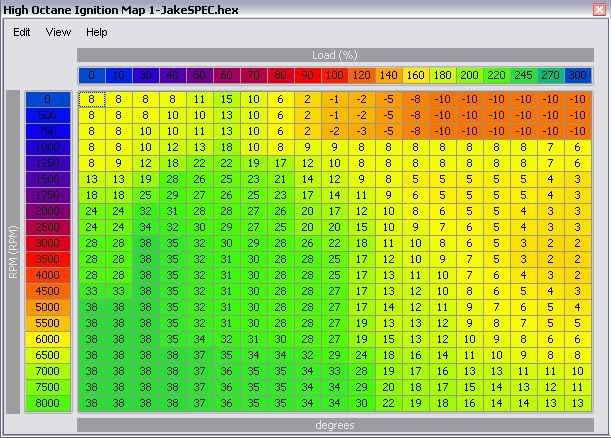
One thing about rescaling vs. adding columns, is that though it lowers the resolution you can increase the scaling distance from 20 to 25% increments above 200% and add quite alot of extra depth. I have been experimenting with this so far with good results and not too much of a loss from "too much difference" for it to extrapolate at different load levels.
You can pretty much always drop 20% because the car never spends much time there. At 30mph cruising around town mine tends to be in the 30% range and of course idle is about 10% or so. Here is an example of what it can look like and get to 300 pretty easy:

Evolved Member
Joined: Jan 2006
Posts: 953
Likes: 2
From: Oxfordshire
I wasn't this bit that I thought would take the time, it's finding all the sub routines that would reference the maps and load scales and changing the code to point to those new maps. Of course I have noticed that you are a bit more knowlagable about assembly code than me
 so maybe, if you've looked into it, there isn't as much work as I thought.
JB I am unruffled thanks! Thinking about it, alot of the USDM cars show logs with much higher load (2 byte and calc) than my JDM 7 shows. Guess I was thinking along the lines of what my 7 shows. Though this could be due to a rather annoying and hard to track down boost fluctuation on my car.
MB


well if you guys have IDAPro finding the references is pretty damn easy.
the "dimensions" of the 3d tables are located in the 3dtable and in the axis 2d tables.
Its probably not worthwhile adding columns because you are wasting a lot of ROM space... as JB said you can remove some of the lower load columns because they aren't hit as much and most look the same anyways...
its not a problem for me yet, as I haven't hit 280load, yet alone 300
the "dimensions" of the 3d tables are located in the 3dtable and in the axis 2d tables.
Its probably not worthwhile adding columns because you are wasting a lot of ROM space... as JB said you can remove some of the lower load columns because they aren't hit as much and most look the same anyways...
its not a problem for me yet, as I haven't hit 280load, yet alone 300


Evolved Member
Joined: Jan 2006
Posts: 953
Likes: 2
From: Oxfordshire
well if you guys have IDAPro finding the references is pretty damn easy.
the "dimensions" of the 3d tables are located in the 3dtable and in the axis 2d tables.
Its probably not worthwhile adding columns because you are wasting a lot of ROM space... as JB said you can remove some of the lower load columns because they aren't hit as much and most look the same anyways...
its not a problem for me yet, as I haven't hit 280load, yet alone 300
the "dimensions" of the 3d tables are located in the 3dtable and in the axis 2d tables.
Its probably not worthwhile adding columns because you are wasting a lot of ROM space... as JB said you can remove some of the lower load columns because they aren't hit as much and most look the same anyways...
its not a problem for me yet, as I haven't hit 280load, yet alone 300
MB
Evolved Member
Joined: Jan 2006
Posts: 953
Likes: 2
From: Oxfordshire
20 can go for 100% sure, 40% for 75%, and probably then at least one more. I would also recommend that if needed just open the scaling jumps more than 25% as I showed earlier to 30% and that would land you to a max of 330 if you took out 40% also.
That is definitely more than 95% of anyone running on the street would actually need assuming the intake hasnt messed up the MAF. I can only think of one person that has reliably shown his car to exceed that on a stock turbo (let alone something like a Green) that doesnt have a MAF issue as far as we can tell. I would definitely be scaled out to at least 320 for a high boost Green on pump or a 30R and bigger.
That is definitely more than 95% of anyone running on the street would actually need assuming the intake hasnt messed up the MAF. I can only think of one person that has reliably shown his car to exceed that on a stock turbo (let alone something like a Green) that doesnt have a MAF issue as far as we can tell. I would definitely be scaled out to at least 320 for a high boost Green on pump or a 30R and bigger.
It's ALWAYS the case .. because the subroutine says so
But it does not pull timing like you think .. it's an algorithm that says once you exceed the load .. every amount of load over limit .. the timing is reduced this amount .. .. semi linear until you're way over the load limit ..
Burgers .. the subroutines are very easy to find .. they are almost all the same from 7 thru 9 ..
But it does not pull timing like you think .. it's an algorithm that says once you exceed the load .. every amount of load over limit .. the timing is reduced this amount ..
.. semi linear until you're way over the load limit .. Burgers .. the subroutines are very easy to find .. they are almost all the same from 7 thru 9 ..
