


IDA Pro tutorial request


A quick hint to help you get started (I'm not going to give you the answer just yet, unless you're really in a hurry  ): the RPM axis data for the EGR Map offset tables is the same between 96940011 and 96530006, but the data for the tables themselves is different.
): the RPM axis data for the EGR Map offset tables is the same between 96940011 and 96530006, but the data for the tables themselves is different.
(One last hint, this time regarding MAP scaling.)

(One last hint, this time regarding MAP scaling.)
On another note: There must be a formula to figure out how to count 3112 bytes without having to count every line then multiplying by 16. (my brain is off duty
 )
)
 So, what I'm doing is counting 3112 bytes from the hex on 96940011 (I found a couple of addy's this way). I found the same string of hex on the 96530006 rom, but the address doesn't work and there seems to be several hex strings that match right around the same area. I tried a couple of the addresses for the egr offset rpm, but none are working. What am I missing?
Okay, this all assumes a couple of things: first, that you're using IDA, and second, that you have a reasonably-complete disassembly of the ROMs you're working with.
A quick way to achieve the second item is to go to the beginning of the rom, then hit 'd' three times to turn the first entry into a long-word (ie. so it looks something like "0000xxxx"). Hit '*' to create an array of values; you want the array to be 255 entries long, with 1 item per line, an element width of 0, and be sure to uncheck "create as array". Once that's done, you'll have a list of 255 "interrupt vectors"; these are the addresses that the processor jumps to when certain hardware events happen, such as data arriving on the serial port, certain sensors delivering information, etc.
Go to each address listed (except for any "FFFFxxxx" addresses; those are RAM addresses, and in this case are just references to where the stack starts), and hit 'c'; that will tell IDA to start disassembling at that address. IDA is going to think hard about that for a little while on the first address.
That's going to take you a while. Once you're done, come back here.
Okay. Now, for every table you edit in EcuFlash, there's the data that's actually in the table, and the axis data. For example, the timing map is full of timing data, but there's a 2d axis along each of the top and the side for load and RPM, respectively. While the data in the main table often changes from ROM to ROM, the data in the axes (RPM, load, etc) often stays the same (not always, but it's a handy shortcut).
So, you can often search a new ROM for the axis data taken from a "known" ROM (ie. hit alt-B in IDA, and type in "xx xx xx xx" for the hex data in the axis to search for it). When you find that, go up a few lines, and you'll see a comment like "DATA XREF: sub....". Click on the "sub..." part, and you'll be taken to a list of offsets; click on the "DATA XREF" reference to the right of the off_XXXX line you were taken to, and that'll show you the code that actually makes use of that table. See my recent post about table lookups to see how to make sense of that, but basically, sub_CC6 is the routine that parses the axis, and sub_C28 and sub_E02 parse the tables themselves. But, you can usually just compare the code from the two ROMs at that point, and a matching pattern should be pretty obvious, meaning you should be able to use that as a clue for locating the table data.
It's been a long day, and I'm exhausted, so I'm probably explaining this poorly, but hopefully that gives you a place to start?
A quick way to achieve the second item is to go to the beginning of the rom, then hit 'd' three times to turn the first entry into a long-word (ie. so it looks something like "0000xxxx"). Hit '*' to create an array of values; you want the array to be 255 entries long, with 1 item per line, an element width of 0, and be sure to uncheck "create as array". Once that's done, you'll have a list of 255 "interrupt vectors"; these are the addresses that the processor jumps to when certain hardware events happen, such as data arriving on the serial port, certain sensors delivering information, etc.
Go to each address listed (except for any "FFFFxxxx" addresses; those are RAM addresses, and in this case are just references to where the stack starts), and hit 'c'; that will tell IDA to start disassembling at that address. IDA is going to think hard about that for a little while on the first address.
That's going to take you a while.
Once you're done, come back here.Okay. Now, for every table you edit in EcuFlash, there's the data that's actually in the table, and the axis data. For example, the timing map is full of timing data, but there's a 2d axis along each of the top and the side for load and RPM, respectively. While the data in the main table often changes from ROM to ROM, the data in the axes (RPM, load, etc) often stays the same (not always, but it's a handy shortcut).
So, you can often search a new ROM for the axis data taken from a "known" ROM (ie. hit alt-B in IDA, and type in "xx xx xx xx" for the hex data in the axis to search for it). When you find that, go up a few lines, and you'll see a comment like "DATA XREF: sub....". Click on the "sub..." part, and you'll be taken to a list of offsets; click on the "DATA XREF" reference to the right of the off_XXXX line you were taken to, and that'll show you the code that actually makes use of that table. See my recent post about table lookups to see how to make sense of that, but basically, sub_CC6 is the routine that parses the axis, and sub_C28 and sub_E02 parse the tables themselves. But, you can usually just compare the code from the two ROMs at that point, and a matching pattern should be pretty obvious, meaning you should be able to use that as a clue for locating the table data.
It's been a long day, and I'm exhausted, so I'm probably explaining this poorly, but hopefully that gives you a place to start?
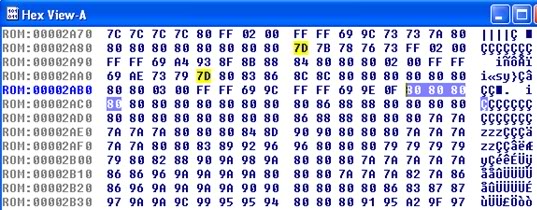


Thanks guys, I understand that now.
But, say for instance the address 2abd (Highlighted 80 80 80 80) is an address for the first High Octane fuel table for a JDM EVO 9(88570008). Why would there be a difference in the values I see in the High Octane Fuel table when using the address 2ac1 which also shows as 80 80 80 80, or even 2acd for that matter. Why wouldn't they show the same data as long as the string is correct?
I realize I'm probably doing this backwards, because I'm skipping a couple of other steps that I don't understand.
But, say for instance the address 2abd (Highlighted 80 80 80 80) is an address for the first High Octane fuel table for a JDM EVO 9(88570008). Why would there be a difference in the values I see in the High Octane Fuel table when using the address 2ac1 which also shows as 80 80 80 80, or even 2acd for that matter. Why wouldn't they show the same data as long as the string is correct?
I realize I'm probably doing this backwards, because I'm skipping a couple of other steps that I don't understand.
The 80's are the same exact data. If you start using different starting addresses for the tables, then all of the data is being shifted that amount of bytes. You probably think you are seeing different data because you are incorrectly assuming the order of the table in the hex code (it may be in columns, when you are expecting rows, etc).
I can assure you that one 80 is exactly the same as the next 80.
I can assure you that one 80 is exactly the same as the next 80.
The 80's are the same exact data. If you start using different starting addresses for the tables, then all of the data is being shifted that amount of bytes. You probably think you are seeing different data because you are incorrectly assuming the order of the table in the hex code (it may be in columns, when you are expecting rows, etc).
I can assure you that one 80 is exactly the same as the next 80.
I can assure you that one 80 is exactly the same as the next 80.
Last edited by D-VO; Nov 23, 2009 at 10:48 PM.

Ok bringing this back again sorry. So I downloaded the IDA Pro freeware. I drag in my rom into the window but it does not give the the right processor in that window they are all intel? Does this matter? Dont want to start diving into this if this is does matter. Is there another free version I can get that will have this as an option? This only gives me 16 different processors to choose from.
Last edited by 03lances; Nov 22, 2010 at 01:16 AM.
Nvm I got a solution this is confusing stuff especially since I have no background in this type of stuff but I am determined to figure this out thank you for this informative tutorial guys!!!
this is confusing stuff especially since I have no background in this type of stuff but I am determined to figure this out thank you for this informative tutorial guys!!!

