


A/C Logging and RPM control found !!!


Thread Starter
Evolved Member
Joined: Apr 2008
Posts: 604
Likes: 0
From: Sydney, Australia
A/C Logging and RPM control found !!!
I did some playing around and found exactly how to log the A/C output. Fostytou was on the right track. It is logged from MUT 9A and on bit 1.
For EvoScan, remove the old A/C relay data item and add this one.
<DataListItem DataLog="N" Color="" Display="Air Con Output" LogReference="AirCon" RequestID="9A" Eval="x bit 1" Unit="On/Off" MetricEval="" MetricUnit="" ResponseBytes="1" GaugeMin="0" GaugeMax="2" ChartMin="0" ChartMax="2" ScalingFactor="1" Notes="" Priority="1" Visible="False" />
I was incorrect earlier in saying the A/C turns off at 5750rpm, which was based on incorrect logging. It is actually 5500rpm, and will turn back on when you go below 5250rpm. I made up the tables to adjust it.
For 80700010:
<table name="A/C RPM Limits" category="Limits" address="21f0" type="2D" level="4" scaling="RPMStatLimit">
<table name="Engine Speed" type="Static X Axis" elements="2">
<data>Off Above</data>
<data>On Below</data>
</table>
</table>
It also turns off based on TPS and not Load. The TPS logs as turning it off at 85%, but I am still searching for this adjustment.
Edit:
I just did a quick search and the same map works for 98640014 and 90550001.
For EvoScan, remove the old A/C relay data item and add this one.
<DataListItem DataLog="N" Color="" Display="Air Con Output" LogReference="AirCon" RequestID="9A" Eval="x bit 1" Unit="On/Off" MetricEval="" MetricUnit="" ResponseBytes="1" GaugeMin="0" GaugeMax="2" ChartMin="0" ChartMax="2" ScalingFactor="1" Notes="" Priority="1" Visible="False" />
I was incorrect earlier in saying the A/C turns off at 5750rpm, which was based on incorrect logging. It is actually 5500rpm, and will turn back on when you go below 5250rpm. I made up the tables to adjust it.
For 80700010:
<table name="A/C RPM Limits" category="Limits" address="21f0" type="2D" level="4" scaling="RPMStatLimit">
<table name="Engine Speed" type="Static X Axis" elements="2">
<data>Off Above</data>
<data>On Below</data>
</table>
</table>
It also turns off based on TPS and not Load. The TPS logs as turning it off at 85%, but I am still searching for this adjustment.
Edit:
I just did a quick search and the same map works for 98640014 and 90550001.
Last edited by Mattjin; Apr 17, 2009 at 12:26 AM.

Very cool! If you can find 88590015 that would be sweet. I'd love to bump this down and feel a little more comfortable about using it...
Oh, and I have to give credit to tephra for getting me on track with the MUT location.
Oh, and I have to give credit to tephra for getting me on track with the MUT location.


YAY YAY YAY YAY! I have been wondering about this for YEARS!
please please please can you find it for 96530006?
Thank you thank you thank you!
*edit*
It would be awesome to know this as well. If it turns off above 85% TPS anyways, that would be dandy.
please please please can you find it for 96530006?
Thank you thank you thank you!
*edit*
It would be awesome to know this as well. If it turns off above 85% TPS anyways, that would be dandy.
Last edited by scheides; Apr 17, 2009 at 08:28 AM.

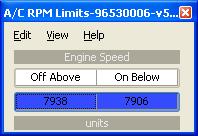
I looked at 96530006 and since I'm really not a disassembler I don't want to give any misinformation at this point, but it looks like the map either isn't there, or it's at 21f2 and the values for on and off are 7906 and 7938.
Last edited by l2r99gst; Apr 17, 2009 at 03:59 PM.


Trending Topics
Thread Starter
Evolved Member
Joined: Apr 2008
Posts: 604
Likes: 0
From: Sydney, Australia
Unfortunately the code for the evo 8's and 9's is different and I cannot say for certain how it is handled. The evo 7's are quite obvious to find, but the others aren't.
I have a candidate subroutine for it, but I dont have a vehicle here to verify it. Can someone do a slow free-rev log to see what rpm it cuts off at, then I might be able to dig a little deeper. Unless jcsbanks, tephra, mrfred, acamus, etc.... can help out?
I have a candidate subroutine for it, but I dont have a vehicle here to verify it. Can someone do a slow free-rev log to see what rpm it cuts off at, then I might be able to dig a little deeper. Unless jcsbanks, tephra, mrfred, acamus, etc.... can help out?
I just searched 96530006 for two RPM entries 250 and 500 RPM apart from 6500 to 4000 and found nothing. So, if this code is in this ROM, it's in a different table format or different values.
Thread Starter
Evolved Member
Joined: Apr 2008
Posts: 604
Likes: 0
From: Sydney, Australia
From the subroutine I think is controlling it, it may turn off at around the 7938rpm and off at 7906rpm mark on the newer models! The only rom I have a thorough disassembly of is my own, and it was a little bit of work to find the routine in that. Once found the RPM was obvious though. So for any newer cars with the different routine I am only taking an educated guess.
So for 88590015 you can try 1e18 and 1e1a for the rpm's (just put 1e18 in the map from my first post). Try dropping the numbers to a low rpm like 2000 and 1750, and see if it works as I think. They are definitely RPM values in the code, it is just the default values being above the RPM Limit that have me confused.
There are also a couple of engine temp conditions involved too.
So for 88590015 you can try 1e18 and 1e1a for the rpm's (just put 1e18 in the map from my first post). Try dropping the numbers to a low rpm like 2000 and 1750, and see if it works as I think. They are definitely RPM values in the code, it is just the default values being above the RPM Limit that have me confused.
There are also a couple of engine temp conditions involved too.
Last edited by Mattjin; Apr 17, 2009 at 02:24 PM.

Evolved Member
Joined: May 2006
Posts: 2,399
Likes: 6
From: UK
I see the same RPM comparisons, but the routine is complex. Worse still, I'm struggling to make all the bridges that reach to MUT9A bit 1. There appears to be a set of bit 1 on reset, and another routine during the normal loop that clears it, but I can't link the comparisons, it just seems to happen.
Might be one best worth looking at further by more testing rather than disassembly.
Might be one best worth looking at further by more testing rather than disassembly.

Thread Starter
Evolved Member
Joined: Apr 2008
Posts: 604
Likes: 0
From: Sydney, Australia
For 88580013, 0014, and 0015. You need to add the line to the EvoScan Data.XML (in the DataSettings directory) from the first post so you can log the A/C correctly. Add the map to your xml and try 1df2 as the address.
I may have the TPS conditions for my own rom, but will know shortly when I test it.
I may have the TPS conditions for my own rom, but will know shortly when I test it.
Last edited by Mattjin; Apr 17, 2009 at 03:39 PM.
For 96530006, you can try this...let mattjin confirm whether it looks right:
It's 7938 and 7906, as mentioned above.
Edit: 96940011 looks like 1DF8
Eric
Code:
<table name="A/C RPM Limits" category="Limits" address="21f2" type="2D" level="4" scaling="RPMStatLimit">
<table name="Engine Speed" type="Static X Axis" elements="2">
<data>Off Above</data>
<data>On Below</data>
</table>
</table>
Edit: 96940011 looks like 1DF8
Eric
Last edited by l2r99gst; Apr 17, 2009 at 04:04 PM.