


Partial Throttle Knock - Tuners PLEASE HELP!




You can always compare voltage vs knock sum as well.
Voltage is amplitude so while its not 100% the real answer it will at least help you make some educated guesses about whats real and whats not in a built motor.
Aaron
Voltage is amplitude so while its not 100% the real answer it will at least help you make some educated guesses about whats real and whats not in a built motor.
Aaron

Aaron...I've been doing that for a long time and people ALWAYS tell me I am wrong. The key to is to see the large spikes over the threshold as real knock and only little noise that breaks the threshold as false knock.

What you can get from the voltage signal is a baseline of how noisy your motor is, in general. For example, a built motor may be noisier, on average, than a stock motor. And you can create your own knock threshold based on this average noise level.
A very, very good thread that explains all of this well is the thread that jcsbanks posted on how the ECU calculates knock and the knock table definitions. He gives all of the paramaters to log, etc.
Let me see if I can find John's thread and link to it here.
Here is John's thread. Read the whole thing...it's a great thread that will thoroughly explain how the ECU determines knock and how to tune the tables, if necessary.
Here is a graph from John showing the knock signal against the threshold, against the resulting knocksum from page 5 of that thread:
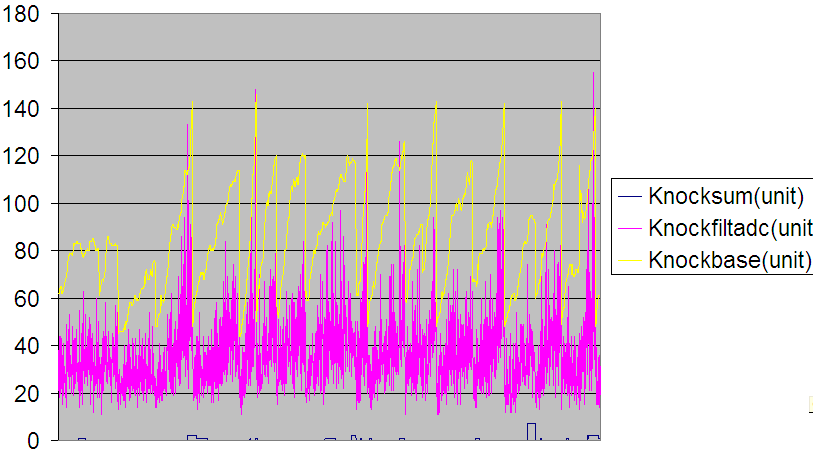
Another, zoomed in a bit:
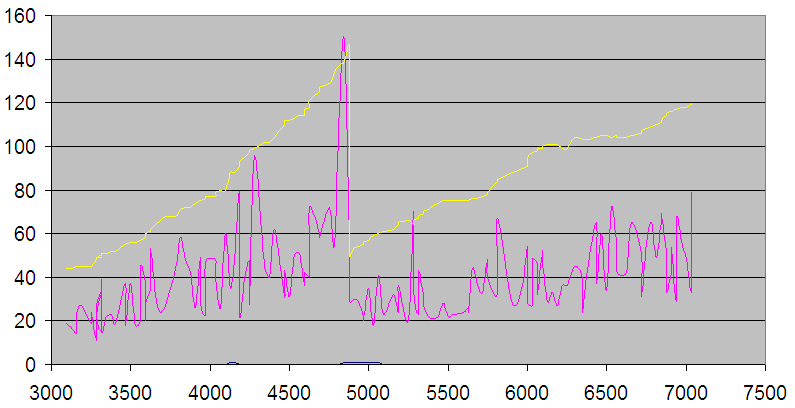
One final one...showing everything that can be logged...John gives an explanation of all of this in his thread:

John's explanation for above graph:
So it is a full throttle pull from 3000 RPM to 7000 RPM approx (x-axis).
The very spiky trace in blue is the knock voltage if you like. I presume it will be bandpass filtered and rectified. Then a gated integrator of the knock sensor signal for each ignition event.
Yellow is a moving average of the knock voltage. Cyan is a moving average of that. This is then used to calculate knockbase which is in magenta.
The mult, add1 and add2 are looked up by RPM from the tables I posted earlier in this thread.
Knockbase=(mult*knockvar2/8) + Add1 or Add2
Add1 is used before the gain is reduced (at about knockbase 140 or about 4800 RPM on this particular trace), Add2 is used after the gain is reduced.
Testing this for example at 6000 RPM reading the numbers off the graph:
knockbase=(19*40/8)+7=102 which is about what knockbase actually is on the graph at about 6000 RPM.
The very spiky trace in blue is the knock voltage if you like. I presume it will be bandpass filtered and rectified. Then a gated integrator of the knock sensor signal for each ignition event.
Yellow is a moving average of the knock voltage. Cyan is a moving average of that. This is then used to calculate knockbase which is in magenta.
The mult, add1 and add2 are looked up by RPM from the tables I posted earlier in this thread.
Knockbase=(mult*knockvar2/8) + Add1 or Add2
Add1 is used before the gain is reduced (at about knockbase 140 or about 4800 RPM on this particular trace), Add2 is used after the gain is reduced.
Testing this for example at 6000 RPM reading the numbers off the graph:
knockbase=(19*40/8)+7=102 which is about what knockbase actually is on the graph at about 6000 RPM.
Once knockbase is calculated, the calculation of the increase in knocksum (if there is more than a small difference between knockfiladc and knockbase) is:
(x*(knockfiltadc-knockbase)/(knockbase*8))+1 clipped to 7, with the knocksum itself being clipped to 36. x has two values - 16 or 32 depending on whether you are below or above the load threshold table that started this thread off.
On some ECUs the increase in knocksum is clipped to 0 if you are below the load threshold, which effectively disables any increase in knocksum below that load. In others it appears unclipped, but will still be less than half as sensitive.
There are other fine details that are not terribly important.
(x*(knockfiltadc-knockbase)/(knockbase*8))+1 clipped to 7, with the knocksum itself being clipped to 36. x has two values - 16 or 32 depending on whether you are below or above the load threshold table that started this thread off.
On some ECUs the increase in knocksum is clipped to 0 if you are below the load threshold, which effectively disables any increase in knocksum below that load. In others it appears unclipped, but will still be less than half as sensitive.
There are other fine details that are not terribly important.
Last edited by l2r99gst; Aug 14, 2010 at 11:37 AM.
One side note (that you will find out if you read the thread), is that many of these parameters can only be logged accurately with DMA. Something like EvoScan won't be able to accurately log some of this. But, nonetheless, it can still be used to get an idea of what's going on.
Once you read that thread and understand what's going on, you will have a perfect understand of knock control in the stock ECU and how to tune it, if necessary.
Once you read that thread and understand what's going on, you will have a perfect understand of knock control in the stock ECU and how to tune it, if necessary.

Evolved Member
Joined: Mar 2008
Posts: 1,392
Likes: 2
From: uk
l2r99gst...I use the method you described. I guess I don't explain it in the great detail you do. Yes, you first have to determine how "noisy" your motor is. Then you can make the adjustments as necessary.

EvoM Guru
iTrader: (50)
Joined: Mar 2006
Posts: 9,675
Likes: 132
From: Tri-Cities, WA // Portland, OR
Something to consider is that Evo 9s tend to have phantom knock at ~2500 rpm at low loads. On my own car, I typically see 2-5 knock counts when crossing ~2500 rpm at around 80 load. Its happening at higher load in your car, but its something to consider.

Thread Starter
Evolved Member
iTrader: (19)
Joined: Jul 2007
Posts: 1,497
Likes: 2
From: the burgh, pa
Well, have ironed out all the really bad spots through timing and fuel changes. Still two areas with three counts and I have come to the assumption that these are likely phantom. I have pulled as much as 5* more in those areas and they won't change. So here are my multiplier tables:

So what do you think, should they be edited for that RPM band?
So what do you think, should they be edited for that RPM band?
Ok since you are 100% convinced that the knock is phantom. Raise the "Knock Sensitivity Load Threshold" in the problem area to like 80. Try again. If you are still getting the phantom knock then you should raise the Noise multiplier by a point or 2 in the problem area.
Thread Starter
Evolved Member
iTrader: (19)
Joined: Jul 2007
Posts: 1,497
Likes: 2
From: the burgh, pa
Well, I thought I was all good and certian the rest was phantom and only 2-3 counts then on my way home this bad boy popped up.... What. The. F.


Any ideas? Or should I just go with upping the multiplier tables. I have tried everything at this point...
Any ideas? Or should I just go with upping the multiplier tables. I have tried everything at this point...