


My Ignition tables doesn't match up with EVOscan datalogs


Thread Starter
Newbie
Joined: Nov 2010
Posts: 26
Likes: 1
From: Australia
My Ignition tables doesn't match up with EVOscan datalogs
Hi guys,
Over the last couple of weeks i've been playing around with my EVO 8 MR. The tuning process has been relatively easy, thanks to all the resources and post from evolutionm
I've got an issue with my ignition tables in ecuflash and evoscan datalogs. I have notice the Timing Advance column in the datalogs doesn't correlates with my ignition tables. As pictured, im running around 16-17 deg of timing up top. In my logs, it only register 11-13 deg. Shouldn't my logs be similar to my ignition map?
Here is a my ignition table in ecuflash
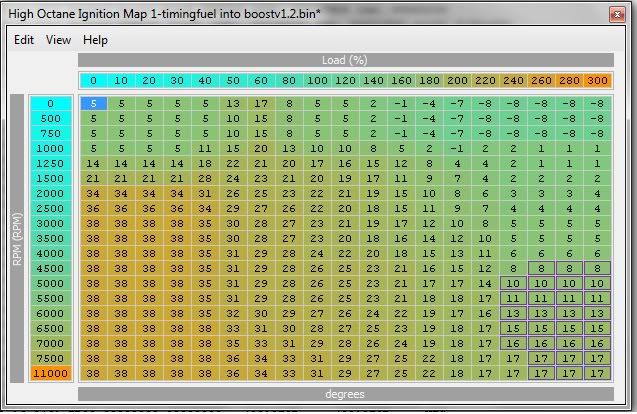
I've turned the boost down to 20 psi. A/f 11.7 - 12:0
Any help would be appreciated
Over the last couple of weeks i've been playing around with my EVO 8 MR. The tuning process has been relatively easy, thanks to all the resources and post from evolutionm
I've got an issue with my ignition tables in ecuflash and evoscan datalogs. I have notice the Timing Advance column in the datalogs doesn't correlates with my ignition tables. As pictured, im running around 16-17 deg of timing up top. In my logs, it only register 11-13 deg. Shouldn't my logs be similar to my ignition map?
Here is a my ignition table in ecuflash
I've turned the boost down to 20 psi. A/f 11.7 - 12:0
Any help would be appreciated

Thread Starter
Newbie
Joined: Nov 2010
Posts: 26
Likes: 1
From: Australia
Either 1byte or 2byte would be an improvement.
I suggest you move up to the Tephra V7 ROM, as it has 1byte load already implemented. You will really like the big maps as well.

I suggest you move up to the Tephra V7 ROM, as it has 1byte load already implemented. You will really like the big maps as well.
Thread Starter
Newbie
Joined: Nov 2010
Posts: 26
Likes: 1
From: Australia

Evolved Member
Joined: Oct 2010
Posts: 2,447
Likes: 14
From: Australia
Have you checked the "Upper Boundary Ignition Map" (or whatever it's called in your definitions)?
I recently had a similar issue with my RA map/logging interpretation - the upper boundary map was limiting the timing value being used. It was still full of factory values.
Was initially a problem for me, as (a) I didn't even know it existed --noob--, and (b) it wasn't defined in my EcuFlash XML. Once both of those were rectified, everything made a lot more sense!!
If this is what's going on, you'll be able to increase the upper boundary values to get more headroom. Not all in one hit, obviously... 7 degrees advancement is a pretty big jump! :P
On the RA, I ended up copying all of the "boundary-limited" cell values from the upper boundary map into the high octane ignition map, so I could see the real values being used all in one place. Then I increased the relevant upper boundary map cells a few degrees to get headroom for future tuning. It was a fiddly PITA to do, but it was safe.
Rich
PS. If you're working through the same ECU learning curve stuff, this thread might have some useful info... it contains lots of help and advice from some of the very bright people on this forum...
https://www.evolutionm.net/forums/09...ng-tuning.html
I recently had a similar issue with my RA map/logging interpretation - the upper boundary map was limiting the timing value being used. It was still full of factory values.
Was initially a problem for me, as (a) I didn't even know it existed --noob--, and (b) it wasn't defined in my EcuFlash XML. Once both of those were rectified, everything made a lot more sense!!
If this is what's going on, you'll be able to increase the upper boundary values to get more headroom. Not all in one hit, obviously... 7 degrees advancement is a pretty big jump! :P
On the RA, I ended up copying all of the "boundary-limited" cell values from the upper boundary map into the high octane ignition map, so I could see the real values being used all in one place. Then I increased the relevant upper boundary map cells a few degrees to get headroom for future tuning. It was a fiddly PITA to do, but it was safe.
Rich
PS. If you're working through the same ECU learning curve stuff, this thread might have some useful info... it contains lots of help and advice from some of the very bright people on this forum...
https://www.evolutionm.net/forums/09...ng-tuning.html
Last edited by richardjh; Nov 29, 2010 at 04:39 PM. Reason: Fixed dodgy link.

Evolved Member
Joined: May 2009
Posts: 522
Likes: 2
From: mnt vernon ny
Have you checked the "Upper Boundary Ignition Map" (or whatever it's called in your definitions)?
I recently had a similar issue with my RA map/logging interpretation - the upper boundary map was limiting the timing value being used. It was still full of factory values.
Was initially a problem for me, as (a) I didn't even know it existed --noob--, and (b) it wasn't defined in my EcuFlash XML. Once both of those were rectified, everything made a lot more sense!!
If this is what's going on, you'll be able to increase the upper boundary values to get more headroom. Not all in one hit, obviously... 7 degrees advancement is a pretty big jump! :P
On the RA, I ended up copying all of the "boundary-limited" cell values from the upper boundary map into the high octane ignition map, so I could see the real values being used all in one place. Then I increased the relevant upper boundary map cells a few degrees to get headroom for future tuning. It was a fiddly PITA to do, but it was safe.
Rich
PS. If you're working through the same ECU learning curve stuff, this thread might have some useful info... it contains lots of help and advice from some of the very bright people on this forum...
https://www.evolutionm.net/forums/09...ng-tuning.html
I recently had a similar issue with my RA map/logging interpretation - the upper boundary map was limiting the timing value being used. It was still full of factory values.
Was initially a problem for me, as (a) I didn't even know it existed --noob--, and (b) it wasn't defined in my EcuFlash XML. Once both of those were rectified, everything made a lot more sense!!
If this is what's going on, you'll be able to increase the upper boundary values to get more headroom. Not all in one hit, obviously... 7 degrees advancement is a pretty big jump! :P
On the RA, I ended up copying all of the "boundary-limited" cell values from the upper boundary map into the high octane ignition map, so I could see the real values being used all in one place. Then I increased the relevant upper boundary map cells a few degrees to get headroom for future tuning. It was a fiddly PITA to do, but it was safe.
Rich
PS. If you're working through the same ECU learning curve stuff, this thread might have some useful info... it contains lots of help and advice from some of the very bright people on this forum...
https://www.evolutionm.net/forums/09...ng-tuning.html
Trending Topics

Thread Starter
Newbie
Joined: Nov 2010
Posts: 26
Likes: 1
From: Australia
I still have this issue. Do you guys reckon it could be the ecu flash program itself? Or my definition?
Im abit puzzle why my logs doesnt match my ROM. I've made the switch to 1 byte load
I notice its 6-8 deg less in the evoscan logs compared to my ignition timing ROM
I don't think there is anything wrong with my evoscan as i've tried mitsu log and it shows the similar logs
Im abit puzzle why my logs doesnt match my ROM. I've made the switch to 1 byte load
I notice its 6-8 deg less in the evoscan logs compared to my ignition timing ROM
I don't think there is anything wrong with my evoscan as i've tried mitsu log and it shows the similar logs


I think you should start here: https://www.evolutionm.net/forums/ec...te-thread.html
Get your MUT table setup and start logging 2-byte load...this will allow you to pinpoint exactly where you are on the map (load vs rpm)
What's your ROM ID?
Get your MUT table setup and start logging 2-byte load...this will allow you to pinpoint exactly where you are on the map (load vs rpm)
What's your ROM ID?

Its one of these 3 reason:
-Your not logging load correctly and therefore not in the cells you think you are.
-Your getting knock and the ECU is pulling timing.
-Your air temps are high and the "Air Temp vs Timing trim" map is coming into play and pulling timing.
-Your not logging load correctly and therefore not in the cells you think you are.
-Your getting knock and the ECU is pulling timing.
-Your air temps are high and the "Air Temp vs Timing trim" map is coming into play and pulling timing.
Thread Starter
Newbie
Joined: Nov 2010
Posts: 26
Likes: 1
From: Australia
I think you should start here: https://www.evolutionm.net/forums/ec...te-thread.html
Get your MUT table setup and start logging 2-byte load...this will allow you to pinpoint exactly where you are on the map (load vs rpm)
What's your ROM ID?
Get your MUT table setup and start logging 2-byte load...this will allow you to pinpoint exactly where you are on the map (load vs rpm)
What's your ROM ID?
How do i setup 2 byte load for that ROM ID?
I might get one or two knocksum at most. I dont think it should be pulling 6-8 deg of timing
Ill have a close eye on the air temp. What air temp should i be keeping an eye on?
Im on E85. No knocks recorded
ROM ID - 96260009
How do i setup 2 byte load for that ROM ID?
Im on 1 byte load at the moment. That should be accurate?
I might get one or two knocksum at most. I dont think it should be pulling 6-8 deg of timing
Ill have a close eye on the air temp. What air temp should i be keeping an eye on?
ROM ID - 96260009
How do i setup 2 byte load for that ROM ID?
Im on 1 byte load at the moment. That should be accurate?
I might get one or two knocksum at most. I dont think it should be pulling 6-8 deg of timing
Ill have a close eye on the air temp. What air temp should i be keeping an eye on?
1 or 2 knock sum should not pull 6-8degrees, so its not that.
Last, there is a "Ignition Trim vs Air Temp" table in each ROM. It pulls timing based on intake air temps. It looks like this:
