Notices
ECU Flash

How do I increase samples/second in EvoScan?

Thread Tools
 
Search this Thread
 
Old Apr 17, 2013 | 02:41 PM
  #1  
SQ2Evo's Avatar
Thread Starter
Newbie
10 Year Member
iTrader: (2)
 
Joined: Aug 2012
Posts: 49
Likes: 0
From: DE
How do I increase samples/second in EvoScan?

Right now a full 3rd gear pull at WOT is only giving me about 20 samples to work with. I'd like to significantly increase this but can't find where/how to adjust it in EvoScan. Any suggestions?
Reply
Old Apr 17, 2013 | 03:50 PM
  #2  
90zcrex's Avatar
Evolving Member
iTrader: (11)
 
Joined: Feb 2012
Posts: 275
Likes: 2
From: Columbia, SC
Make sure you are only logging the things you really need, also in the options unclick the log to screen, That helped me a good bit.
Reply
Old Apr 17, 2013 | 05:31 PM
  #3  
SQ2Evo's Avatar
Thread Starter
Newbie
10 Year Member
iTrader: (2)
 
Joined: Aug 2012
Posts: 49
Likes: 0
From: DE
Originally Posted by 90zcrex
Make sure you are only logging the things you really need, also in the options unclick the log to screen, That helped me a good bit.
So will Evoscan just log as much as it possibly can by default? Meaning the rate at which it logs is solely dependent on how much I ask it to record? I figured there might be a setting to change how much the user wants evoscan to log
Reply
Old Apr 17, 2013 | 06:36 PM
  #4  
CDrinkH2O's Avatar
EvoM Guru
15 Year Member
Liked
Loved
Community Favorite
iTrader: (7)
 
Joined: Nov 2006
Posts: 1,147
Likes: 162
From: San Francisco
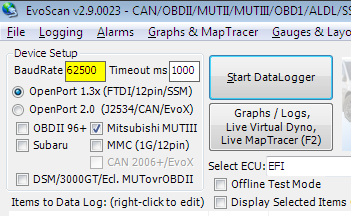
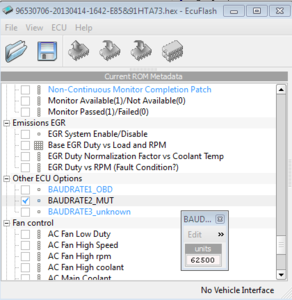
Change the baud rate to 62500 in your ROM and in evoscan. That will increase the sampling to the max. I got roughly 4 times the standard rate of 16250.
How do I increase samples/second in EvoScan?-speed1.png

How do I increase samples/second in EvoScan?-speed2.png

Last edited by CDrinkH2O; Apr 17, 2013 at 07:49 PM. Reason: Added pics
Reply
Old Apr 18, 2013 | 05:56 AM
  #5  
evo8426's Avatar
Evolved Member
iTrader: (27)
 
Joined: Jan 2006
Posts: 4,248
Likes: 9
From: Charlotte, North Carolina
You cannot increase the baud rate with the Evo 9.

Turn off "Log Data to Screen" this one here will increase your logged data a whole lot.

Only log items such as TPS, RPM, Load, Wideband, Timing, Boost, and KnockSum. Those are really the only essential items.
Reply
Old Apr 19, 2013 | 09:09 AM
  #6  
SQ2Evo's Avatar
Thread Starter
Newbie
10 Year Member
iTrader: (2)
 
Joined: Aug 2012
Posts: 49
Likes: 0
From: DE
Nice, turned off Log to screen and unchecked some unnecessary items and got way better results. Thanks for the help
Reply
Related Topics
Thread
Thread Starter
Forum
Replies
Last Post
Lukelis
Evo How To Requests / Questions / Tips
0
Apr 26, 2011 05:48 AM
Dochka
ECU Flash
5
Mar 17, 2011 03:46 AM
germanracing
ECU Flash
2
Jan 19, 2011 07:58 AM
2k4EvoVIII
ECU Flash
60
Feb 13, 2009 01:47 AM


All times are GMT -7. The time now is 12:56 AM.