


Need Help Mounting AVIC D3 Double Din


Need Help Mounting AVIC D3 Double Din
I installed an AVIC D3 Double Din Head Unit in my car with the stock radio brackets and the fitment was terrible. 
I tried installing it in the upper portion and the surround would not work because the head unit was too high. Then I ghetto rigged it so I could install it in the lower portion (where there are no mounting holes) and it fits inside the surround but doesn't sit flush and doesn't come out far enough.
Anybody have any suggestions? Should I have used the upper mounting locations and drilled new holes in the brackets?
Any help is appreciated.
Thanks!
I tried installing it in the upper portion and the surround would not work because the head unit was too high. Then I ghetto rigged it so I could install it in the lower portion (where there are no mounting holes) and it fits inside the surround but doesn't sit flush and doesn't come out far enough.
Anybody have any suggestions? Should I have used the upper mounting locations and drilled new holes in the brackets?
Any help is appreciated.
Thanks!


I'm assuming your d3 did not come with the template in the instructions. If that is the case, just follow what Jameson IXMR said. I had to do the same thing.
Please excuse the roughness of this picture. Quick 3-min MSPaint job. Basicly, I drilled new holes where you see the green in the picture. Then I used my dremel tool and nothced the sharp overlapped areas leaving a long oval shape. It left me enough room to vertically adjust the radio as much as I liked for a perfect fit.
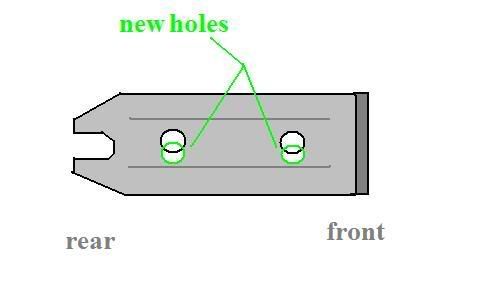
Please excuse the roughness of this picture. Quick 3-min MSPaint job. Basicly, I drilled new holes where you see the green in the picture. Then I used my dremel tool and nothced the sharp overlapped areas leaving a long oval shape. It left me enough room to vertically adjust the radio as much as I liked for a perfect fit.

Thanks a lot for the help y'all. I got it in today. I drilled the holes lower like in NoTec's awesome tech diagram 
I think it turned out that I only needed to drill the front hole because the rear is up all the way and the front is down all the way.
There was still a gap between the bezel and the headunit where you could see into the dash so I just used some stick on foam insulation to block it. It actually turned out pretty clean.
I'll post some pics later.
I think it turned out that I only needed to drill the front hole because the rear is up all the way and the front is down all the way.
There was still a gap between the bezel and the headunit where you could see into the dash so I just used some stick on foam insulation to block it. It actually turned out pretty clean.
I'll post some pics later.
Trending Topics
Light the radio up so the gap is equal on all four sides. Then test fit the cover and make sure it looks perfectly even. Now measure the outside lengths of the face of the headunit and cut a faceplate sized hole in a piece of sheetmetal. Trim it so that it is like 1/2" border and painters tape it to the backside of the bezel. Then test-fit and move it until it fits/looks oem. Then leave the tape on and tape it to the back of the bezel with a more permanent double sided tape (I actually hot-glued it on).


Thread
Thread Starter
Forum
Replies
Last Post
kinkbmxrydr
Lancer Audio and Security (All models)
27
Apr 8, 2008 07:39 AM
