


How to post pictures in text?


Thread Starter


Joined: Apr 2012
Posts: 535
Likes: 1
From: fairbanks, ak
How to post pictures in text?
I'm working on a how to for retrofitting a autodim/homelink rear view into the evo and I was just trying to figure out how to post the pictures in the text so they are more useful during the install. If anyone can give me a quick rundown on how to do that it would be awesome thanks.

Here you go
https://www.evolutionm.net/forums/ev...k-warning.html
Open an account, if you don't already, with Photobucket or any of the many online picture hosting web sites. Upload your pics there and copy and past the IMG link of the picture you want to share with the world to the body of your text/post.
Like so..

https://www.evolutionm.net/forums/ev...k-warning.html
Open an account, if you don't already, with Photobucket or any of the many online picture hosting web sites. Upload your pics there and copy and past the IMG link of the picture you want to share with the world to the body of your text/post.
Like so..

Last edited by SilverShadow03; Jan 16, 2014 at 01:35 PM.

Thread Starter
Joined: Apr 2012
Posts: 535
Likes: 1
From: fairbanks, ak
Ok sorry Demon somehow I was posting my reply at the same time you posted and I didn't see it so now the pics are just links. I will try to sift through the computer codes and swap them over but I'm no computer genius so that may take awhile.
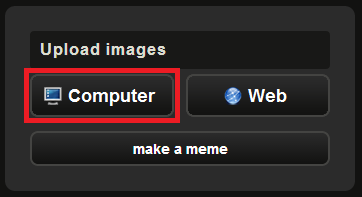
1. Go to Imgur.com. Click on the Computer button to upload an image from your computer

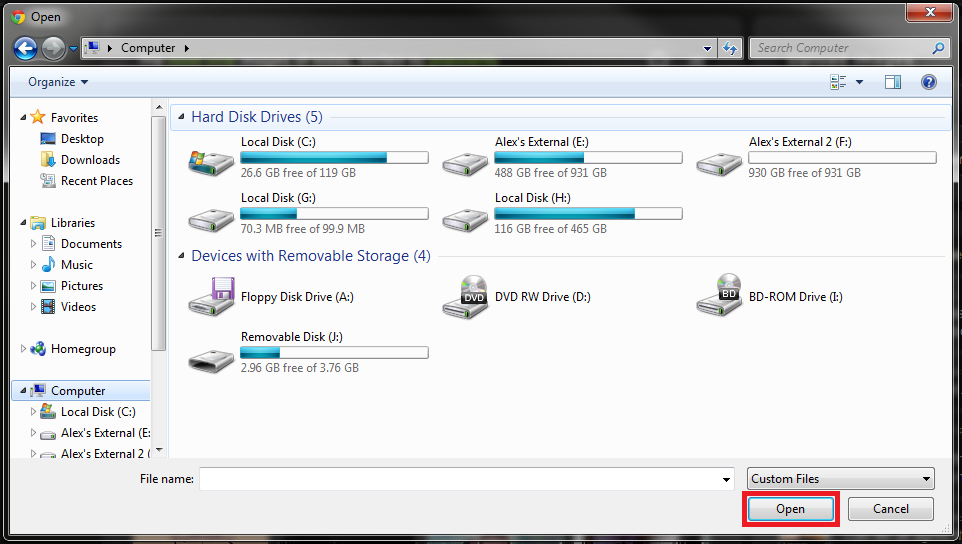
2. Browse your computer for the image (or images) you want to upload, select the images, and click Open

3. You have the option to add all of the images you upload into an album so that they are grouped together when other people view them. When you're ready, click Start Upload

4. Once the images have finished uploading you will see this screen. On the bottom you can select what size thumbnail you wish to view. By clicking the small notepad icon it will copy the text to your clipboard so you can easily paste it where you need

BBCode and Linked BBCode are the two formats you want to use for forums. For this walk-through I used BBCode because I had no need to link to a larger version of the image. If you want to post a thumbnail but link to the full resolution if someone clicks on the image, select the thumbnail size with the links on the bottom and then copy the Linked BBCode text
2. Browse your computer for the image (or images) you want to upload, select the images, and click Open
3. You have the option to add all of the images you upload into an album so that they are grouped together when other people view them. When you're ready, click Start Upload

4. Once the images have finished uploading you will see this screen. On the bottom you can select what size thumbnail you wish to view. By clicking the small notepad icon it will copy the text to your clipboard so you can easily paste it where you need
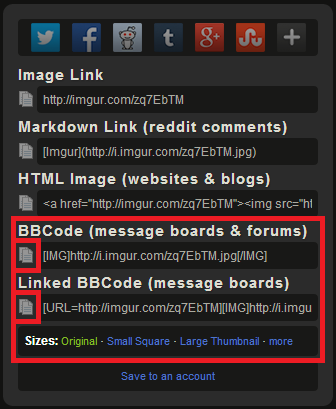
BBCode and Linked BBCode are the two formats you want to use for forums. For this walk-through I used BBCode because I had no need to link to a larger version of the image. If you want to post a thumbnail but link to the full resolution if someone clicks on the image, select the thumbnail size with the links on the bottom and then copy the Linked BBCode text
Last edited by llDemonll; Jan 17, 2014 at 03:33 PM.
Trending Topics

Thread
Thread Starter
Forum
Replies
Last Post
svt_lightning01
For Sale - Engine / Drivetrain / Power
2
Feb 6, 2013 07:31 PM
*.jdmevo8.*
Northwest Region
5
Jan 6, 2011 06:28 PM