


Greddy Turbo Timer Instal Pics/good detail


Greddy Turbo Timer Instal Pics/good detail
Before You get started you will need the following items:
Phillips scredriver,
wire strippers/crimpers
10mm wrench/socket
butt connectors
Note: The brown wire, and the three female conecters on the TT harness will not be used in this installation. Tape them off so they do not ground to anything.
http://www.roadraceengineering.com/e...-ecuwiring.htm
heres an ecu diagram for hooking up the speed wire. If you don'twant to mess with your ecu wiring its ok, it reads in KPH anyways.

Here is all the stuff, TT with wiring and TT harness, make sure everything is in good condition before starting.

Note: you may want to disconnect battey, but I like to listen to music while I work so I took the risk and didn't have a problem.
Start by removing the drivers side lower steering wheel column cover and the lower dash piece by the pedals. There are 2 screws on the the bottom holding the lower dash piece and 3 clips that pop off at the top. The steering wheel piece is held on by 3 screws remove them and it should come off in 2 pieces.
Once this is completed you should see this wiring harness:

This harness is a little bit of a pain to get off because the clip to get it off is on the backside. I used a screwdriver to push the clip down while I pulled it off. then you can plug in your TT harness into it, route the wiring where you want to mount your TT.
To ground your TT hook the black wire with the "O" on the end of it to this bolt:

Now on to the parking brake interface wire. Its the purple one BTW, Unscrew these in your center console:

Lift it up from the back and the 2 clips in the front will pop out and you should see this:

hook your purple wire to the wire comming off the E-brake. I removed all the tape around the E-brake for easier installation. I also heat shrinked the conncetion to prevent corrosion/shorting. Throw your center console back on and route the E-Brake wire where your TT is going to be mounted.
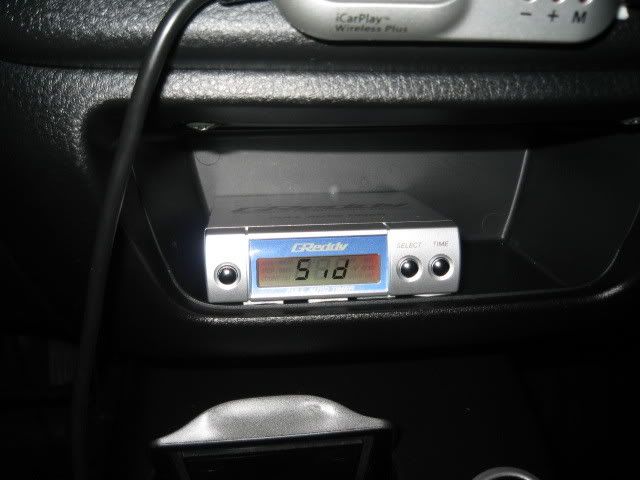
I monted mine in the center tray by routing the wire behind everything and cutting a smal hole in the back of it. To remove just unscrew the 2 screws and it will pop off.

I didn't have a dremel so I just used a utillity knife to cut out the hole. Route the wire through connect everything and you should have a working turbo timer. I used double sided sticky tape to mount it in place. I bought 3m, the stick pad that comes with it didn't work well enough for me.
Please PM if you have any questions and I will update this thread. Happy modding!
Phillips scredriver,
wire strippers/crimpers
10mm wrench/socket
butt connectors
Note: The brown wire, and the three female conecters on the TT harness will not be used in this installation. Tape them off so they do not ground to anything.
http://www.roadraceengineering.com/e...-ecuwiring.htm
heres an ecu diagram for hooking up the speed wire. If you don'twant to mess with your ecu wiring its ok, it reads in KPH anyways.
Here is all the stuff, TT with wiring and TT harness, make sure everything is in good condition before starting.
Note: you may want to disconnect battey, but I like to listen to music while I work so I took the risk and didn't have a problem.
Start by removing the drivers side lower steering wheel column cover and the lower dash piece by the pedals. There are 2 screws on the the bottom holding the lower dash piece and 3 clips that pop off at the top. The steering wheel piece is held on by 3 screws remove them and it should come off in 2 pieces.
Once this is completed you should see this wiring harness:
This harness is a little bit of a pain to get off because the clip to get it off is on the backside. I used a screwdriver to push the clip down while I pulled it off. then you can plug in your TT harness into it, route the wiring where you want to mount your TT.
To ground your TT hook the black wire with the "O" on the end of it to this bolt:
Now on to the parking brake interface wire. Its the purple one BTW, Unscrew these in your center console:
Lift it up from the back and the 2 clips in the front will pop out and you should see this:
hook your purple wire to the wire comming off the E-brake. I removed all the tape around the E-brake for easier installation. I also heat shrinked the conncetion to prevent corrosion/shorting. Throw your center console back on and route the E-Brake wire where your TT is going to be mounted.
I monted mine in the center tray by routing the wire behind everything and cutting a smal hole in the back of it. To remove just unscrew the 2 screws and it will pop off.
I didn't have a dremel so I just used a utillity knife to cut out the hole. Route the wire through connect everything and you should have a working turbo timer. I used double sided sticky tape to mount it in place. I bought 3m, the stick pad that comes with it didn't work well enough for me.
Please PM if you have any questions and I will update this thread. Happy modding!
Last edited by W_evo8; Jan 14, 2008 at 09:59 PM.


OK.... so I used this for reference since I had gotten a Greddy full auto turbo timer from a buddy of mine who had it in an SRT-4. I color matched all the ones in the column, hooked the black wire to a ground(like shown), and had to make a wire long enough to reach to the E-brake. WHERE the hell does the Brown wire conect too?!?!?

And does it matter which position the "line" switch is in since it doesn't specify in the Greddy online manual?
TIA,
Dan
And does it matter which position the "line" switch is in since it doesn't specify in the Greddy online manual?
TIA,
Dan


So either the Timer is jacked up.... or it's not made for an EVO. (although that shouldn't matter)
I can scroll through all the functions, I can set time in auto and normal mode, but it doesnt count down OR keep time. The only mode i have found that works right is the battery voltage mode.
I can scroll through all the functions, I can set time in auto and normal mode, but it doesnt count down OR keep time. The only mode i have found that works right is the battery voltage mode.


Trending Topics

So either the Timer is jacked up.... or it's not made for an EVO. (although that shouldn't matter)
I can scroll through all the functions, I can set time in auto and normal mode, but it doesnt count down OR keep time. The only mode i have found that works right is the battery voltage mode.
I can scroll through all the functions, I can set time in auto and normal mode, but it doesnt count down OR keep time. The only mode i have found that works right is the battery voltage mode.


Thread
Thread Starter
Forum
Replies
Last Post
W_evo8
Evo Show / Shine
14
Mar 25, 2009 07:04 PM
