


Back Up Camera


Newbie
Joined: Feb 2009
Posts: 19
Likes: 0
From: Evansville, IN
I just installed an ebay camera on my MR (factory MMCS).
The install went quicker and smoother than I expected. Fishing the wire was pretty simple, only tricky part was getting the interior door sill trim back in and lined up correctly.
There is not much documentation on where to pentrate through to the license plate area so I will comment on what I did.... I drilled a 1" hole behind the trunk plastic latch trim piece (right below the dentent on the sheet metal). This worked out perfectly! It lined up directly with the existing hole above the license plate. I then just fished the wire under the LR passanger seat.
Total cost: ~$50 (ebay camera= $30, adapter= $20)
Total install time: 3.5 hours
I will try and get some pics up soon.
The install went quicker and smoother than I expected. Fishing the wire was pretty simple, only tricky part was getting the interior door sill trim back in and lined up correctly.
There is not much documentation on where to pentrate through to the license plate area so I will comment on what I did.... I drilled a 1" hole behind the trunk plastic latch trim piece (right below the dentent on the sheet metal). This worked out perfectly! It lined up directly with the existing hole above the license plate. I then just fished the wire under the LR passanger seat.
Total cost: ~$50 (ebay camera= $30, adapter= $20)
Total install time: 3.5 hours
I will try and get some pics up soon.

Newbie
Joined: May 2009
Posts: 14
Likes: 0
From: Canada

Newbie
Joined: Apr 2009
Posts: 83
Likes: 0
From: Westminster, MD
That is the exact camera I purchased.
Video quality is OK. It's not great, but nothing worse than I expected. Nightvision is basically B/W. The main problem is when it's raining, moisture will block the lense sometimes.

http://cgi.ebay.com/NEW-CAR-REAR-VIE...3A1%7C294%3A50
That is the exact camera I purchased.
Video quality is OK. It's not great, but nothing worse than I expected. Nightvision is basically B/W. The main problem is when it's raining, moisture will block the lense sometimes.
That is the exact camera I purchased.
Video quality is OK. It's not great, but nothing worse than I expected. Nightvision is basically B/W. The main problem is when it's raining, moisture will block the lense sometimes.
Rain? What's that? LOL, luckily I live in a desert, so haven't had the moisture problem yet.

^ Yeah I hear what you're saying on the quality! I guess my pad is not as loaded as yours, I'm just looking at a 36' LG 
Mine gets a little blurry when it rains; like once every 3 months. My nightvision is pretty good and in color. The reverse lights really help out. [Daytime pics on page 2]
Mine gets a little blurry when it rains; like once every 3 months. My nightvision is pretty good and in color. The reverse lights really help out. [Daytime pics on page 2]

http://cgi.ebay.com/NEW-CAR-REAR-VIE...3A1%7C294%3A50
That is the exact camera I purchased.
Video quality is OK. It's not great, but nothing worse than I expected. Nightvision is basically B/W. The main problem is when it's raining, moisture will block the lense sometimes.
That is the exact camera I purchased.
Video quality is OK. It's not great, but nothing worse than I expected. Nightvision is basically B/W. The main problem is when it's raining, moisture will block the lense sometimes.

hey fellas..can anyone help me out? i tried to install my back up cam today to the factory nav and the write up here: http://www.soflancer.com/downloads/backcam.pdf says "On the back of the NAV you will find on the right side there is a 12 pin
connection block with nothing connected. Keep this pin out in mind. "
well there was something plugged in there thati had to unlplug...i plugged the harness and the rca cable in and try to set up the cam and it won't show anything on my screen (just black).
can anyone help me out?
here's the back of the nav unit and something's plugged in there...
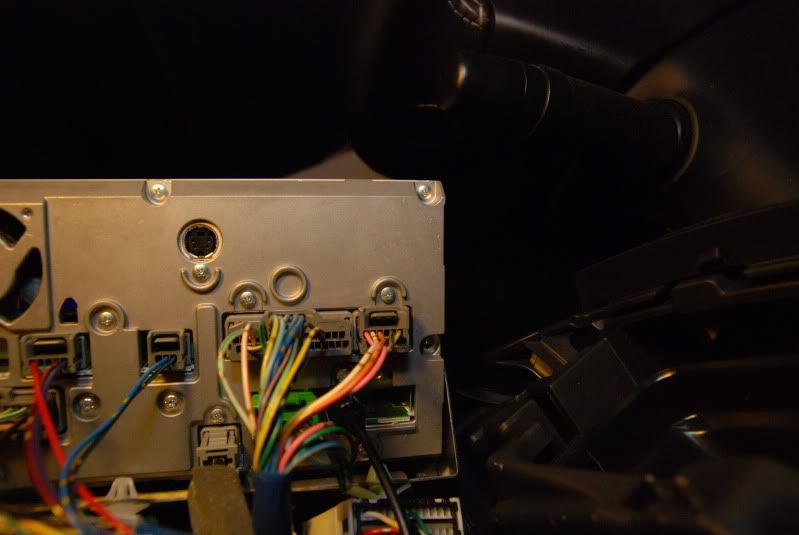
connection block with nothing connected. Keep this pin out in mind. "
well there was something plugged in there thati had to unlplug...i plugged the harness and the rca cable in and try to set up the cam and it won't show anything on my screen (just black).
can anyone help me out?
here's the back of the nav unit and something's plugged in there...
Last edited by reggiesd; Jul 28, 2009 at 12:26 AM.


reggiesd, i was just looking at an old picture of the back of my nav and it looks exacatly like yours. i wonder now how the people with the MMCS are doing it since there is a plug in there and it seems you cant remove it. do you think you can just "tap" onto the wires?
reggiesd, i was just looking at an old picture of the back of my nav and it looks exacatly like yours. i wonder now how the people with the MMCS are doing it since there is a plug in there and it seems you cant remove it. do you think you can just "tap" onto the wires?

https://www.evolutionm.net/forums/sa...tion-unit.html
look at this guy's nav its blank. i am confused now.
look at this guy's nav its blank. i am confused now.