


ECUflash/ Tactrix cable newb thread


As for the definition files, you should extract them to this folder:
c:\program files\openecu\ecuflash\rommetdata\mitsubishi\lance r
If you go into that folder you will see the couple of .xml definition files that come with EcuFlash for the Lancer. When you add all of my definition files into it you will be able to read pretty much any Lancer ROM. You should also check to make sure that this folder is the folder EcuFlash is looking at for definition files. Go to File > Options. Then look at what is listed under the 'Metadata Directory'. You should see:
C:/Program Files/OpenECU/EcuFlash/rommetadata or
C:/Program Files (x86)/OpenECU/EcuFlash/rommetadata [if you are running 64-bit Windows]
Correct the entry if it doesn't show this. Close and re-open EcuFlash and try to open the ROM you saved. If you get an error that states 'Unknown ROM Image' then your ROM doesn't have a definition file created for it yet.

You don't have to have the cable connected to use EcuFlash. If you have already read your ROM from your ECU and saved it to your computer you can open it and view it any time you want.
As for the definition files, you should extract them to this folder:
c:\program files\openecu\ecuflash\rommetdata\mitsubishi\lance r
If you go into that folder you will see the couple of .xml definition files that come with EcuFlash for the Lancer. When you add all of my definition files into it you will be able to read pretty much any Lancer ROM. You should also check to make sure that this folder is the folder EcuFlash is looking at for definition files. Go to File > Options. Then look at what is listed under the 'Metadata Directory'. You should see:
C:/Program Files/OpenECU/EcuFlash/rommetadata or
C:/Program Files (x86)/OpenECU/EcuFlash/rommetadata [if you are running 64-bit Windows]
Correct the entry if it doesn't show this. Close and re-open EcuFlash and try to open the ROM you saved. If you get an error that states 'Unknown ROM Image' then your ROM doesn't have a definition file created for it yet.
As for the definition files, you should extract them to this folder:
c:\program files\openecu\ecuflash\rommetdata\mitsubishi\lance r
If you go into that folder you will see the couple of .xml definition files that come with EcuFlash for the Lancer. When you add all of my definition files into it you will be able to read pretty much any Lancer ROM. You should also check to make sure that this folder is the folder EcuFlash is looking at for definition files. Go to File > Options. Then look at what is listed under the 'Metadata Directory'. You should see:
C:/Program Files/OpenECU/EcuFlash/rommetadata or
C:/Program Files (x86)/OpenECU/EcuFlash/rommetadata [if you are running 64-bit Windows]
Correct the entry if it doesn't show this. Close and re-open EcuFlash and try to open the ROM you saved. If you get an error that states 'Unknown ROM Image' then your ROM doesn't have a definition file created for it yet.

I guess a definition file doesnt exist for my ROM? I click the link to save the definition files. i tryed to save it to the directory you mentioned above "c:\program files\openecu\ecuflash\rommetdata\mitsubishi\lance r" but it said the folder doesnt exsist. Im lost..is saving it the same as extracting it? how to i extract the files??
click c drive, then program files, then openecu, then ecuflash, then rommetadata, then mitsubishi, then lancer. Senate typed that out by hand and made some typos. Once there, you will see a few other files. If you have the master definition file downloaded, and you open it up, you should see a window that looks like any other file explorer window. If you have winzip, winrar, 7zip or any other compression file software....you may see something different, but pretend you don't for now.
so you have the zip file "opened" not necessarily extracted just opened. Click all the files there, select them all with ctrl-A and just drag them all into the file (i mean folder) senate mentioned above. then close and reopen ecuflash
Also probably best to state the obvious...and start from the beginning.
Plug the cable into your car and computer, and open ecuflash. Select "read rom from ecu" and just save your stock rom from the car onto your computer as a backup.
Then, once you've got it saved, proceed as above, but I want to make sure you keep a backup of that original rom file.
Plug the cable into your car and computer, and open ecuflash. Select "read rom from ecu" and just save your stock rom from the car onto your computer as a backup.
Then, once you've got it saved, proceed as above, but I want to make sure you keep a backup of that original rom file.
Click start, then My computer.
click c drive, then program files, then openecu, then ecuflash, then rommetadata, then mitsubishi, then lancer. Senate typed that out by hand and made some typos. Once there, you will see a few other files. If you have the master definition file downloaded, and you open it up, you should see a window that looks like any other file explorer window. If you have winzip, winrar, 7zip or any other compression file software....you may see something different, but pretend you don't for now.
so you have the zip file "opened" not necessarily extracted just opened. Click all the files there, select them all with ctrl-A and just drag them all into the file (i mean folder) senate mentioned above. then close and reopen ecuflash
click c drive, then program files, then openecu, then ecuflash, then rommetadata, then mitsubishi, then lancer. Senate typed that out by hand and made some typos. Once there, you will see a few other files. If you have the master definition file downloaded, and you open it up, you should see a window that looks like any other file explorer window. If you have winzip, winrar, 7zip or any other compression file software....you may see something different, but pretend you don't for now.
so you have the zip file "opened" not necessarily extracted just opened. Click all the files there, select them all with ctrl-A and just drag them all into the file (i mean folder) senate mentioned above. then close and reopen ecuflash
Ok, i can get into the ecuflash folder thanks to your step by step for me
 If i try to open the definition files that i have downloaded it opens ECUflash and tells me the rom is missing or something. What program do i need to open the donloaded definition files with? i tried opening it with the internet and it wouldnt work, it wont even let me open it with "winzip"

Last edited by Mitsu.kid.02; Oct 3, 2010 at 08:58 PM.
Ok, i can get into the ecuflash folder thanks to your step by step for me If i try to open the definition files that i have downloaded it opens ECUflash and tells me the rom is missing or something. What program do i need to open the donloaded definition files with? i tried opening it with the internet and it wouldnt work, it wont even let me open it with "winzip"
If i try to open the definition files that i have downloaded it opens ECUflash and tells me the rom is missing or something. What program do i need to open the donloaded definition files with? i tried opening it with the internet and it wouldnt work, it wont even let me open it with "winzip" The definition files themselves aren't opened. You open ECUFlash, and in the menu of ecuflash (file, options) there is a path for where the rommetadata and definitions exist. If the .xml files (the definitions) are in that folder, then when you go to open the .bin or .hex of your car's ROM, the definition files are used to interperet the data into a human readable form. Take a screen shot of where you are having the problem or error, and post it on photobucket.com. With the program open, press print screen key on your keyboard. Next, open mspaint, from the accessories menu in windows. Press CTRL-V and the image will be pasted into paint. Save the picture and upload it to photobucket, and put a link to the photobucket image in this thread.


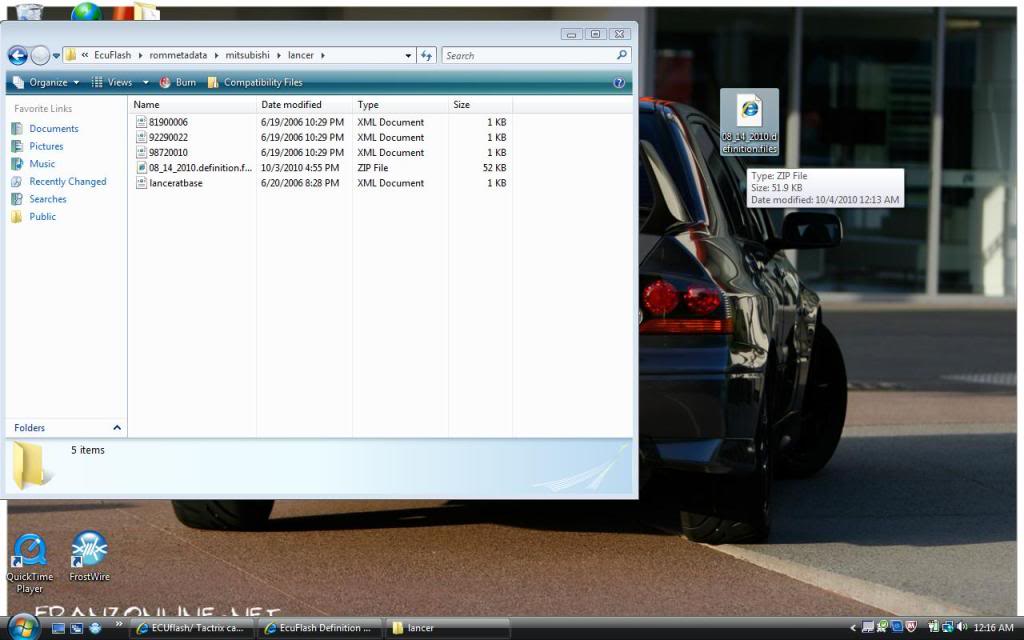
Last edited by Mitsu.kid.02; Oct 3, 2010 at 09:32 PM.

On that third image you have there, Click on the path at the top of the folder (ie click to the right of the word lancer) and it should highlight the entire path into a folder path, like c:\program files\....something\whatever. Just press ctrl-C and it will copy that path, then go over to the "unzip" screen you have up in your last pic, delete out all of that path and hit ctrl-V and it will paste the correct one you just copied in there.
As an alternative, click the word "Browse" in the unzip box, and just go through the menus that way to find the proper path, the same way you found it above.
For what it's worth, it's difficult to give exact advice....because you have a Vista/7 computer in the first screen shots and an XP in the second screen shot. It's easier to unzip in Vista/7 than XP for some people, but if you are going to use both of these computers, make sure the same definitions are on both computers. If it's not your computer, you better keep copies of all the ROMS you have in a safe place.
As an alternative, click the word "Browse" in the unzip box, and just go through the menus that way to find the proper path, the same way you found it above.
For what it's worth, it's difficult to give exact advice....because you have a Vista/7 computer in the first screen shots and an XP in the second screen shot. It's easier to unzip in Vista/7 than XP for some people, but if you are going to use both of these computers, make sure the same definitions are on both computers. If it's not your computer, you better keep copies of all the ROMS you have in a safe place.
Last edited by HornstarBU; Oct 4, 2010 at 08:27 AM.
On that third image you have there, Click on the path at the top of the folder (ie click to the right of the word lancer) and it should highlight the entire path into a folder path, like c:\program files\....something\whatever. Just press ctrl-C and it will copy that path, then go over to the "unzip" screen you have up in your last pic, delete out all of that path and hit ctrl-V and it will paste the correct one you just copied in there.
As an alternative, click the word "Browse" in the unzip box, and just go through the menus that way to find the proper path, the same way you found it above.
For what it's worth, it's difficult to give exact advice....because you have a Vista/7 computer in the first screen shots and an XP in the second screen shot. It's easier to unzip in Vista/7 than XP for some people, but if you are going to use both of these computers, make sure the same definitions are on both computers. If it's not your computer, you better keep copies of all the ROMS you have in a safe place.
As an alternative, click the word "Browse" in the unzip box, and just go through the menus that way to find the proper path, the same way you found it above.
For what it's worth, it's difficult to give exact advice....because you have a Vista/7 computer in the first screen shots and an XP in the second screen shot. It's easier to unzip in Vista/7 than XP for some people, but if you are going to use both of these computers, make sure the same definitions are on both computers. If it's not your computer, you better keep copies of all the ROMS you have in a safe place.
Ok, i understand what your saying! Thanks for the help bro! Basically im at work so this file has no need here, i just wanted to see if i had an "extract all" option when i downloaded this file from work it had that option, but when i download it at home, it does not have that option... i only use the laptop at home to work with my car...how do i "extract all" when i download the file at home on vista/7? the only options i have are open, open with etc, no "extract all" see what im sayin? is there a way i can extract the files and save them to my email or something so i can put them into the ecuflash folder on my laptop? Basically i can save them to the ecu folder here but not at home...its weird
Last edited by Mitsu.kid.02; Oct 4, 2010 at 08:55 AM.