


ECUFlash / Evoscan / Mitsulogger Questions


okay i just dl v1.40 and I want to know which cable do I use..? I've been out of the game for a while.. cant find my 1.3, so b4 i buy another one.. which one do i buy.. I heard there's a new one out there..lol

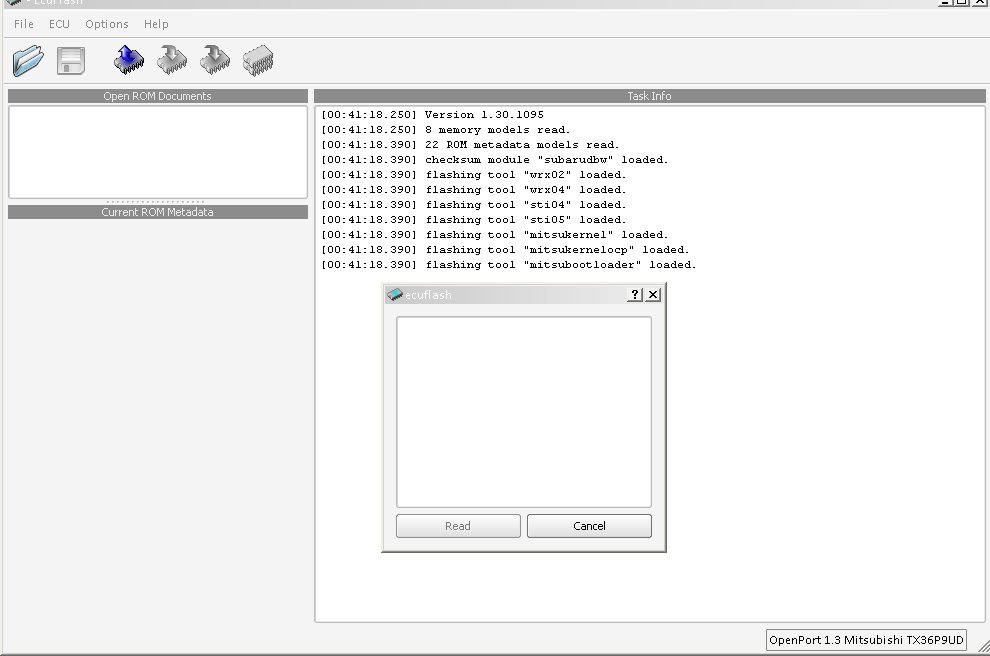
same problem here, works ok before. have tried uninstalling everything, evoscan, ecuflash, and the drivers for the tratrix, but there is still nothing to select when click "read from ecu"


Newbie
Joined: Nov 2008
Posts: 17
Likes: 0
From: New Zealand
I’m having the same problem with v 1.40, its just hanging when I ask it to read my Evo 9 ecu. It has read it before fine.
I was wondering if its driver problem? In particular with the tactrix cable running as a comms serial port as that’s where I had it throw up a windows message about not being able to find drivers that better match the ones I already had?
EvoScan was still running ok though.
I was wondering if its driver problem? In particular with the tactrix cable running as a comms serial port as that’s where I had it throw up a windows message about not being able to find drivers that better match the ones I already had?
EvoScan was still running ok though.
after some searching it seems like people are having similar issues after ecuflash version 1.4 installed. pretty sure the problem has something to do with the drivers for the cable. i will try v1.3 on another clean computer to see if it works fine or not.
Chris, did you receive my email? im planning to start the tuning as soon as this problem got solved.
Chris, did you receive my email? im planning to start the tuning as soon as this problem got solved.


Account Disabled
iTrader: (38)
Joined: Aug 2005
Posts: 9,319
Likes: 1
From: Virginia Beach, Virginia
after some searching it seems like people are having similar issues after ecuflash version 1.4 installed. pretty sure the problem has something to do with the drivers for the cable. i will try v1.3 on another clean computer to see if it works fine or not.
Chris, did you receive my email? im planning to start the tuning as soon as this problem got solved.
Chris, did you receive my email? im planning to start the tuning as soon as this problem got solved.

i just installed ecuflash v1.3 on a clean laptop and the program read the ecu fine without any problem. So its certain the problem has to do with the drivers for the cable.
I have tried removing all the installed software ecuflash, evoscan, drivers for the cable, removed all the driver related .dll and .sys manually from system32 and drivers directories, but it seems there are still some left-behinds which makes the reinstalling non-effective. I hope some experts can provide a solution for complete removal of driver related files.
I have tried removing all the installed software ecuflash, evoscan, drivers for the cable, removed all the driver related .dll and .sys manually from system32 and drivers directories, but it seems there are still some left-behinds which makes the reinstalling non-effective. I hope some experts can provide a solution for complete removal of driver related files.
Account Disabled
iTrader: (38)
Joined: Aug 2005
Posts: 9,319
Likes: 1
From: Virginia Beach, Virginia
I'm not in front of my tuning laptop but I recall there being two ways to clean it up.
1- uninstall ecuflash/evoscan from add/remove programs, then Uninstall the drivers from add/remove programs. Reboot and Re-install
2 - There was an uninstall program .exe in the ecuflash and evoscan folders if I remember correctly... something like C:\Program Files\OpenECU\EcuFlash\drivers\x86
1- uninstall ecuflash/evoscan from add/remove programs, then Uninstall the drivers from add/remove programs. Reboot and Re-install
2 - There was an uninstall program .exe in the ecuflash and evoscan folders if I remember correctly... something like C:\Program Files\OpenECU\EcuFlash\drivers\x86
I'm not in front of my tuning laptop but I recall there being two ways to clean it up.
1- uninstall ecuflash/evoscan from add/remove programs, then Uninstall the drivers from add/remove programs. Reboot and Re-install
2 - There was an uninstall program .exe in the ecuflash and evoscan folders if I remember correctly... something like C:\Program Files\OpenECU\EcuFlash\drivers\x86
1- uninstall ecuflash/evoscan from add/remove programs, then Uninstall the drivers from add/remove programs. Reboot and Re-install
2 - There was an uninstall program .exe in the ecuflash and evoscan folders if I remember correctly... something like C:\Program Files\OpenECU\EcuFlash\drivers\x86


I’m having the same problem with v 1.40, its just hanging when I ask it to read my Evo 9 ecu. It has read it before fine.
I was wondering if its driver problem? In particular with the tactrix cable running as a comms serial port as that’s where I had it throw up a windows message about not being able to find drivers that better match the ones I already had?
EvoScan was still running ok though.
I was wondering if its driver problem? In particular with the tactrix cable running as a comms serial port as that’s where I had it throw up a windows message about not being able to find drivers that better match the ones I already had?
EvoScan was still running ok though.


I asked this question in a thread but nobody has giving me any ideas so I'll ask here. I have evoscan v2.5 and an openport 1.3 cable. Ecuflash works perfectly, but it won't stay connected to Evoscan. On my laptop, it disconnects and reconnects within 10 seconds. On my buddy's laptop, it does the same every minute or so. I've uninstalled Evoscan and reinstalled it. Anybody got any ideas?

