


Android + Evo


Connectivity isn't really that difficult, especially with the Android tablet over the carpc.
If you guys want to read a ton on the subject you can go to mp3car.com and check out the forum about CarPCs, tablet CarPCs, etc, etc. There are a ton of different build out there.
I have been running a CarPC for years in two different cars, but I am about to move over to Android as well, to save the need for a PC, and a few extra parts. When I finally switch over, maybe I can make a list. But connectivity really isn't that bad in terms of the radio/amp integration and/or power integration.
If you guys want to read a ton on the subject you can go to mp3car.com and check out the forum about CarPCs, tablet CarPCs, etc, etc. There are a ton of different build out there.
I have been running a CarPC for years in two different cars, but I am about to move over to Android as well, to save the need for a PC, and a few extra parts. When I finally switch over, maybe I can make a list. But connectivity really isn't that bad in terms of the radio/amp integration and/or power integration.


Evolved Member
iTrader: (33)
Joined: Jul 2002
Posts: 5,313
Likes: 1
From: Raleigh, Transplanted from Toronto, Canada
Damn thats super clean. I may have to give my wife my Pioneer and do this instead. I realize its old but the install was very professional
Last edited by SmurfZilla; Feb 19, 2013 at 10:00 AM.


Connectivity isn't really that difficult, especially with the Android tablet over the carpc.
If you guys want to read a ton on the subject you can go to mp3car.com and check out the forum about CarPCs, tablet CarPCs, etc, etc. There are a ton of different build out there.
I have been running a CarPC for years in two different cars, but I am about to move over to Android as well, to save the need for a PC, and a few extra parts. When I finally switch over, maybe I can make a list. But connectivity really isn't that bad in terms of the radio/amp integration and/or power integration.
If you guys want to read a ton on the subject you can go to mp3car.com and check out the forum about CarPCs, tablet CarPCs, etc, etc. There are a ton of different build out there.
I have been running a CarPC for years in two different cars, but I am about to move over to Android as well, to save the need for a PC, and a few extra parts. When I finally switch over, maybe I can make a list. But connectivity really isn't that bad in terms of the radio/amp integration and/or power integration.
i could just shut up and check out those links u posted later today
For connecting to the radio, you have a few options. But in general, you would be using the audio out (3.5mm) to connect to your audio system. Also, if you wanted, you could use a bluetooth receiver, plugged into your amp and have audio sent from the tablet via bluetooth to your car's speakers. There are really a lot of options, but all are fairly straightforward.
Just a quick example. I will be replacing my CarPC with a Nexus 7 sometime in the near future. For the CarPC, you needed a lot more complex hardware, including a power supply designed for a car environment (this controls startup/shutdown of the PC when car starts, etc). With the Android, you can use Tasker to do this.
For the Nexus 7, I will be using the newly released dock from Asus as it uses the POGO pins for charging. So, you will have your USBs and 3.5mm audio out still free. So, for audio, I could go 3.5mm to RCAs to amp. Or do it with bluetooth reciever: amp to rca to bluetooth receiver. This would also help with any potential ground loops as well having audio cables connected.
Just a quick example. I will be replacing my CarPC with a Nexus 7 sometime in the near future. For the CarPC, you needed a lot more complex hardware, including a power supply designed for a car environment (this controls startup/shutdown of the PC when car starts, etc). With the Android, you can use Tasker to do this.
For the Nexus 7, I will be using the newly released dock from Asus as it uses the POGO pins for charging. So, you will have your USBs and 3.5mm audio out still free. So, for audio, I could go 3.5mm to RCAs to amp. Or do it with bluetooth reciever: amp to rca to bluetooth receiver. This would also help with any potential ground loops as well having audio cables connected.
For connecting to the radio, you have a few options. But in general, you would be using the audio out (3.5mm) to connect to your audio system. Also, if you wanted, you could use a bluetooth receiver, plugged into your amp and have audio sent from the tablet via bluetooth to your car's speakers. There are really a lot of options, but all are fairly straightforward.
Just a quick example. I will be replacing my CarPC with a Nexus 7 sometime in the near future. For the CarPC, you needed a lot more complex hardware, including a power supply designed for a car environment (this controls startup/shutdown of the PC when car starts, etc). With the Android, you can use Tasker to do this.
For the Nexus 7, I will be using the newly released dock from Asus as it uses the POGO pins for charging. So, you will have your USBs and 3.5mm audio out still free. So, for audio, I could go 3.5mm to RCAs to amp. Or do it with bluetooth reciever: amp to rca to bluetooth receiver. This would also help with any potential ground loops as well having audio cables connected.
Just a quick example. I will be replacing my CarPC with a Nexus 7 sometime in the near future. For the CarPC, you needed a lot more complex hardware, including a power supply designed for a car environment (this controls startup/shutdown of the PC when car starts, etc). With the Android, you can use Tasker to do this.
For the Nexus 7, I will be using the newly released dock from Asus as it uses the POGO pins for charging. So, you will have your USBs and 3.5mm audio out still free. So, for audio, I could go 3.5mm to RCAs to amp. Or do it with bluetooth reciever: amp to rca to bluetooth receiver. This would also help with any potential ground loops as well having audio cables connected.

Evolved Member
iTrader: (33)
Joined: Jul 2002
Posts: 5,313
Likes: 1
From: Raleigh, Transplanted from Toronto, Canada

Parrot makes nice looking devices but they lack in the software. They take a long time to boot, crash, all require internet, etc., etc.
They look damn pretty, but they leave a lot to be desired in the functionality department
They look damn pretty, but they leave a lot to be desired in the functionality department


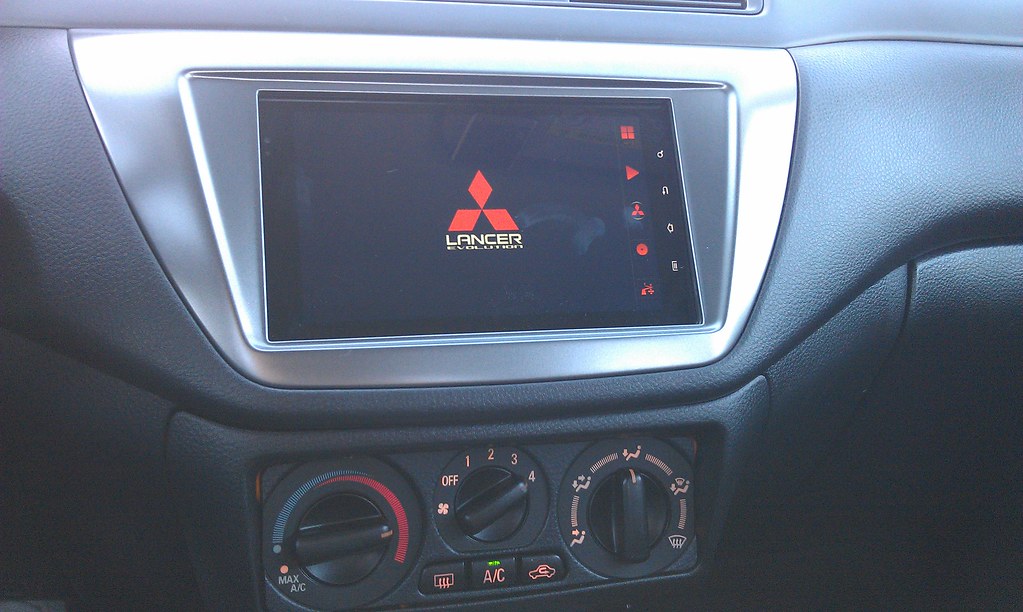


I'm in the process of pulling together pieces to do something similar but was curious on what route you went for hardwiring the tablet charger to the car.
I've seen people tap into the existing stereo harness or cigarette lighter power and others run a dedicated power from the battery so I'm curious as to how you went about it if you're willing to share.
Also, have you had any issues with charge rate being less than the power consumption when using any of the more intensive apps like turn by turn navigation or internet radio?
Thanks!
I've seen people tap into the existing stereo harness or cigarette lighter power and others run a dedicated power from the battery so I'm curious as to how you went about it if you're willing to share.
Also, have you had any issues with charge rate being less than the power consumption when using any of the more intensive apps like turn by turn navigation or internet radio?
Thanks!
You can pull your power from wherever is most convenient for you. What I did personally when I first bought my Evo was to install a separate min fuse box, so that I can have plenty of switched and constant 12v for whatever accessories would be added in the future.
That being said, for the tablet, I wired in a spare cigarette lighter socket (~$1) behind the tablet to one of those switched 12V fused wires (you can use the existing cigarette lighter if you wish, since it will have enough power for your needs).
From there, I just bought one of the cigarette lighter adapters on Amazon, Ebay etc that provide a couple USB ports. Plug that into the new cigarette socket and that is where you power the tablet from.
You just have to make sure that adapter that you buy can supply sufficient amperage (at least 2A) and that the usb cable and adapter allow fast charging.
If you use a Nexus 7, do a google search for 'Timur USB ROM'. He provides a Kernel specifically designed for fixed installations in cars, where the tablet goes to deep sleep automatically upon power loss and wakes up when power is back (ie starting car). I posted a couple quick videos in the other thread in this subforum to show that. That ROM also has a setting which enables or disabled the fast charging.
As far as charge rates go, I have no problem with the charging with several intensive apps open (SDR touch, CarHome, Google Maps navigation, Torque, etc).
That being said, for the tablet, I wired in a spare cigarette lighter socket (~$1) behind the tablet to one of those switched 12V fused wires (you can use the existing cigarette lighter if you wish, since it will have enough power for your needs).
From there, I just bought one of the cigarette lighter adapters on Amazon, Ebay etc that provide a couple USB ports. Plug that into the new cigarette socket and that is where you power the tablet from.
You just have to make sure that adapter that you buy can supply sufficient amperage (at least 2A) and that the usb cable and adapter allow fast charging.
If you use a Nexus 7, do a google search for 'Timur USB ROM'. He provides a Kernel specifically designed for fixed installations in cars, where the tablet goes to deep sleep automatically upon power loss and wakes up when power is back (ie starting car). I posted a couple quick videos in the other thread in this subforum to show that. That ROM also has a setting which enables or disabled the fast charging.
As far as charge rates go, I have no problem with the charging with several intensive apps open (SDR touch, CarHome, Google Maps navigation, Torque, etc).