DSLR Photography for beginner - How to shoot like a Pro.


Thread Starter
Evolved Member
iTrader: (34)
Joined: Apr 2008
Posts: 977
Likes: 1
From: LA | New York | Seattle


So Alvin you telling me my 5mp point n shoot can't do these awesome pictures  I would like to get an XTi with the 18-135mm lense...I think that should be good enough for awhile eh?
I would like to get an XTi with the 18-135mm lense...I think that should be good enough for awhile eh?


Thread Starter
Evolved Member
iTrader: (34)
Joined: Apr 2008
Posts: 977
Likes: 1
From: LA | New York | Seattle
Sure  You can see minimal processing is the key. In the picture with my puppy, one of the most important thing was for me to rotate the picture so that the deck is parallel with the frame of the picture. Other than that everything else was just adjusting the sharpness and the color of the picture to how my eyes saw it at the time it was captured.


You can see minimal processing is the key. In the picture with my puppy, one of the most important thing was for me to rotate the picture so that the deck is parallel with the frame of the picture. Other than that everything else was just adjusting the sharpness and the color of the picture to how my eyes saw it at the time it was captured.

Newbie
Joined: Nov 2007
Posts: 13
Likes: 0
From: Fresno, CA
That is done using Photoshop's two very simple tools: eye dropper tool and brush tool. You use the eye dropper to select a pixel close to the spot where the item you want to eliminate is, then you use the brush to paint that color over the item. It's not easy to make it look flawless so I do not suggest you doing this until you're more comfortable with Photoshop. Like they say, walk first before you run
great write up by the way. and explaining the rig shots is increadlby helpful.

Sure You can see minimal processing is the key. In the picture with my puppy, one of the most important thing was for me to rotate the picture so that the deck is parallel with the frame of the picture. Other than that everything else was just adjusting the sharpness and the color of the picture to how my eyes saw it at the time it was captured.
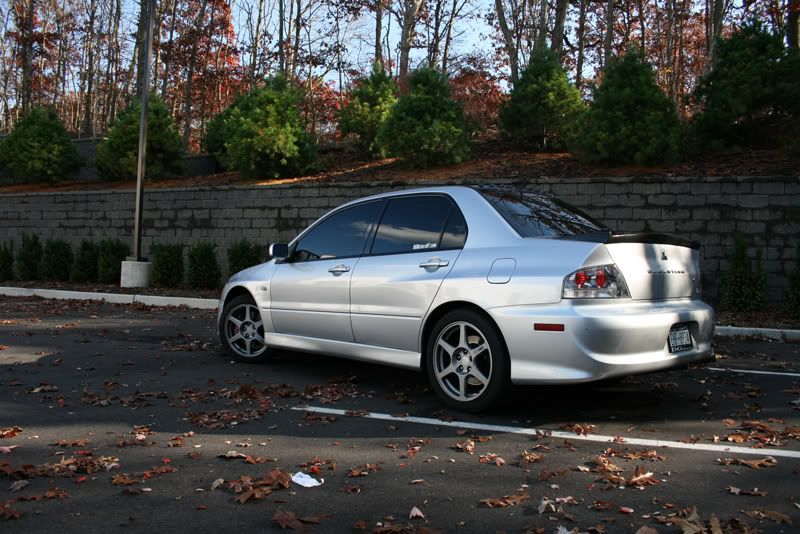
You can see minimal processing is the key. In the picture with my puppy, one of the most important thing was for me to rotate the picture so that the deck is parallel with the frame of the picture. Other than that everything else was just adjusting the sharpness and the color of the picture to how my eyes saw it at the time it was captured.thanks.. hmm. i have canon rebel xti and when i shoot pix in either auto or manual they seem to be kinda blurry until i photoshop em and make em not blurry.
Heres my original picture
and heres my edited picture
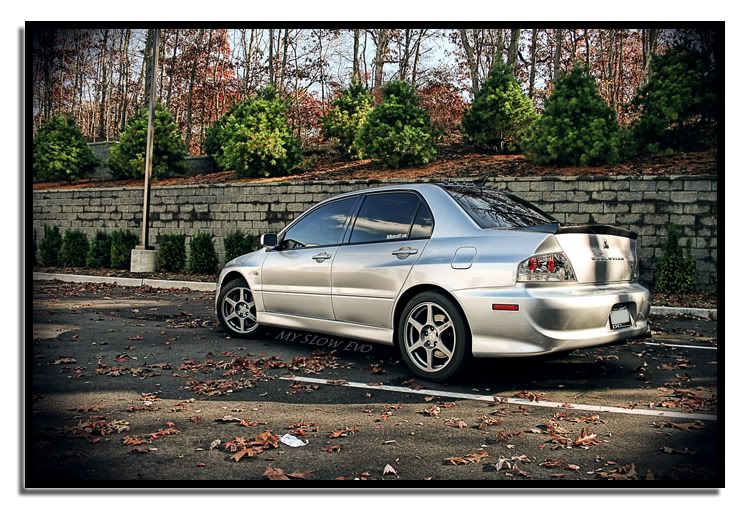
the originals seem to come out like Crap. lol.. Alot of the other pix i took where Really Blurry and they were on auto with auto focus.. i dont get it