


LCD / touchscreen carputer options??


LCD / touchscreen carputer options??
Hi, I was wondering if thee are any commercially available LCD options yet that will allow me to view an EvoScan gauge setup including external inputs such as WB02. The EvoScan touchscreen appears to be Evo IX and lower only? Sorry if this has been discussed.

Its not the software that enables touch screen input. It is the relationship between computer and the screen usually a usb connection older style were serial. Any app can be run with touchscreen. However a small 7inch screen is a little difficult to be exact with with a mouse pointer. Thats y most flip out touch screens have big boxes you touch with your finger.
Its not the software that enables touch screen input. It is the relationship between computer and the screen usually a usb connection older style were serial. Any app can be run with touchscreen. However a small 7inch screen is a little difficult to be exact with with a mouse pointer. Thats y most flip out touch screens have big boxes you touch with your finger.

Evolved Member
Joined: Dec 2008
Posts: 901
Likes: 0
From: CA
Search is your friend :-) Alternatively, if you want something that is easy & inexpensive to setup without "overhauling" your dash, then checkout this thread:
https://www.evolutionm.net/forums/ev...an-gauges.html
Clicky videos on my sig.
https://www.evolutionm.net/forums/ev...an-gauges.html
Clicky videos on my sig.
Last edited by tipoytm; Sep 10, 2009 at 08:19 AM.
Search is your friend :-) Alternatively, if you want something that is easy & inexpensive to setup without "overhauling" your dash, then checkout this thread:
https://www.evolutionm.net/forums/ev...an-gauges.html
Clicky videos on my sig.
https://www.evolutionm.net/forums/ev...an-gauges.html
Clicky videos on my sig.

The only setup's I've seen that I like are all homebrew. Some examples:
http://www.avbrand.com/projects/carpc/
http://inventgeek.com/Projects/Autom.../overview.aspx
http://www.avbrand.com/projects/carpc/
http://inventgeek.com/Projects/Autom.../overview.aspx
Trending Topics

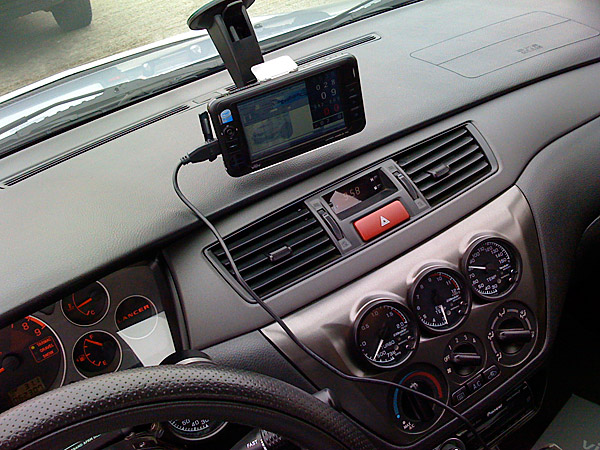
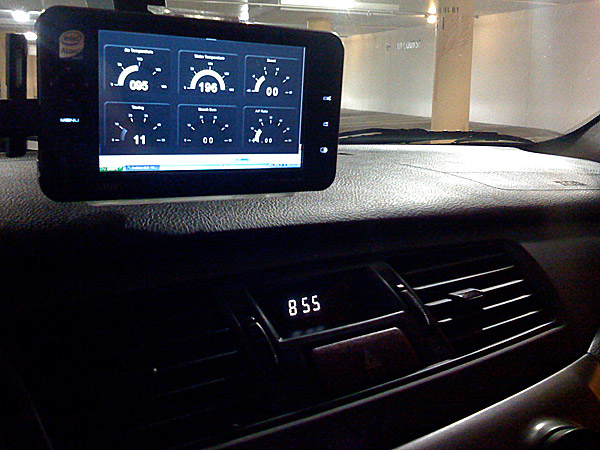
https://www.evolutionm.net/forums/ec...pc-review.html
You could also purchase a cheap(er) netbook and then use this USB touchscreen: http://www.mimomonitors.com/
Evolved Member
Joined: Dec 2008
Posts: 901
Likes: 0
From: CA
^ That UMPC looks like a great solution for the OP, it runs windows XP... thus it can run ANYTHING... unlike the Evoscan GPS device. The virtual gauges are resizable so, it won't be a problem with the screen size, as long as you don't display too many gauges (helps with the lag anyway). Nice setup Bryan :-) What GPS software do you use or does it come with one bundled? I was thinking of getting MS Streets & Trips plus the dongle.
I can't live without a keyboard, but since that thing has Bluetooth builtin, a BT mini-keyboard (or USB wireless) would be a nice addition and if you don't use it, you just snuck it in under the driver seat.
I can't live without a keyboard, but since that thing has Bluetooth builtin, a BT mini-keyboard (or USB wireless) would be a nice addition and if you don't use it, you just snuck it in under the driver seat.
Last edited by tipoytm; Sep 10, 2009 at 11:47 AM.
You could also purchase a cheap(er) netbook and then use this USB touchscreen: http://www.mimomonitors.com/
Will that pocket PC start up and run EvoScan automatically, or do you log in everytime you start the car?
Evolved Member
Joined: Dec 2008
Posts: 901
Likes: 0
From: CA
^ It is running Windows XP, so easiest trick is to use Hibernate. Set all the parameters of Evoscan, your gauge layout, hotkeys, etc. Once you got your desktop setup... all you need to do is specify under XP's control panel that when you press the power button, it won't shutdown, but instead hibernate. Set everything (sleep button, etc) to Hibernate. So next time you turn on your miniPC, the desktop you had it preset will just pop back on.
I have that demoed on my 2nd vid, when I fire up the netbook, it just goes back to the last state it was in before hibernation. I don't have to manually launch and set everything again.
I have that demoed on my 2nd vid, when I fire up the netbook, it just goes back to the last state it was in before hibernation. I don't have to manually launch and set everything again.
Last edited by tipoytm; Sep 10, 2009 at 12:50 PM.

Thread
Thread Starter
Forum
Replies
Last Post
giumela
Evo X Electrical / Audio / Security
293
Aug 22, 2017 08:29 AM
evo4mad
ECU Flash
1880
May 5, 2015 06:22 PM
smanders
Evo X Electrical / Audio / Security
5
Apr 13, 2009 08:42 PM
