


Conditional How-To: SMART fuel threshold


 I did not even know that that directory existed.

Lol, I would have never thought to look there. I was looking under the Xede support section that shows the available firmware/Xmap for downloading. Thanks Dustin for directing us to the proper link, really appreciate it.

O.K I am going to try and do this firmware upgrade tonight when I get home from work. Excuse my lack of knowledege with this firmware upgrade. Do I upload all the 3 firmware items (V3.2.0.3 Smart, XCodeV3.2.0.16, and XCode V3.2.0.16) indivudually to my Xede or do I combine them in one folder and upload them all at once?

I downloaded all the new Firmware/Xmap per Dustin's instructions. I then began setting up my Conditional S.M.A.R.T. map and ran into a little problem. I was unable to change the Output Variable to Freq0 Out. All I could choose from is Feq0O Out. On the Conditional Setup in the Map Enable Setup, the "RPM" was not showing in it's box. I could not get it to appear, everything else was working out as directed. I'm concerned about this because I know from the past that if all these parameters are not set up properly, the car will not run right. Please help. Thanks.
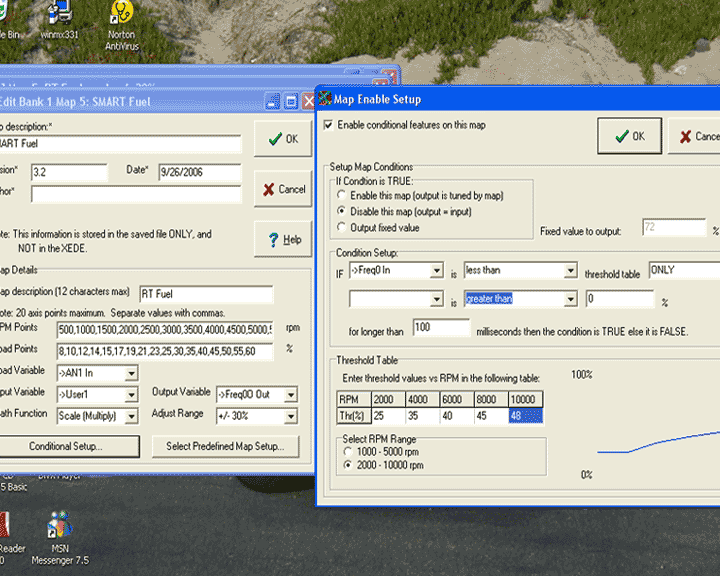

Don't worry about the RPM in the Box, the second condition line is disabled after the word ONLY. (AND , OR will activate second condition statement).
"Freq0O Out" may just be a SW typo. The best way to test if all is OK is to watch the cursor track the smart fuel table while you drive around with Xede connected to the laptop.
"Freq0O Out" may just be a SW typo. The best way to test if all is OK is to watch the cursor track the smart fuel table while you drive around with Xede connected to the laptop.
Thanks Jorge T, I was actually going to PM you about this one. I was also thinking about a software typo, but was not quite sure if it was. I'm hoping that Dustin or Shiv will read this and set this straight. Thanks again.
Just checked mine and it has the variable for output as "Freq0 Out".
Are you using Xmap v3.2.0.17 (the one I'm using showing the correctly "named" output variable) or are you using Xmap v3.2.0.16?
Are you using Xmap v3.2.0.17 (the one I'm using showing the correctly "named" output variable) or are you using Xmap v3.2.0.16?
Thanks again Dustin. I loaded up the new firmware last night. Took a couple of tries, but my Xede finally accepted it. I then uploaded my new revised conditional map today and the car feels fine. I am now officially updated  .
.
.


O.K I am going to try and do this firmware upgrade tonight when I get home from work. Excuse my lack of knowledege with this firmware upgrade. Do I upload all the 3 firmware items (V3.2.0.3 Smart, XCodeV3.2.0.16, and XCode V3.2.0.16) indivudually to my Xede or do I combine them in one folder and upload them all at once?
- XCode v3.2.0.16 Conditional XMap --> XCode V32016_V109(Pre).hex
- XCode v3.2.0.16 Conditional Firmware --> XCode V32016 Hybrid SMART Firmware (4-Even only).hex
And just so I'm sure how to go about this, I assume I should
- Flash the Xede with the new firmware (from above)
- Uninstall my current version of XMap (3.2.0.7)
- Install XMAP v3.2.17
- Tune!


