


Conditional How-To: SMART fuel threshold


Thread Starter
Evolved Member
iTrader: (20)
Joined: Mar 2003
Posts: 4,941
Likes: 0
From: Danville/Blackhawk, California
Conditional How-To: SMART fuel threshold
Here's another instructional how-to for those beta guys running the new conditional software...
For those running SMART, there is no no reason to have a separate SMART Fuel Threshold table (used to active/deactive the SMART fuel table). Now we can dictate the activation/deactivation thresholds with conditional parameters nested inside the SMART Fuel Map. What this means is there is one less table needed in a full SMART map (now 5 instead of 6). And since the Xede can hold 12 maps it in (divided into 2 banks), you can now have two fully SMART+meth/nls/etc,. maps at the flip of the switch. More importantly, you can now set up a much nicer threshold switch for SMART fuel activation/decactivation. Before, it was an RPM independant switch at 40% load. Now you can can contour the switch as a function of RPM (which is the ideal way of doing it since RPM will affect load).
Here's what you do...
Go to your SMART Fuel Threshold table. It's the one that has 0s in the top half and -100s in the bottom half. Right-click on it. Select "Delete this map." It'll ask you if you are sure. Say yes.
Go to your SMART Fuel table. Right-click and Select "Edit this map." Go to the Load Variable parameter and change it to AN1in (Wideband o2 input). Then go to Conditional Set up and configure it to look like this:

How this works...
This is a pretty simple one. It reads like this... Disable this SMART Fuel map (make it completely pass-through) if Load (aka MAF in aka Freq0in) is less than the load threshold curve down below for a period longer than 100 milliseconds (1/10th of a second). Notice that is is an ONLY conditional parameter. Not an AND or an OR. This means that only one condition (alone with the time parameter) had to be met in order for the map to be disabled. Once load/MAF/Freq0in is greater than the threshold curve, the SMART Fuel Table is active and doing its thing. You'll find that you can now have your SMART Fuel system working more often now wherease before it would only really kick on above 4000rpm under highish boost. Pretty easy, huh?
Cheers,
shiv
For those running SMART, there is no no reason to have a separate SMART Fuel Threshold table (used to active/deactive the SMART fuel table). Now we can dictate the activation/deactivation thresholds with conditional parameters nested inside the SMART Fuel Map. What this means is there is one less table needed in a full SMART map (now 5 instead of 6). And since the Xede can hold 12 maps it in (divided into 2 banks), you can now have two fully SMART+meth/nls/etc,. maps at the flip of the switch. More importantly, you can now set up a much nicer threshold switch for SMART fuel activation/decactivation. Before, it was an RPM independant switch at 40% load. Now you can can contour the switch as a function of RPM (which is the ideal way of doing it since RPM will affect load).
Here's what you do...
Go to your SMART Fuel Threshold table. It's the one that has 0s in the top half and -100s in the bottom half. Right-click on it. Select "Delete this map." It'll ask you if you are sure. Say yes.
Go to your SMART Fuel table. Right-click and Select "Edit this map." Go to the Load Variable parameter and change it to AN1in (Wideband o2 input). Then go to Conditional Set up and configure it to look like this:
How this works...
This is a pretty simple one. It reads like this... Disable this SMART Fuel map (make it completely pass-through) if Load (aka MAF in aka Freq0in) is less than the load threshold curve down below for a period longer than 100 milliseconds (1/10th of a second). Notice that is is an ONLY conditional parameter. Not an AND or an OR. This means that only one condition (alone with the time parameter) had to be met in order for the map to be disabled. Once load/MAF/Freq0in is greater than the threshold curve, the SMART Fuel Table is active and doing its thing. You'll find that you can now have your SMART Fuel system working more often now wherease before it would only really kick on above 4000rpm under highish boost. Pretty easy, huh?
Cheers,
shiv


Go to your SMART Fuel table. Right-click and Select "Edit this map." Go to the Load Variable parameter and change it to AN1in (Wideband o2 input). Then go to Conditional Set up and configure it to look like this:

Needs to be a sticky
Trending Topics
Now I do have lean protect and Smart conditionals activated...so far so good car feels quick. Noticed boost is spiking higher ... will have to log , does not make sense since it's a lot warmer and boost table was set when temps were in the 60s.


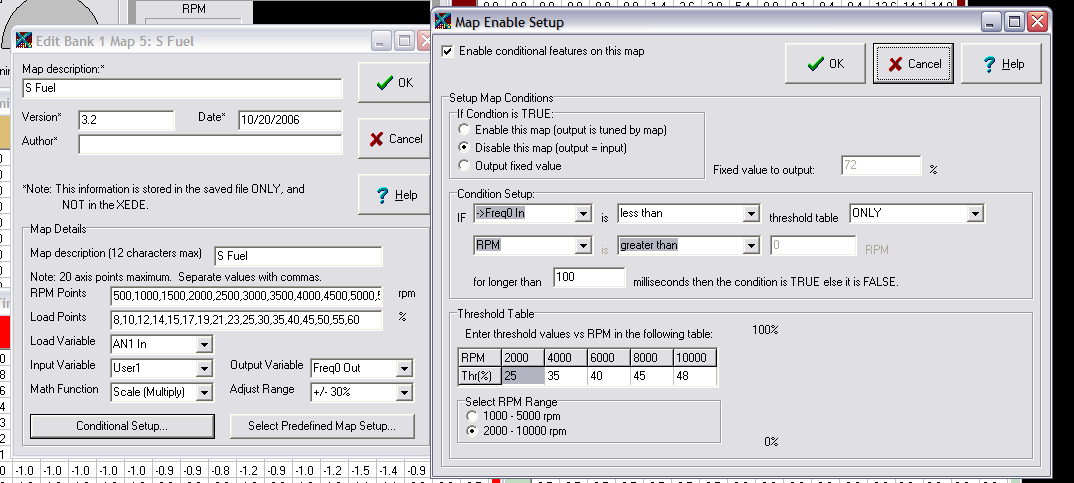


When I tried to make my conditional fuel map, it looked a little different from yours, Jorge T. Please see my screen shot as an attachment. How do I complete the rest of the conditional fuel map? I also got a message that says "This feature has not been fully implemented" when I accessed the conditional map feature. Is it normal for that message to pop up? Also one quick question for Shiv. I am still using the original S.M.A.R.T. set up from the Tuning Technologies dyno day from 7/2005. Will this map work with that firmware or will I need to update to a newer version?
Last edited by EvoTio; Nov 10, 2006 at 08:24 AM.