


HOW TO: Change the .xml to open maps


Thread Starter
Evolved Member
iTrader: (6)
Joined: May 2006
Posts: 731
Likes: 0
From: From Vegas to Reno
HOW TO: Change the .xml to open maps
We've all had the dreaded "Unkown Rom Image" box pop up on us before. Heres how I have found to navigate through it, and also change it if you happen to pick the wrong .xml file.
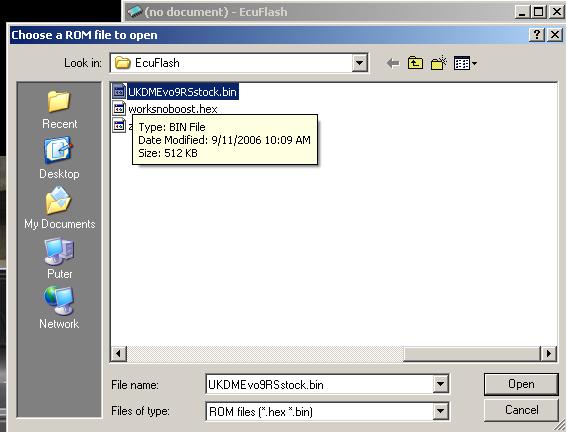
First thing, we need to open EcuFlash. Lets say I want to take a look at a new rom I just downloaded, a stock Euro evo 9 RS. Select it from the list and open it up.
Ahh here it is, our favorite box. Well lets go ahead and select a .xml file and give it a shot. So select "copied from definition below" and use the drop down box. For this one Im going to select 2006 Mitsubishi USDM Lancer EVO9 (88590013). Lets see how that works out for us.

Ok, so our rom is open. Lets take a look at the high octane fuel table and see how it looks.

Ooops, that doesnt look right at all! See how the rpm and load values are all messed up? Alot of times you can still read the values in the table, but its just a pain. Basically the .xml file we chose was pointing at the wrong definitions. No worries, lets fix it.
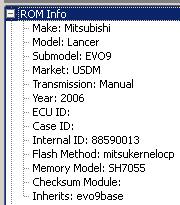
First double check the .xml file number that you used. You can see it by clicking on the + next to Rom Info at the top of the map. Internal ID: 88590013, got it. Once you know the number, close EcuFlash. It loads .xml files each time you open it, and we are going to change them around a bit.
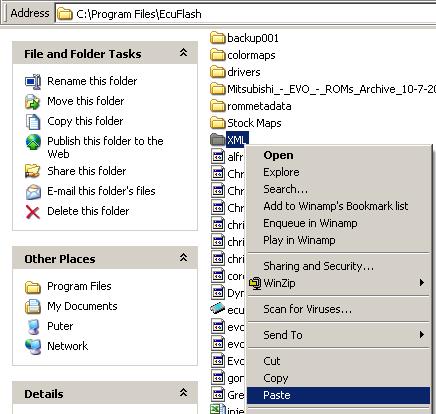
Next we are going to navigate to the program folder for EcuFlash. It is usually located in your program files. Go to My Computer --> C: --> Program Files --> EcuFlash.
From here lets create a new folder. Call it XML. We will be using it to swap .xml files back and forth from the rommetadata folder. Speaking of rommetadata, lets go into that. In that folder you should see a couple more, you want the one labeled Mitsubishi. Then after that we are going to pick Evo. In this folder, you should see your .xml files that EcuFlash is using to read your maps. Lets find the .xml we used on our Euro RS map we tried to load.
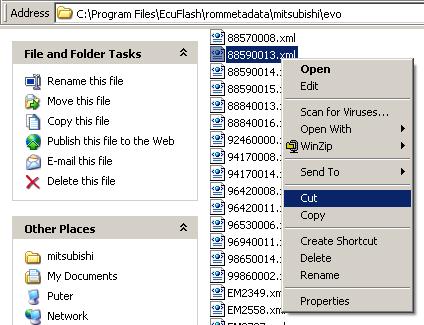
Right click, select cut. Then use the back button three times to get us back to the root EcuFlash folder where we made that XML folder. Paste that .xml file into the XML folder we made. Usually I go check and make sure its gone from the rommetadata --> mitsubishi --> evo folder as well before I open up EcuFlash again.
Now we are ready to open EcuFlash again. Lets try that map again, and use a different .xml definition. By deleting the one it was using out of the folder, EcuFlash is going to ask us to define it again. Lets try this 2006 Mitsubishi EDM Lancer EVO9 (88840016). That sounds promising. Same thing, "copied from definition below" and select if from the drop down.
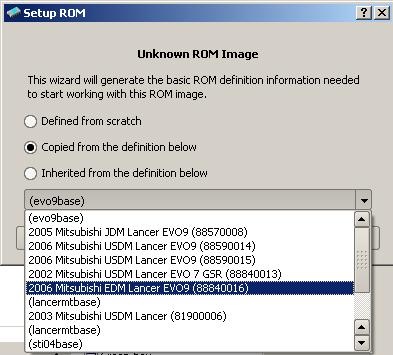
Lets see how we did, open up that high octane fuel map again.

Much better! Thats alot easier to cross reference then that other jumble of numbers, and the other tables will now match up correctly as well now.
We're not completely done though, there is one last step. We need to put that .xml file that we deleted back into the rommetadata folder. Some other map we have may need it. So, go back into your EcuFlash folder, and click on the XML folder again.
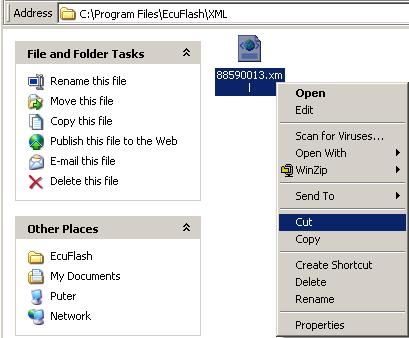
Lets cut it again, and hit back to get to the EcuFlash root folder. Back into rommetadata it goes, so click there, then mitsubishi, and finally the evo folder. Paste it back in there with the others.
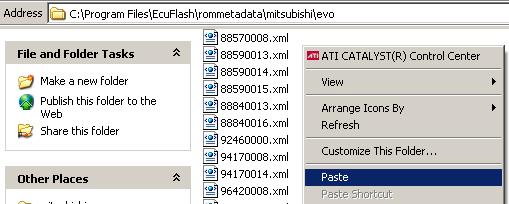
Thats it, your all done! I hope this is helpful for people that are trying to read maps and cant quite get the .xml to match up. Its trial and error sometimes, but until I found out how to swap the .xml you only had one shot at a map before it was all messed up. This should help!
First thing, we need to open EcuFlash. Lets say I want to take a look at a new rom I just downloaded, a stock Euro evo 9 RS. Select it from the list and open it up.
Ahh here it is, our favorite box. Well lets go ahead and select a .xml file and give it a shot. So select "copied from definition below" and use the drop down box. For this one Im going to select 2006 Mitsubishi USDM Lancer EVO9 (88590013). Lets see how that works out for us.
Ok, so our rom is open. Lets take a look at the high octane fuel table and see how it looks.
Ooops, that doesnt look right at all! See how the rpm and load values are all messed up? Alot of times you can still read the values in the table, but its just a pain. Basically the .xml file we chose was pointing at the wrong definitions. No worries, lets fix it.
First double check the .xml file number that you used. You can see it by clicking on the + next to Rom Info at the top of the map. Internal ID: 88590013, got it. Once you know the number, close EcuFlash. It loads .xml files each time you open it, and we are going to change them around a bit.
Next we are going to navigate to the program folder for EcuFlash. It is usually located in your program files. Go to My Computer --> C: --> Program Files --> EcuFlash.
From here lets create a new folder. Call it XML. We will be using it to swap .xml files back and forth from the rommetadata folder. Speaking of rommetadata, lets go into that. In that folder you should see a couple more, you want the one labeled Mitsubishi. Then after that we are going to pick Evo. In this folder, you should see your .xml files that EcuFlash is using to read your maps. Lets find the .xml we used on our Euro RS map we tried to load.
Right click, select cut. Then use the back button three times to get us back to the root EcuFlash folder where we made that XML folder. Paste that .xml file into the XML folder we made. Usually I go check and make sure its gone from the rommetadata --> mitsubishi --> evo folder as well before I open up EcuFlash again.
Now we are ready to open EcuFlash again. Lets try that map again, and use a different .xml definition. By deleting the one it was using out of the folder, EcuFlash is going to ask us to define it again. Lets try this 2006 Mitsubishi EDM Lancer EVO9 (88840016). That sounds promising. Same thing, "copied from definition below" and select if from the drop down.
Lets see how we did, open up that high octane fuel map again.
Much better! Thats alot easier to cross reference then that other jumble of numbers, and the other tables will now match up correctly as well now.
We're not completely done though, there is one last step. We need to put that .xml file that we deleted back into the rommetadata folder. Some other map we have may need it. So, go back into your EcuFlash folder, and click on the XML folder again.
Lets cut it again, and hit back to get to the EcuFlash root folder. Back into rommetadata it goes, so click there, then mitsubishi, and finally the evo folder. Paste it back in there with the others.
Thats it, your all done! I hope this is helpful for people that are trying to read maps and cant quite get the .xml to match up. Its trial and error sometimes, but until I found out how to swap the .xml you only had one shot at a map before it was all messed up. This should help!
Last edited by 20psiMR; Dec 12, 2006 at 09:47 AM.


Trending Topics

Newbie
Joined: Apr 2007
Posts: 31
Likes: 0
From: Norway
I am a little curious how definition selection works - I mean; when opening a ROM-file, does EcuFlash automatically use the definition file named the same as as the Internal ID? (If the Internal ID in the ROM reads 88840016 - then it automatically uses the 88840016.xml definition?)
What is the "Inherits: evo9base"? How is evo9base.xml used?
Here is the reason I got confused:
I tried to disable the rear O2 sensor by changing the definition file (88840016.xml). But the changes didn't appear in ECUflash when opening the ROM. Then I saw the Inherits: evo9base, and tried to change the evo9base.xml file, and then the definition changes became visible when opening the ROM...
What is the "Inherits: evo9base"? How is evo9base.xml used?
Here is the reason I got confused:
I tried to disable the rear O2 sensor by changing the definition file (88840016.xml). But the changes didn't appear in ECUflash when opening the ROM. Then I saw the Inherits: evo9base, and tried to change the evo9base.xml file, and then the definition changes became visible when opening the ROM...
Newbie
Joined: Apr 2007
Posts: 31
Likes: 0
From: Norway
I am a little curious how definition selection works - I mean; when opening a ROM-file, does EcuFlash automatically use the definition file named the same as as the Internal ID? (If the Internal ID in the ROM reads 88840016 - then it automatically uses the 88840016.xml definition?)
What is the "Inherits: evo9base"? How is evo9base.xml used?
What is the "Inherits: evo9base"? How is evo9base.xml used?


Thread
Thread Starter
Forum
Replies
Last Post
mrfred
ECU Flash
268
Feb 26, 2022 06:16 PM
