Notices
ECU Flash

Custom EvoScan Gauges

Thread Tools
 
Search this Thread
 
Old Apr 25, 2010 | 09:45 AM
  #1  
dyezak's Avatar
Thread Starter
Evolving Member
iTrader: (3)
 
Joined: Mar 2010
Posts: 253
Likes: 0
From: Plano TX
Custom EvoScan Gauges

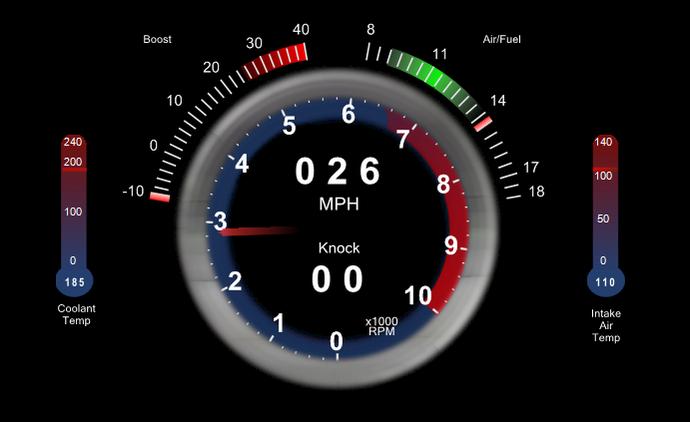
I'm running a carputer in my car in a custom double-din install I did and will be running EvoScan full time to be gauges. So far this is what the install looks like, and below that is my first go at a set of custom gauges that will be running in it (inspired by the Lexus LFA tach/speedo:

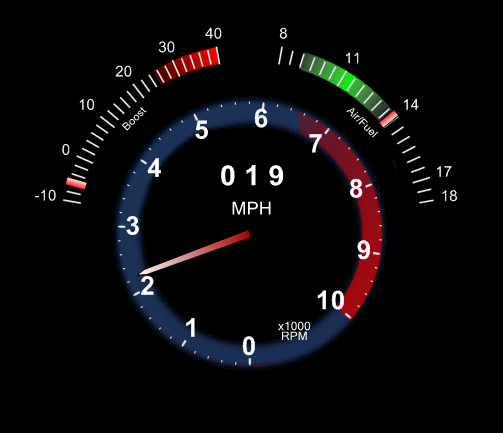


Newest Revision:
Attached Thumbnails Custom EvoScan Gauges-gauge-layout.png  

Last edited by dyezak; Apr 26, 2010 at 03:09 PM.
Reply
Old Apr 25, 2010 | 09:56 AM
  #2  
vmrevo9's Avatar
Evolved Member
Veteran: Air Force
15 Year Member
iTrader: (33)
 
Joined: Oct 2006
Posts: 2,544
Likes: 16
From: Huntsville, AL
looks pretty cool! i want to do this so bad to mine. maybe after the upgrades i have planned!
Reply
Old Apr 25, 2010 | 09:59 AM
  #3  
And's Avatar
And
Evolving Member
20 Year Member
 
Joined: Dec 2005
Posts: 419
Likes: 0
From: Bristol, England
what size screen is that?
Reply
Old Apr 25, 2010 | 10:04 AM
  #4  
dyezak's Avatar
Thread Starter
Evolving Member
iTrader: (3)
 
Joined: Mar 2010
Posts: 253
Likes: 0
From: Plano TX
8"
Reply
Old Apr 25, 2010 | 10:16 AM
  #5  
nudge120's Avatar
Evolving Member
iTrader: (2)
 
Joined: Mar 2006
Posts: 334
Likes: 1
From: Las Vegas
Looks awesome, are you willing to post up your template??
Reply
Old Apr 25, 2010 | 10:20 AM
  #6  
nudge120's Avatar
Evolving Member
iTrader: (2)
 
Joined: Mar 2006
Posts: 334
Likes: 1
From: Las Vegas
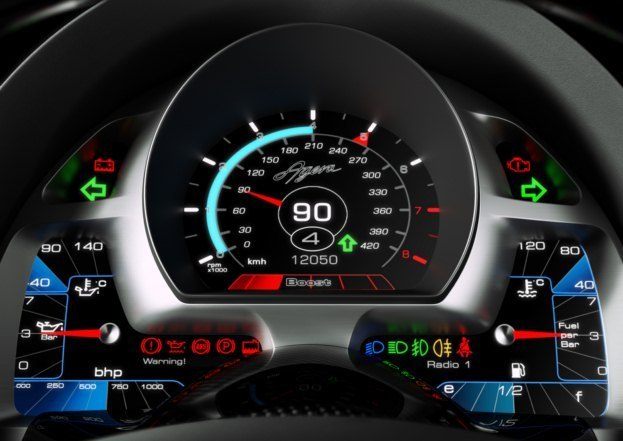
If I was inclined enough to do a custom gauge template this is the one I'd base mine off of.

Reply
Old Apr 25, 2010 | 10:27 AM
  #7  
dyezak's Avatar
Thread Starter
Evolving Member
iTrader: (3)
 
Joined: Mar 2010
Posts: 253
Likes: 0
From: Plano TX
First, yes, I'll post up the XML's when I'm done. Secondly, what car is that gauge cluster from? After I spent a few hours with DashDAQ and figured out how to import images this morning the dash above should actually be no problem. It would take a while but it can be done.

Last edited by dyezak; Apr 25, 2010 at 10:29 AM.
Reply
Old Apr 25, 2010 | 11:18 AM
  #8  
nudge120's Avatar
Evolving Member
iTrader: (2)
 
Joined: Mar 2006
Posts: 334
Likes: 1
From: Las Vegas
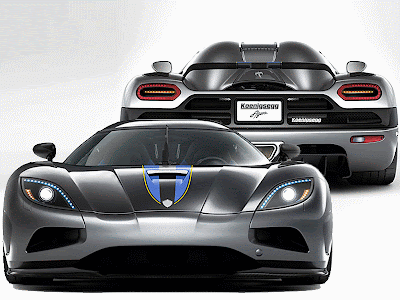
Its the cluster from the Koenigsegg Agera. I look forward to you sharing your work, thanks.


Last edited by nudge120; Apr 25, 2010 at 11:21 AM.
Reply
Old Apr 25, 2010 | 12:31 PM
  #9  
dyezak's Avatar
Thread Starter
Evolving Member
iTrader: (3)
 
Joined: Mar 2010
Posts: 253
Likes: 0
From: Plano TX
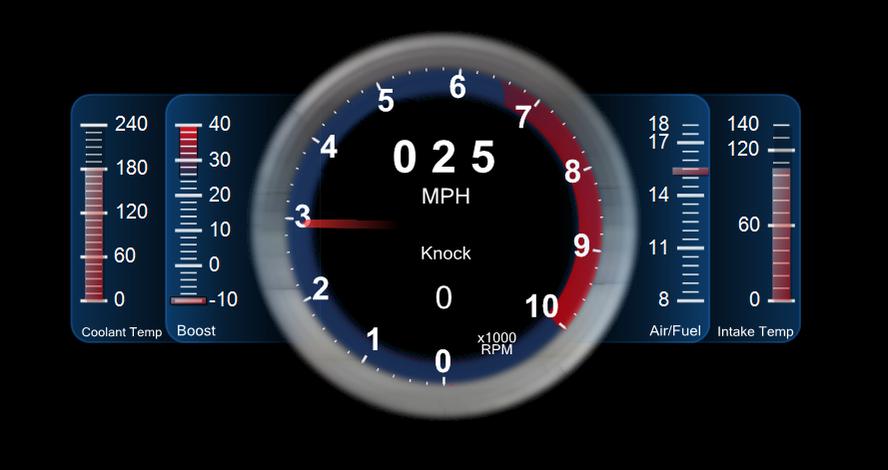
I think I'm getting the hang of creating these. I was able to create a temp gauge in the shape of a thermometer in about 10min, then add it to my current dash. I put two of them in, one on each side, one for intake temp and one for coolant temp...
Reply
Old Apr 25, 2010 | 07:06 PM
  #10  
mfr122887's Avatar
Evolving Member
iTrader: (14)
 
Joined: Feb 2006
Posts: 305
Likes: 0
From: Westchester, NY
Are you using DashDAQ gauges with EvoScan?
Reply
Old Apr 25, 2010 | 07:18 PM
  #11  
dyezak's Avatar
Thread Starter
Evolving Member
iTrader: (3)
 
Joined: Mar 2010
Posts: 253
Likes: 0
From: Plano TX
Originally Posted by mfr122887
Are you using DashDAQ gauges with EvoScan?
Yup, just using DashDAQ and EvoScan to make my gauges, and GIMP to make the images to inlay into the Gauge Clusters. Here's where I am at now, on the left is coolant temp and the right is intake temp (haven't done the labels yet):

Attached Thumbnails Custom EvoScan Gauges-dash.jpg  
Reply
Old Apr 25, 2010 | 07:20 PM
  #12  
mfr122887's Avatar
Evolving Member
iTrader: (14)
 
Joined: Feb 2006
Posts: 305
Likes: 0
From: Westchester, NY
DashDAQ templates are compatible with EvoScan? Can they be loaded from the EvoScan menus?
Reply
Old Apr 25, 2010 | 07:26 PM
  #13  
dyezak's Avatar
Thread Starter
Evolving Member
iTrader: (3)
 
Joined: Mar 2010
Posts: 253
Likes: 0
From: Plano TX
I'm sorry, I am mistaken. It's not DashDAQ, it's Dundas Gauge for .NET (the one EvoScan comes built with).
Reply
Old Apr 25, 2010 | 07:39 PM
  #14  
MR Turco's Avatar
EvoM Staff Alumni
iTrader: (16)
 
Joined: May 2007
Posts: 3,233
Likes: 3
From: Massachusetts
love it, just needs knock output
Reply
Old Apr 25, 2010 | 08:31 PM
  #15  
dyezak's Avatar
Thread Starter
Evolving Member
iTrader: (3)
 
Joined: Mar 2010
Posts: 253
Likes: 0
From: Plano TX
Knock was there, but hidden...I'm still working on more to add to this without cluttering up the display and thinking about changing the Boost/AFR display to look like the Ford Fusion side gauges.

Things I still want to do:

1. Add shift light
2. Add alt-map indicator
3. Change Boost/AFR to look like Ford Fusion side gauges
4. Possibly change coolant/intake temps to be like the Fusion gauges too


Ford Fusion Gauges:

Attached Thumbnails Custom EvoScan Gauges-dash2.jpg  

Last edited by dyezak; Apr 25, 2010 at 08:33 PM.
Reply


All times are GMT -7. The time now is 12:18 AM.