


Xede datalogging now possible on Mac and Unix


Thread Starter
Evolved Member
iTrader: (6)
Joined: May 2004
Posts: 2,502
Likes: 1
From: Tennessee, USA
Update:
Ok, so that thread/yield fix alleviated much of the performance difficulties I'd been seeing. On my 800mhz iBook, CPU usage while running the realtime monitor went from 80% to 10% and this is with doubling the screen update frequency. Watch timing being pulled galore!
The I/O Array error that jeremy was seeing yesterday should be mostly gone as well. It was being caused by excessive performance requirements and the producer thread getting too far behind the consumer. I can still force this exception by doing really evil things to my machine like starting up ten programs that do nothing but crunch the cpu.
d
Ok, so that thread/yield fix alleviated much of the performance difficulties I'd been seeing. On my 800mhz iBook, CPU usage while running the realtime monitor went from 80% to 10% and this is with doubling the screen update frequency. Watch timing being pulled galore!
The I/O Array error that jeremy was seeing yesterday should be mostly gone as well. It was being caused by excessive performance requirements and the producer thread getting too far behind the consumer. I can still force this exception by doing really evil things to my machine like starting up ten programs that do nothing but crunch the cpu.
d


Thread Starter
Evolved Member
iTrader: (6)
Joined: May 2004
Posts: 2,502
Likes: 1
From: Tennessee, USA
 Big News: stable release pending
I just posted a prerelease of 1.0 to the website (the perennial http://www.donour.com/cars/pyxede). The change log is on the site, so I'll let you read it there, but the bottom line is this: with threading properly detangled, everything has settled down considerably. I have no trouble leaving the application running and doing other cpu-intensive thing. In addition, users should be able to data log at 100+hz for quite a while (or until they fill up their hard disk).
Enjoy and send bug reports to me.
d
Enjoy and send bug reports to me.
d

Originally Posted by donour
I just posted a prerelease of 1.0 to the website (the perennial http://www.donour.com/cars/pyxede). The change log is on the site, so I'll let you read it there, but the bottom line is this: with threading properly detangled, everything has settled down considerably. I have no trouble leaving the application running and doing other cpu-intensive thing. In addition, users should be able to data log at 100+hz for quite a while (or until they fill up their hard disk).
Enjoy and send bug reports to me.
d
Enjoy and send bug reports to me.
d
You mentioned my name, I feel special.

EDIT: You would think that there would be more people testing, but I guess they aren't quite the computer nerds that we are. I know VISHNU's group are a bunch of nerds. I bet they have one room with nothing, but shiv's & dustins comps.

Update: I did some runs today (Version 1.0) at lunch and I am still getting the I/O errors when using the high speed datalogging. My IT guy at work, figured out the graphing problem for me. On Windows 2000, if you have something on the desktop it automatically puts the "documents and settings" in the path name. When I moved it to the C: drive the plotting worked.
Thread Starter
Evolved Member
iTrader: (6)
Joined: May 2004
Posts: 2,502
Likes: 1
From: Tennessee, USA
Originally Posted by jj_008
Update: I did some runs today (Version 1.0) at lunch and I am still getting the I/O errors when using the high speed datalogging.
My IT guy at work, figured out the graphing problem for me. On Windows 2000, if you have something on the desktop it automatically puts the "documents and settings" in the path name. When I moved it to the C: drive the plotting worked.
Otherwise did the application perform ok? Were you able to do dyno runs and get reasonable results?
d
Originally Posted by donour
The same errors as before?
Hm...I'm still not sure what exactly the error is. Is it not correctly understanding the path with spaces in it?
Otherwise did the application perform ok? Were you able to do dyno runs and get reasonable results?
d
Hm...I'm still not sure what exactly the error is. Is it not correctly understanding the path with spaces in it?
Otherwise did the application perform ok? Were you able to do dyno runs and get reasonable results?
d
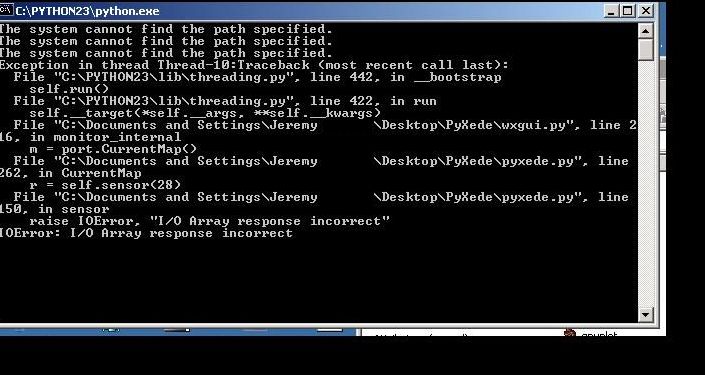
The error that states: The system cannot find path specified. Once I put the programs off the desktop and onto the C: directory everything worked great for teh road dyno program.
The other errors below that were the same for the datalogging.
Other then that the graph looked pretty similar except my HP and TQ were lower. I think it was low due to a boost leak. On the second run using only the high speed datalogging, I ran through 3 gears before my intercooler pipe blew off
 .
.
Thread Starter
Evolved Member
iTrader: (6)
Joined: May 2004
Posts: 2,502
Likes: 1
From: Tennessee, USA
Originally Posted by jj_008
The error that states: The system cannot find path specified. Once I put the programs off the desktop and onto the C: directory everything worked great for teh road dyno program.
The other errors below that were the same for the datalogging.
Other then that the graph looked pretty similar except my HP and TQ were lower. I think it was low due to a boost leak. On the second run using only the high speed datalogging, I ran through 3 gears before my intercooler pipe blew off .
.
Last edited by donour; Jun 10, 2005 at 04:30 PM.
Originally Posted by donour
Bah. I blame this one on windows or ntfs or something. My fix is to say "whitespace in paths isn't supported".
Curses. Can you pm the exact errors? The linenumbers will have changed from the last one. I believe this is happening when the serial port reading falls behind the Xede and the OS starts dropping data. I could supress the errors by ignoring it and forcing a catchup but I want the software to not lose ANY samples.
Curses. Can you pm the exact errors? The linenumbers will have changed from the last one. I believe this is happening when the serial port reading falls behind the Xede and the OS starts dropping data. I could supress the errors by ignoring it and forcing a catchup but I want the software to not lose ANY samples.

In general pre1.0 is running well on my old Win2000 notebook. Attached are two runs that represent substantially the same configuration of the car. The second plot has the boost table below 5000 RPM setup with slightly lower duty cycle. I hacked them together to overlay the two runs, shown in the third plot (yes I know it looks ugly).
I wonder if it would be useful to log and display timing in conjunction with HP and torque? Looking at the first plot you will see why...
Is the structure of the first plot an artifact of the averaging in relationship to the fact there were a large number of samples with zeros for hp / torque between samples with data in them? Are you using box car averaging?
I wonder if it would be useful to log and display timing in conjunction with HP and torque? Looking at the first plot you will see why...
Is the structure of the first plot an artifact of the averaging in relationship to the fact there were a large number of samples with zeros for hp / torque between samples with data in them? Are you using box car averaging?
Thread Starter
Evolved Member
iTrader: (6)
Joined: May 2004
Posts: 2,502
Likes: 1
From: Tennessee, USA
Originally Posted by freedom
In general pre1.0 is running well on my old Win2000 notebook. Attached are two runs that represent substantially the same configuration of the car. The second plot has the boost table below 5000 RPM setup with slightly lower duty cycle. I hacked them together to overlay the two runs, shown in the third plot (yes I know it looks ugly).
It's good to hear you got it working though. Did you have to make any changes to the code to get it to run on windows 2000?
I wonder if it would be useful to log and display timing in conjunction with HP and torque? Looking at the first plot you will see why...
Is the structure of the first plot an artifact of the averaging in relationship to the fact there were a large number of samples with zeros for hp / torque between samples with data in them? Are you using box car averaging?
What is box car averaging?
d
Thread Starter
Evolved Member
iTrader: (6)
Joined: May 2004
Posts: 2,502
Likes: 1
From: Tennessee, USA
I have another prerelease of 1.0 at the website. I fixed a few bugs, but I haven't found anything show stopping. I'll give it another week or so then mark it as stable.
d
d