


Xede datalogging now possible on Mac and Unix


Thread Starter
Evolved Member
iTrader: (6)
Joined: May 2004
Posts: 2,502
Likes: 1
From: Tennessee, USA
Originally Posted by crusin_lancer
You going to release a windows version and a UNIX version or will this all be changed depending on what system you choose in the settings?
d
Last edited by donour; Jun 7, 2005 at 11:00 AM.

Originally Posted by donour
No, there's only one version. arch.py selects settings based upon what kind of system your running. It already does things like select an appropriate temp directory, gnuplot program, and wxwindows version. So I just added selection of a time function. When everything works correctly, it will be seemless and everyone can download the same file.
d
d
Thread Starter
Evolved Member
iTrader: (6)
Joined: May 2004
Posts: 2,502
Likes: 1
From: Tennessee, USA
Originally Posted by crusin_lancer
Thats what I had figured. Keep us updated when you release the new version.
On a side note, I built a high speed logging function as per the specifications chiptorque sent me. There's some code in the 0.8 tarball, but it doesn't work yet. Either the specification has one-off error or my code does (I'm guessing the latter).
d
Thread Starter
Evolved Member
iTrader: (6)
Joined: May 2004
Posts: 2,502
Likes: 1
From: Tennessee, USA
Ok gang. I've got a new version, 0.9
http://www.donour.com/cars/pyxede
Most notable (and exciting) is the new high speed data logging. It should provide a 3 fold increase in samplerate when logging more than one sensor value. It is, however, less accurate than the old data logging method (which is still available), but for most users it should be fine. I believe it's the same accuracy as xmap3's data logging facility.
I urge people to download this version and test, test, test. There are a handful of bugs remaining (that I know about), but they are minor and you probably won't even notice them. So grab the tarball and start breaking things...oh and tell me about them.
d
http://www.donour.com/cars/pyxede
Most notable (and exciting) is the new high speed data logging. It should provide a 3 fold increase in samplerate when logging more than one sensor value. It is, however, less accurate than the old data logging method (which is still available), but for most users it should be fine. I believe it's the same accuracy as xmap3's data logging facility.
I urge people to download this version and test, test, test. There are a handful of bugs remaining (that I know about), but they are minor and you probably won't even notice them. So grab the tarball and start breaking things...oh and tell me about them.
d

Originally Posted by donour
Ok gang. I've got a new version, 0.9
http://www.donour.com/cars/pyxede
Most notable (and exciting) is the new high speed data logging. It should provide a 3 fold increase in samplerate when logging more than one sensor value. It is, however, less accurate than the old data logging method (which is still available), but for most users it should be fine. I believe it's the same accuracy as xmap3's data logging facility.
I urge people to download this version and test, test, test. There are a handful of bugs remaining (that I know about), but they are minor and you probably won't even notice them. So grab the tarball and start breaking things...oh and tell me about them.
d
http://www.donour.com/cars/pyxede
Most notable (and exciting) is the new high speed data logging. It should provide a 3 fold increase in samplerate when logging more than one sensor value. It is, however, less accurate than the old data logging method (which is still available), but for most users it should be fine. I believe it's the same accuracy as xmap3's data logging facility.
I urge people to download this version and test, test, test. There are a handful of bugs remaining (that I know about), but they are minor and you probably won't even notice them. So grab the tarball and start breaking things...oh and tell me about them.
d
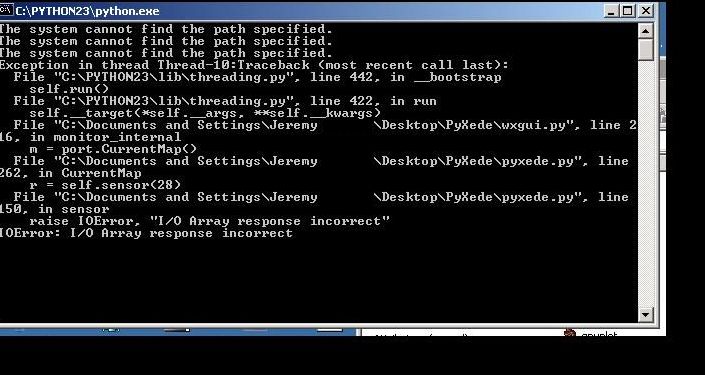
Here is my datalog. I just ran it through 2 gears. Probably not that useful, but it gave me some errors (as seen in the error pic).
Thread Starter
Evolved Member
iTrader: (6)
Joined: May 2004
Posts: 2,502
Likes: 1
From: Tennessee, USA
Originally Posted by jj_008
I did some more runs today (w/ the .9). The program didn't lock up so that was a good sign. I did have this error and I still can't get it to plot (top error).
IMAGE DELETED
Here is my datalog. I just ran it through 2 gears. Probably not that useful, but it gave me some errors (as seen in the error pic).
d
Last edited by donour; Jun 9, 2005 at 08:28 AM.
Thread Starter
Evolved Member
iTrader: (6)
Joined: May 2004
Posts: 2,502
Likes: 1
From: Tennessee, USA
Originally Posted by jj_008
Now, for better news. I got the road dyno software to work, but I couldn't graph it w/ gnuplot. This is a 3rd gear pull from 3500rpm to 7500rpm.
d
Thread Starter
Evolved Member
iTrader: (6)
Joined: May 2004
Posts: 2,502
Likes: 1
From: Tennessee, USA
One thing that has become apparant with this software is that it does not like slow machines. It gets pretty finicky on my mac (which is ungodly slow) when I'm I have other things running at high priority. Most of this I chalk up to the python threading system and the wxWindows GUI toolkit. I have zero problems data logging for a long period of time from a terminal. However, the GUI does get a little unstable if left running while doing other things.
EDIT: Doh! I found a hugh, glaring, monstrous thread bug that is probably causing most of the performance problems as well confusing the event handler. I'm calling the graphics library yield() function from a bunch of different threads. That's a big no-no and makes applications blow up.
d
EDIT: Doh! I found a hugh, glaring, monstrous thread bug that is probably causing most of the performance problems as well confusing the event handler. I'm calling the graphics library yield() function from a bunch of different threads. That's a big no-no and makes applications blow up.
d
Last edited by donour; Jun 9, 2005 at 09:05 AM.
This program has worked on my 1.5ghz 256mb of Ram dell laptop. I have no problems on my 3.4ghz 1gig of Ram Alienware laptop. Locking up issues anyways, but then there are always other bugs.
Originally Posted by donour
Hm...it still looks a little screwy to me. That run only has 3 seconds of samples. Interpolated, it looks like the attachment. Obviously it needs to be improved.
d
d
 ?
? BTW, I am running a GT3076 so it goes through 3rd pretty quick, but not 3 seconds quick. Probably more like 4 seconds.
Thread Starter
Evolved Member
iTrader: (6)
Joined: May 2004
Posts: 2,502
Likes: 1
From: Tennessee, USA
Originally Posted by jj_008
1200HP & 900 ft-lbs are respectable for a 13 sec car right ?
BTW, I am running a GT3076 so it goes through 3rd pretty quick, but not 3 seconds quick. Probably more like 4 seconds.
? BTW, I am running a GT3076 so it goes through 3rd pretty quick, but not 3 seconds quick. Probably more like 4 seconds.

d
Originally Posted by donour
As per earlier mesgs, those numbers are completely uncalibrated. The key should even say "power", not horsepower. So divide by 1000 and you should be closer to real numbers.
d
d
.Shouldn't it be divide by 100?