


Xede datalogging now possible on Mac and Unix


For Windows 2000, the following change in "arch.py" should be present.
# TMPDIR = r"C:\WINDOWS\Temp\\" # even raw string can't end in '\'
TMPDIR = r"C:\WINNT\Temp\\" # even raw string can't end in '\'
I haven't been able to test the road dyno, only plotting.
# TMPDIR = r"C:\WINDOWS\Temp\\" # even raw string can't end in '\'
TMPDIR = r"C:\WINNT\Temp\\" # even raw string can't end in '\'
I haven't been able to test the road dyno, only plotting.

Thread Starter
Evolved Member
iTrader: (6)
Joined: May 2004
Posts: 2,502
Likes: 1
From: Tennessee, USA
Originally Posted by freedom
For Windows 2000, the following change in "arch.py" should be present.
# TMPDIR = r"C:\WINDOWS\Temp\\" # even raw string can't end in '\'
TMPDIR = r"C:\WINNT\Temp\\" # even raw string can't end in '\'
I haven't been able to test the road dyno, only plotting.
# TMPDIR = r"C:\WINDOWS\Temp\\" # even raw string can't end in '\'
TMPDIR = r"C:\WINNT\Temp\\" # even raw string can't end in '\'
I haven't been able to test the road dyno, only plotting.

However, there is a thread problem that sort of messes things up. I just found it today. It didn't cause much trouble on linux, but locks of my mac laptop pretty good. I imagine the same thing happens on windows.
d
Bug? Not really.
That was my patch to get it to run on Win2000. Sorry about the confusion. I thought you were referring to the comment at the end of the line.
I'm looking forward to testing a version that resolves the threading issue.
That was my patch to get it to run on Win2000. Sorry about the confusion. I thought you were referring to the comment at the end of the line.
I'm looking forward to testing a version that resolves the threading issue.
Thread Starter
Evolved Member
iTrader: (6)
Joined: May 2004
Posts: 2,502
Likes: 1
From: Tennessee, USA
Originally Posted by freedom
Bug? Not really.
That was my patch to get it to run on Win2000. Sorry about the confusion. I thought you were referring to the comment at the end of the line.
That was my patch to get it to run on Win2000. Sorry about the confusion. I thought you were referring to the comment at the end of the line.
That's easy enough to fix, I just need to figure out how to get the windows version from inside python.EDIT: can somebody send me the value returned by sys.getwindowsversion() on windows 2000, windows 9x, and windows NT
I'm looking forward to testing a version that resolves the threading issue.
1) I can collect dyno data in the same thread as the GUI. I thought I was being all smart and saving myself some time. Nope, I it was just toolish.
2) It's ok to have a seperate thread modifying the main window as long as nothing else is. Wrong again. This causes really weird bugs that only show up after doing quite a few runs back to back.
Anyhow, I think I have both of these resolved. Let me test everything then I'll update.
d
Last edited by donour; Jun 6, 2005 at 07:39 AM.

My dyno runs are seem a bit odd. My torque curve is perfectly flat and my HP curve is diagnol. There something wrong or am I doing something wrong? Also is it possible to have our settings saved instead of changing the com port everytime and browsing for the pgnuplot all the time. Kind of annoying. I'm still getting permission denied when trying to run logging. Not sure why this is happening.
Thread Starter
Evolved Member
iTrader: (6)
Joined: May 2004
Posts: 2,502
Likes: 1
From: Tennessee, USA

Originally Posted by crusin_lancer
My dyno runs are seem a bit odd. My torque curve is perfectly flat and my HP curve is diagnol. There something wrong or am I doing something wrong?

You're going to love this one. I just noticed there's one important line commented out of the 0.6 release file, the line that read RPM value.
For the 0.6 release, rpm = time. Sorry about that one. Development is moving really fast and the releases quickly become outdated...Also is it possible to have our settings saved instead of changing the com port everytime and browsing for the pgnuplot all the time. Kind of annoying.
I'm still getting permission denied when trying to run logging. Not sure why this is happening.
I tested a whole bunch of cleanups on the ride to work this morning (I should have taken the bike, but the weather was just too good not to enjoy those advans). Expect 0.7 shortly.

d
Thread Starter
Evolved Member
iTrader: (6)
Joined: May 2004
Posts: 2,502
Likes: 1
From: Tennessee, USA
Originally Posted by crusin_lancer
Yea I tried saving them to my desktop I am even logged in as Administrator so I have no idea why I'm getting permisison denied errors. Blah! 
EDIT: oops, i was getting your mesgs confused with freedom's. Anyway. Try and send me the output from the exception handler.
Oh, and lookee here, a new version:
http://www.donour.com/cars/pyxede
d
Last edited by donour; Jun 6, 2005 at 12:58 PM.
Ok well with the new release I was finally able to run a dyno run. I have included my runs, is this what I should be seeing from a stock evo 8 with XEDE?
Also I am getting timestamp errors when running my dyno runs. I also got this error after datalogging (which I finally got working) then I tried closing pyXEDE and got this.
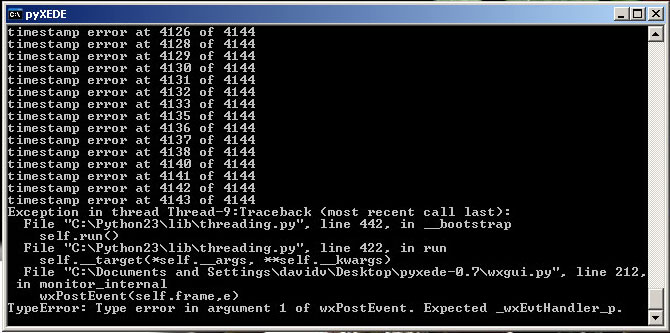
Also I am getting timestamp errors when running my dyno runs. I also got this error after datalogging (which I finally got working) then I tried closing pyXEDE and got this.
Thread Starter
Evolved Member
iTrader: (6)
Joined: May 2004
Posts: 2,502
Likes: 1
From: Tennessee, USA
Originally Posted by crusin_lancer
Ok well with the new release I was finally able to run a dyno run. I have included my runs, is this what I should be seeing from a stock evo 8 with XEDE?
Also I am getting timestamp errors when running my dyno runs.
EDIT: oh lord, if I'm reading the python docs correctly time.time() isn't guaranteed precision higher than the second level on non-unix systems. Let me replace it with something more accurate.
EDIT2: yep, on windows time.time() has only 1/60th second granularity. I have a patch that uses time.clock() on windows which is accurate to the usec. Although on unix time.time() will stil be used as it is much more accurate.
I also got this error after datalogging (which I finally got working) then I tried closing pyXEDE and got this.
EDIT3: looking closely, i think that the engine monitor thread is still sending updates after the GUI exits, thus causing the event exception. Strange...
I'm about to feature freeze the work I've done. I'll try to get the bugs out of the program and mark a 1.0 release. For the 2.0 series I'll add the networking support you were asking about.
d
Last edited by donour; Jun 6, 2005 at 05:49 PM.
Originally Posted by donour
Sort of. That curve is pretty whacky though. It's almost as if...
Hrm. yeah. Well this happens when the timestamps for two rpm samples are the same -- definitely a bad thing as samplerate is pretty slow. My timing isn't anything magic. I'm just calling time.time(). Two calls to that function should NEVER be the same. In lieu of sensical reasoning, I blame the python time module. I'll see if it works differently on windows than on unix.
EDIT: oh lord, if I'm reading the python docs correctly time.time() isn't guaranteed precision higher than the second level on non-unix systems. Let me replace it with something more accurate.
EDIT2: yep, on windows time.time() has only 1/60th second granularity. I have a patch that uses time.clock() on windows which is accurate to the usec. Although on unix time.time() will stil be used as it is much more accurate.
Ick, unhandled exception. I'll have to dig into that one. You say you _only_ got it on program exit?
EDIT3: looking closely, i think that the engine monitor thread is still sending updates after the GUI exits, thus causing the event exception. Strange...
I'm about to feature freeze the work I've done. I'll try to get the bugs out of the program and mark a 1.0 release. For the 2.0 series I'll add the networking support you were asking about.
d
Hrm. yeah. Well this happens when the timestamps for two rpm samples are the same -- definitely a bad thing as samplerate is pretty slow. My timing isn't anything magic. I'm just calling time.time(). Two calls to that function should NEVER be the same. In lieu of sensical reasoning, I blame the python time module. I'll see if it works differently on windows than on unix.
EDIT: oh lord, if I'm reading the python docs correctly time.time() isn't guaranteed precision higher than the second level on non-unix systems. Let me replace it with something more accurate.
EDIT2: yep, on windows time.time() has only 1/60th second granularity. I have a patch that uses time.clock() on windows which is accurate to the usec. Although on unix time.time() will stil be used as it is much more accurate.
Ick, unhandled exception. I'll have to dig into that one. You say you _only_ got it on program exit?
EDIT3: looking closely, i think that the engine monitor thread is still sending updates after the GUI exits, thus causing the event exception. Strange...
I'm about to feature freeze the work I've done. I'll try to get the bugs out of the program and mark a 1.0 release. For the 2.0 series I'll add the networking support you were asking about.
d
Thread Starter
Evolved Member
iTrader: (6)
Joined: May 2004
Posts: 2,502
Likes: 1
From: Tennessee, USA
Originally Posted by crusin_lancer
Only on exit, but I did run a log before exit if that helps.
Bad news: i don't know a way to easily fix it in the short term.
For now, I wouldn't worry about it too much.
Why is my plot like that? Are you saying because of the timestamp?
So, why do you have so few samples. Well, pyXede throws away samples with identical timestamps because, by definition, they have no meaning. When you see "timestamp error", that's pyXede throwing away samples. You probably noticed that it threw away a LOT of samples. That's windows at work. I discovered that time.time() has a pretty low resolution on windows. I've replaced it with the much more accurate time.clock() (note: I only replaced the function used on windows. On everything else time.time() is far better).
Glad to help with any bugs and the networking thing could be somewhat useful.
EDIT: Oh, I almost forgot. I got an email from chiptorque this morning with details on a new "high speed" data logging protocol. Right now, datalogging proceeds pretty much at a single, raw, speed of 125hz. If you want two readings (ie. RPM and CAS) then you get both, but only at about ~60hz. You want ten (10) readings? that's right, a spanking 12 hz. Well this alternate method should allow datalogging much faster -- 4,5, or even 6 readings at 100hz. Joy!
d
Last edited by donour; Jun 7, 2005 at 07:44 AM.