


Live mapping and/or speed density instructions


yep it is.... u can try the one off http://www.mztec.org/evo/livemap/ or if u can wait for a few more days (i have one very very strange bug) and i will have a better and more robust version up.... also the one there currently does not like SD tables.


hmm then send me a pm with ur email... might was well get u hooked on the better version.
EDIT: actually check the link i have the latest version that actually works with SD based roms. by default it comes with xml defs for 9653 V7 based roms... i will check add more later or you can add custom ones urself.
EDIT: actually check the link i have the latest version that actually works with SD based roms. by default it comes with xml defs for 9653 V7 based roms... i will check add more later or you can add custom ones urself.
Last edited by ziad; Feb 3, 2010 at 06:29 AM.

So if at all possible, what would I have to do to incorporate livemap/dma on 88590715 that I also already patched SD on? Same code, just different addresses? I'd love to know because this would make tuning my light load and cruise areas so much less of a headache.

I'd be happy with just livemap for now.
Last edited by SyZyGy1394; Feb 3, 2010 at 01:48 PM.
Ok so in your instructions after it says open the settings and goto create, I pick the old live map directory. I want the xml directory for that correct? It loads the MUT table. What and how exactly do I load the fuel and timing tables?
Im just trying to figure everyone thing out because no offense intended but the directions are kinda vague and short. Only someone who knows what they are doing like you might understand them not someone who is a new user.
Im just trying to figure everyone thing out because no offense intended but the directions are kinda vague and short. Only someone who knows what they are doing like you might understand them not someone who is a new user.

Here is how mine is setup. I'll explain each screenshot below the image:

This is where you setup the requests that you want to log. In my screenshot above, this is how I have my RAM MUT table setup for the time being. Simply setup your table to match what you are logging.

On the ECU Definition tab, on the top is where you set the addresses for the start of the ROM and RAM alt maps space and the size.
The entries on the left are the tables that you have setup in the alt maps space to be copied to RAM. In the screenshot above, you can see the address for my RAM MUT table, which is FFFF A000 (which is right at the start of the alt maps space).
You don't necessarily need the MUT table entry here. These entries are just for the tables that you want to tune in RAM. Each of the table entries here will become a new tab in the LiveMap app, so that you can change the values and tune them realtime. The next few screenshots will show how the rest of my tables are configured.

Bigmaps fuel. My axes may be different than yours. I have mine go to 500 load, incremented by 20 after 100 load, and 11000RPM, incremented by 500 through the whole table.
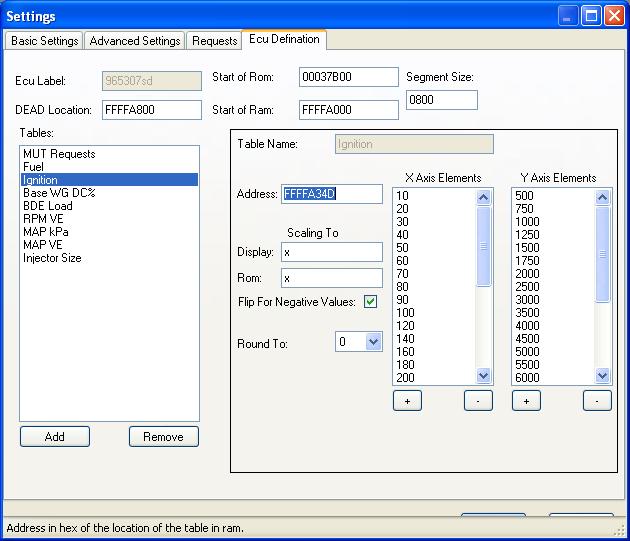
Ignition table. Same axes as fuel.
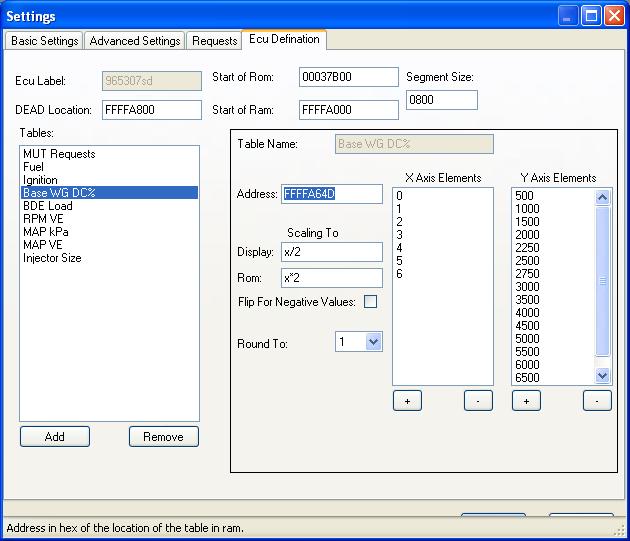
BWG table
Also, make sure in your settings.xml file, you have the following line setup for DMA:
<transProtocol>DMA</transProtocol>
continued in next post (5 attachment max per post)...
This is where you setup the requests that you want to log. In my screenshot above, this is how I have my RAM MUT table setup for the time being. Simply setup your table to match what you are logging.
On the ECU Definition tab, on the top is where you set the addresses for the start of the ROM and RAM alt maps space and the size.
The entries on the left are the tables that you have setup in the alt maps space to be copied to RAM. In the screenshot above, you can see the address for my RAM MUT table, which is FFFF A000 (which is right at the start of the alt maps space).
You don't necessarily need the MUT table entry here. These entries are just for the tables that you want to tune in RAM. Each of the table entries here will become a new tab in the LiveMap app, so that you can change the values and tune them realtime. The next few screenshots will show how the rest of my tables are configured.
Bigmaps fuel. My axes may be different than yours. I have mine go to 500 load, incremented by 20 after 100 load, and 11000RPM, incremented by 500 through the whole table.
Ignition table. Same axes as fuel.
BWG table
Also, make sure in your settings.xml file, you have the following line setup for DMA:
<transProtocol>DMA</transProtocol>
continued in next post (5 attachment max per post)...
Last edited by l2r99gst; Feb 4, 2010 at 04:19 PM.
lol.. yeah those are not really instructions... just a cpl grabs from msn conversations. i will do a instruction doco with screen grabs soon. anyway add the table xmls (add table button)... i recomend fuel first... so basically add "fuel.xml" "ignition.xml" and any others u might have.
if u running 9653 V7 or 8859 V510 then use the given XMLs.
i will create a new thread for livemap issues if u want...seeing quite a few downloads have taken place.
EDIT: just check this thread.
https://www.evolutionm.net/forums/ec...e-map-app.html
if u running 9653 V7 or 8859 V510 then use the given XMLs.
i will create a new thread for livemap issues if u want...seeing quite a few downloads have taken place.
EDIT: just check this thread.
https://www.evolutionm.net/forums/ec...e-map-app.html
Last edited by ziad; Feb 4, 2010 at 04:14 PM.


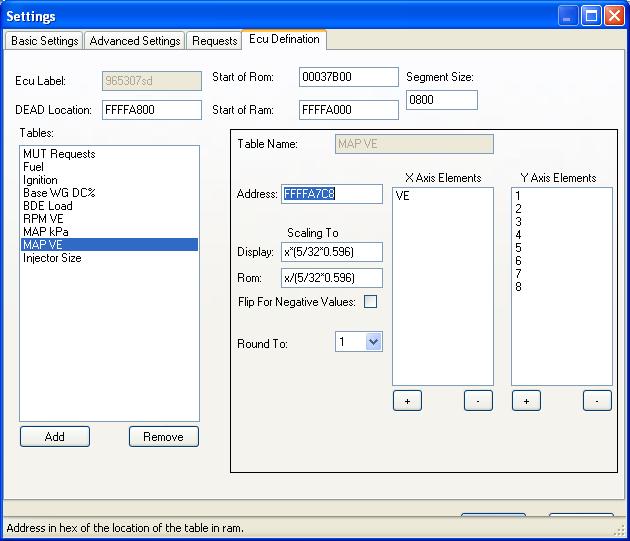

So, here you can see the main screen and the tabs for all of the RAM tables. Here is a shot of the blank fuel table (my laptop isn't connected to the car at the moment...just here on my desk).
If you have the active cell and knock trace selected in the 'basic settings' tab of the settings window, then when you click start, you get a realtime trace through the table. I forget already, but I think just for the ignition table. The cells will color green for no knock and get darker red with more knock.

Eric
If you have the active cell and knock trace selected in the 'basic settings' tab of the settings window, then when you click start, you get a realtime trace through the table. I forget already, but I think just for the ignition table. The cells will color green for no knock and get darker red with more knock.
Eric
Last edited by l2r99gst; Feb 4, 2010 at 04:32 PM.
umm can we please move this to the other thread...... that way i can keep track of any info and help me doing the doco.
https://www.evolutionm.net/forums/ec...e-map-app.html
https://www.evolutionm.net/forums/ec...e-map-app.html

Thread
Thread Starter
Forum
Replies
Last Post
Rasperin
Evo X Engine / Turbo / Drivetrain
7
May 18, 2017 07:56 AM
