


Noob question re Alt Map Swtiching


Thread Starter
Evolving Member
Joined: Feb 2008
Posts: 214
Likes: 1
From: South Africa
Noob question re Alt Map Swtiching
I am having some problems on figuring out to use the alt Map Switching function.
My problem is not related to implementing the Alt Maps, that I know how to do, but more on how you actually go about switching between the maps once you have it setup in ECUFlash and flashed to your car.
This is how I go about it....
I have flashed my car with v7t5 96530706 and have the following Mods Enabled as seen n the pic below.
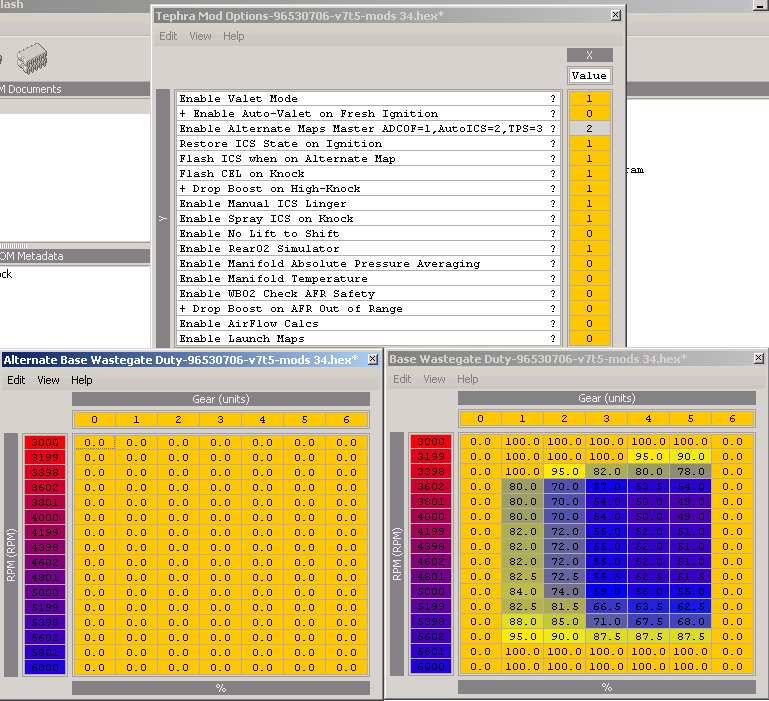
Now I would like to switch between my low boost "ALT map" and my high boost "normal map" depending on the fuel I have in my car. And to do the switching I want to make use of my Auto ICS switch.
So, I flash the car and go for a test drive and log the WGDC in Evoscan 2.6
1st Run
Without doing anything to the ICS switch, I take my car for a WOT drive and log WGDC.
For the first run my ICS light is on steady. Which I presume means I am running on my "high boost" map.
As expected for this run, my wGDC is set to the "high boost" map. Boosting to roughly 1,85 bar as indicated by my boost gauge.
No problems there.
2nd run
I now press the AutoICS switch once and the ICS light now flashes.
One for roughly a second followed very briefly by and off state and then back on for roughly a second.
I now do a log at WOT and this time my WGDC is logging all 0's, which makes me believbe I am now in my "ALT Maps WGDC" low boost tables. The boost gauge confirms this since it only reads a max of 1,5 Bar. (I have a Forge 1,5 bar acutator installed)
3rd Run
I press the Auti ICS switch again and the ICS light flashes. This time it is off for roughly a second and briefly on for a split second, and off again for a second etc etc.
I do another log and once again I get all 0,s on my WGDCc and only boost 1,5 bar.
Hmmmm
I now want to go back to my high boost setting, so I press the switch again hoping to get a steady ICS light state, as I did in my first run when the car boosted 1,85 bar, but instead the ICS light goes back to the state in my second run, where it is on for a second or so and briefly off etc etc.
If I log again I only get 1,5 bar.
So two questions......
1.) Why does the ICS light flash differently between runs 2 and 3 when I am still getting the same "low boost" WGDC as in my Alt tables?
2.) Once I am in "low boost" state. With the ICS light flashing, how do I get back to my "high boost" state with just using the Auto ICS switch?
Even when I turn the car off and back on, it always goes into the "low boost" Alt Maps with the ICS light flashing.
Right now, I have to reflash the car, making a small change to the "Spray on Knock" time, and only then can I get back to my high boost tables with the ICS light on steady.
I must be something wrong, surely there is an easier way to get back to the high boost map?
Thx for looking.
My problem is not related to implementing the Alt Maps, that I know how to do, but more on how you actually go about switching between the maps once you have it setup in ECUFlash and flashed to your car.
This is how I go about it....
I have flashed my car with v7t5 96530706 and have the following Mods Enabled as seen n the pic below.
Now I would like to switch between my low boost "ALT map" and my high boost "normal map" depending on the fuel I have in my car. And to do the switching I want to make use of my Auto ICS switch.
So, I flash the car and go for a test drive and log the WGDC in Evoscan 2.6
1st Run
Without doing anything to the ICS switch, I take my car for a WOT drive and log WGDC.
For the first run my ICS light is on steady. Which I presume means I am running on my "high boost" map.
As expected for this run, my wGDC is set to the "high boost" map. Boosting to roughly 1,85 bar as indicated by my boost gauge.
No problems there.
2nd run
I now press the AutoICS switch once and the ICS light now flashes.
One for roughly a second followed very briefly by and off state and then back on for roughly a second.
I now do a log at WOT and this time my WGDC is logging all 0's, which makes me believbe I am now in my "ALT Maps WGDC" low boost tables. The boost gauge confirms this since it only reads a max of 1,5 Bar. (I have a Forge 1,5 bar acutator installed)
3rd Run
I press the Auti ICS switch again and the ICS light flashes. This time it is off for roughly a second and briefly on for a split second, and off again for a second etc etc.
I do another log and once again I get all 0,s on my WGDCc and only boost 1,5 bar.
Hmmmm
I now want to go back to my high boost setting, so I press the switch again hoping to get a steady ICS light state, as I did in my first run when the car boosted 1,85 bar, but instead the ICS light goes back to the state in my second run, where it is on for a second or so and briefly off etc etc.
If I log again I only get 1,5 bar.
So two questions......
1.) Why does the ICS light flash differently between runs 2 and 3 when I am still getting the same "low boost" WGDC as in my Alt tables?
2.) Once I am in "low boost" state. With the ICS light flashing, how do I get back to my "high boost" state with just using the Auto ICS switch?
Even when I turn the car off and back on, it always goes into the "low boost" Alt Maps with the ICS light flashing.
Right now, I have to reflash the car, making a small change to the "Spray on Knock" time, and only then can I get back to my high boost tables with the ICS light on steady.
I must be something wrong, surely there is an easier way to get back to the high boost map?
Thx for looking.


ok:
ICS always on = ICS on (like normal)
ICS always off = ICS off (like normal)
ICS flashing = altmap enabled
ICS not flashing = altmap disabled
+ combo's
ie if its flashing ON (ie long off, short on) then ICSdisabled+altmap
ie if its flashing OFF (ie long on, short off) then ICSenabled+altmap
load threshold = load you MUST be under to switch maps - exception being ADC0F which will switch to normal maps at any load (for failsafe)
ICS always on = ICS on (like normal)
ICS always off = ICS off (like normal)
ICS flashing = altmap enabled
ICS not flashing = altmap disabled
+ combo's
ie if its flashing ON (ie long off, short on) then ICSdisabled+altmap
ie if its flashing OFF (ie long on, short off) then ICSenabled+altmap
load threshold = load you MUST be under to switch maps - exception being ADC0F which will switch to normal maps at any load (for failsafe)

Just to make a point, its better to have the Alt-Maps be your more aggressive, high-boost settings. This way if anything isnt working properly you'll at least be in the safer of the two setups.
Thread Starter
Evolving Member
Joined: Feb 2008
Posts: 214
Likes: 1
From: South Africa
ok:
ICS always on = ICS on (like normal)
ICS always off = ICS off (like normal)
ICS flashing = altmap enabled
ICS not flashing = altmap disabled
+ combo's
ie if its flashing ON (ie long off, short on) then ICSdisabled+altmap
ie if its flashing OFF (ie long on, short off) then ICSenabled+altmap
load threshold = load you MUST be under to switch maps - exception being ADC0F which will switch to normal maps at any load (for failsafe)
ICS always on = ICS on (like normal)
ICS always off = ICS off (like normal)
ICS flashing = altmap enabled
ICS not flashing = altmap disabled
+ combo's
ie if its flashing ON (ie long off, short on) then ICSdisabled+altmap
ie if its flashing OFF (ie long on, short off) then ICSenabled+altmap
load threshold = load you MUST be under to switch maps - exception being ADC0F which will switch to normal maps at any load (for failsafe)
Just to to clarify
Using the Auto ICS switch, you can either have....
1.) ICSdisabled+altmap
2.) ICSenabled+altmap
3.) Base maps with no AutoICS control.
And if you wanted all of those functions, (incl base maps with AutoICS control) it is better to use the external switch for the ALT Map switching and preserve the ICS switch for the auto spray functions?
Thread Starter
Evolving Member
Joined: Feb 2008
Posts: 214
Likes: 1
From: South Africa

I flash the car and it starts off with the AutoICS light off and in base maps.
Briefly press the AutoICS button activates the AuotICS spray function.
To activate ALT maps....
Press the button for the duration as stipulated in the "Alternate Map time to Activate".
AutoICS light now flashes.
While in Alt Maps, briefly press the button to either switch on/off the AutoICS spray function with the ICS flashing light displaying the state, as you decribed above.
To deactivate ALTMaps...
Press and hold the ICS switch in the Auto position for the duration as stipulated in the "Alternate Map time to Activate".
ICS light now stops flashing and activate/dectivate auto spay function as normal.
Trending Topics


ok:
ICS always on = ICS on (like normal)
ICS always off = ICS off (like normal)
ICS flashing = altmap enabled
ICS not flashing = altmap disabled
+ combo's
ie if its flashing ON (ie long off, short on) then ICSdisabled+altmap
ie if its flashing OFF (ie long on, short off) then ICSenabled+altmap
load threshold = load you MUST be under to switch maps - exception being ADC0F which will switch to normal maps at any load (for failsafe)
ICS always on = ICS on (like normal)
ICS always off = ICS off (like normal)
ICS flashing = altmap enabled
ICS not flashing = altmap disabled
+ combo's
ie if its flashing ON (ie long off, short on) then ICSdisabled+altmap
ie if its flashing OFF (ie long on, short off) then ICSenabled+altmap
load threshold = load you MUST be under to switch maps - exception being ADC0F which will switch to normal maps at any load (for failsafe)
I'm looking for the option to turn "ICS always off". I've looked through my v7 9653 map, and the v7 9417 map and cannot find this option.
Could someone kindly point me towards it please? (I'm looking to use the ICS light for altmap only, and not have to deal with the autoics activating..)

Thread
Thread Starter
Forum
Replies
Last Post
