calc HP/TQ from EvoScan using Excel


Thanks man. I'm getting the most conflicting data about the damn gear ratios! That article shows that some 6 speed versions use the standard final drive from the 5 speed and some use a seperate final drive. Does anyone know for CERTAIN!? I'd prefer for this spreadsheet to be as accurate as we can possibly get it. Also, does the '05 5 speed really have different gears than the '04-'05?
Last edited by Jack_of_Trades; Jun 6, 2009 at 05:10 PM.
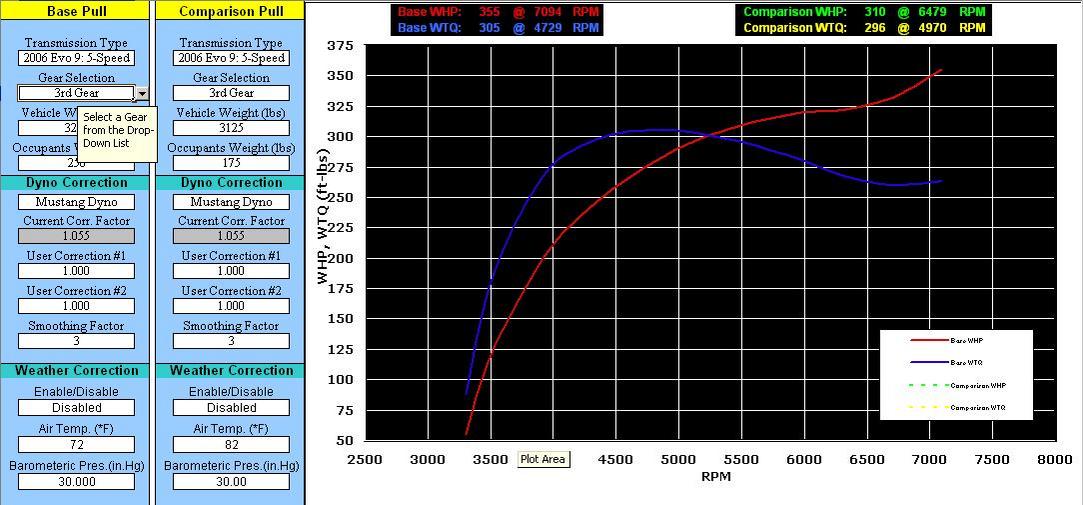
Been working on this when I can but I figured I'd give you a guys snapshot of the layout so far. The only thing I really haven't added is the WHP/WTQ values will go below the graph. Hopefully I'll have it done tomorrow if i can get enough harness' built for members.

Last edited by Jack_of_Trades; Jun 6, 2009 at 08:51 PM.
Ok, all I need to be SURE of is whether the 2005 Evo 8 5-speeds had the same gear ratio/final drive combo as the '03-'04's or the '06's. Anyone know for CERTAIN!??????
Last edited by Jack_of_Trades; Jun 7, 2009 at 04:33 PM.
Here it is kids! This is about as good as I'm gonna get it for now. Its designed to work with Microsoft Excel 2007 so if you have Excel 2003 you should go to Microsofts site and download the free patch so you can see 2007 files just like Excel '07 displays them. If anyone wants to make an OpenOffice Version that matches the layout I have in Excel, I will gladly host it. I'm gonna need some serious beta testing from you guys to find any bugs I may have missed (I'm sure I missed something lol). I especially need to get feedback from 2003-2004 owners,2005 users, 2006 users, and MR owners too.
I added a seperate selection for Buschur's Mustang dyno since my data shows that his Mustang reads roughly 8% less than the average Mustang Dyno data i was given (not like we all don't already know his reads lower than others ). Nothing is set in stone for the preset values yet but I added 2 'USER" Dyno Correction factor boxes as well.
It averages every 250 RPM which I found to work out just fine since most smoothing removes any detail less than 250 RPM anyhow. If the highest RPM area seems to get a little funky on the graph, try deleting the last couple RPM/LogEntrySeconds values from the datalog you pasted into the simulator. Sometimes too much data at the end can confuse the formulas. The only annoying thing I encountered was the pop-up messages that help explain what to enter into each cell on the dyno graph. The message window can be moved anywhere you'd like it to go easy enough though.
Also, if you go to the 'VIEW' tab at the top of Excel, you can view the program in FULL SCREEN which is 10 times easier to use.
Please give me your feedback! Thanks guys!
Click here to Download 'VIRTUAL DYNO ROOM v5.0'!!!
Right click on link and "save as" to save to your computer

I added a seperate selection for Buschur's Mustang dyno since my data shows that his Mustang reads roughly 8% less than the average Mustang Dyno data i was given (not like we all don't already know his reads lower than others
). Nothing is set in stone for the preset values yet but I added 2 'USER" Dyno Correction factor boxes as well. It averages every 250 RPM which I found to work out just fine since most smoothing removes any detail less than 250 RPM anyhow. If the highest RPM area seems to get a little funky on the graph, try deleting the last couple RPM/LogEntrySeconds values from the datalog you pasted into the simulator. Sometimes too much data at the end can confuse the formulas. The only annoying thing I encountered was the pop-up messages that help explain what to enter into each cell on the dyno graph. The message window can be moved anywhere you'd like it to go easy enough though.
Also, if you go to the 'VIEW' tab at the top of Excel, you can view the program in FULL SCREEN which is 10 times easier to use.
Please give me your feedback! Thanks guys!
Click here to Download 'VIRTUAL DYNO ROOM v5.0'!!!
Right click on link and "save as" to save to your computer
Last edited by Jack_of_Trades; Jun 8, 2009 at 09:00 PM.


 Its easy enough to make the drop-down list as long as I want. The Mustang dyno we just tuned with in Mass has the exact same results as your shops (so I assume these two are setup "correctly" and are a good base to set the standard correction factor with. We all know that its just a "simulator" and it could never replace a real dyno so the peak #'s should be taken with a grain of salt.
I also should note that I have it set so if any Mustang Dyno is chosen, it sets a default vehicle weight of 3225 lbs and a driver weight of 175 lbs. The only way to manipulate it is to edit the driver weight above or below 175 lbs.

I definitely will add the 'Big Boy' dyno shops if I can get enough data from their dyno's. Its easy enough to make the drop-down list as long as I want. The Mustang dyno we just tuned with in Mass has the exact same results as your shops (so I assume these two are setup "correctly" and are a good base to set the standard correction factor with. We all know that its just a "simulator" and it could never replace a real dyno so the peak #'s should be taken with a grain of salt.
I also should note that I have it set so if any Mustang Dyno is chosen, it sets a default vehicle weight of 3225 lbs and a driver weight of 175 lbs. The only way to manipulate it is to edit the driver weight above or below 175 lbs.
Its easy enough to make the drop-down list as long as I want. The Mustang dyno we just tuned with in Mass has the exact same results as your shops (so I assume these two are setup "correctly" and are a good base to set the standard correction factor with. We all know that its just a "simulator" and it could never replace a real dyno so the peak #'s should be taken with a grain of salt.I also should note that I have it set so if any Mustang Dyno is chosen, it sets a default vehicle weight of 3225 lbs and a driver weight of 175 lbs. The only way to manipulate it is to edit the driver weight above or below 175 lbs.
It's all a tool in the end.Again, awesome work.

Its a formula conflict I didn't test out. I will fix the error and replace the current link with the repaired version in about 15-20 minutes. For now you can just copy the base pull into both sides I suppose ;-)

Here it is kids! This is about as good as I'm gonna get it for now. Its designed to work with Microsoft Excel 2007 so if you have Excel 2003 you should go to Microsofts site and download the free patch so you can see 2007 files just like Excel '07 displays them. If anyone wants to make an OpenOffice Version that matches the layout I have in Excel, I will gladly host it. I'm gonna need some serious beta testing from you guys to find any bugs I may have missed (I'm sure I missed something lol). I especially need to get feedback from 2003-2004 owners,2005 users, 2006 users, and MR owners too.
I added a seperate selection for Buschur's Mustang dyno since my data shows that his Mustang reads roughly 8% less than the average Mustang Dyno data i was given (not like we all don't already know his reads lower than others ). Nothing is set in stone for the preset values yet but I added 2 'USER" Dyno Correction factor boxes as well.
It averages every 250 RPM which I found to work out just fine since most smoothing removes any detail less than 250 RPM anyhow. If the highest RPM area seems to get a little funky on the graph, try deleting the last couple RPM/LogEntrySeconds values from the datalog you pasted into the simulator. Sometimes too much data at the end can confuse the formulas. The only annoying thing I encountered was the pop-up messages that help explain what to enter into each cell on the dyno graph. The message window can be moved anywhere you'd like it to go easy enough though.
Also, if you go to the 'VIEW' tab at the top of Excel, you can view the program in FULL SCREEN which is 10 times easier to use.
Please give me your feedback! Thanks guys!
Click here to Download 'VIRTUAL DYNO ROOM v5.0'!!!
I added a seperate selection for Buschur's Mustang dyno since my data shows that his Mustang reads roughly 8% less than the average Mustang Dyno data i was given (not like we all don't already know his reads lower than others
). Nothing is set in stone for the preset values yet but I added 2 'USER" Dyno Correction factor boxes as well. It averages every 250 RPM which I found to work out just fine since most smoothing removes any detail less than 250 RPM anyhow. If the highest RPM area seems to get a little funky on the graph, try deleting the last couple RPM/LogEntrySeconds values from the datalog you pasted into the simulator. Sometimes too much data at the end can confuse the formulas. The only annoying thing I encountered was the pop-up messages that help explain what to enter into each cell on the dyno graph. The message window can be moved anywhere you'd like it to go easy enough though.
Also, if you go to the 'VIEW' tab at the top of Excel, you can view the program in FULL SCREEN which is 10 times easier to use.
Please give me your feedback! Thanks guys!
Click here to Download 'VIRTUAL DYNO ROOM v5.0'!!!
I threw in a couple logs, and first thing I noticed is the dynojet #'s were a lil lower... It doesnt erase the log from graph, when you delete the data. Its still showing peak @ 4000 when Im hitting 34xx-3500.
Ok, I updated the link up above but just in case, here is the revision:
http://dsm-ezine.com/Virtual_Dyno/VDR.v5.0.xls
Right click on link and "save as" to save to your computer
Lemme know if this works better guys. THANKS!
EDIT: NVM, its still doing the same thing. Back to work for me lol.
http://dsm-ezine.com/Virtual_Dyno/VDR.v5.0.xls
Right click on link and "save as" to save to your computer
Lemme know if this works better guys. THANKS!
EDIT: NVM, its still doing the same thing. Back to work for me lol.
Last edited by Jack_of_Trades; Jun 8, 2009 at 09:00 PM.